- 7 -
STEP 4
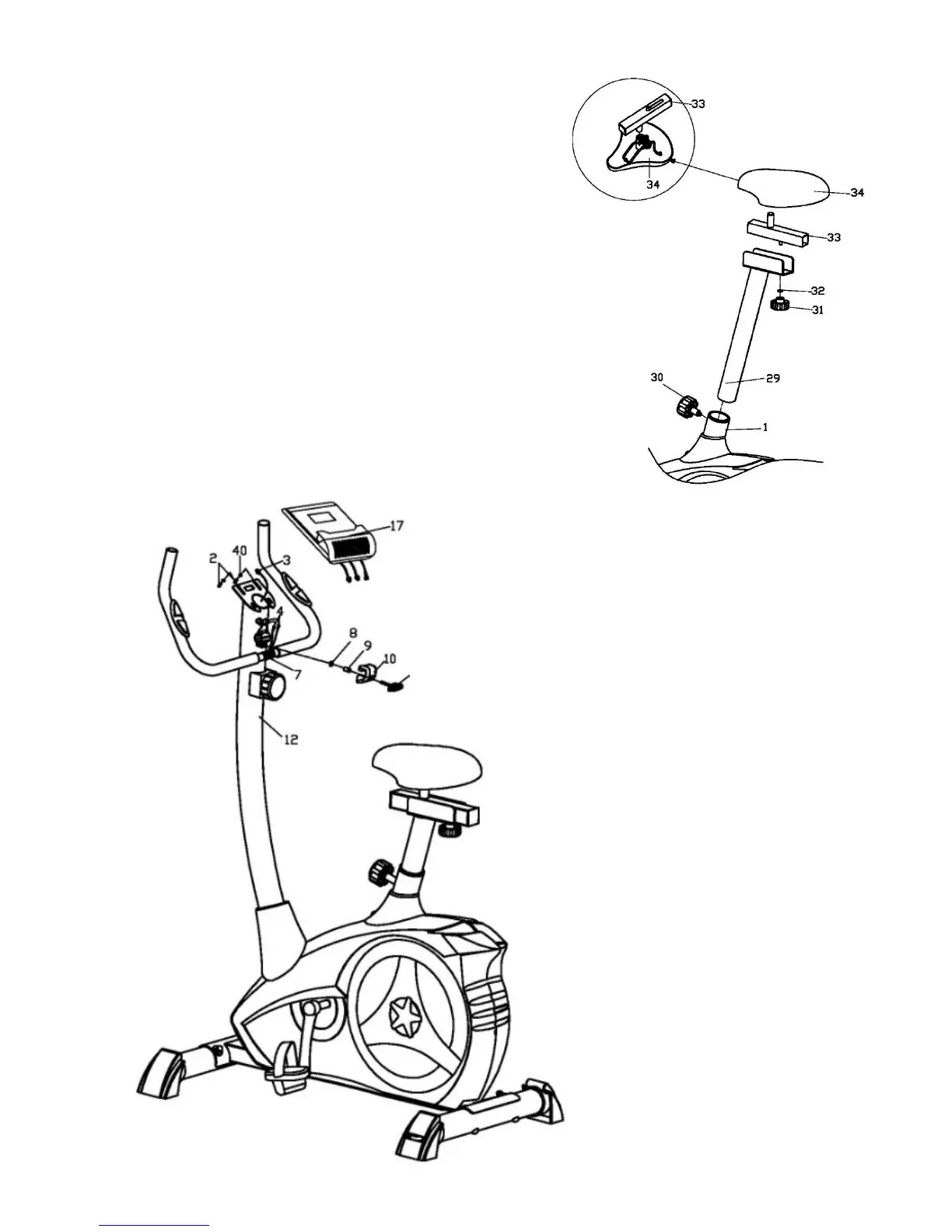
Attach the Saddle (34) to the Horizontal seat post (33),
secured the screw and nut under the Saddle. And then fit
the Horizontal seat post to the Vertical seat post (29),
secured with the Flat washer (32) and Knob nut (31) as
shown.
Insert the Seat post (29) into the Main frame (1), secured
with the Knob (30) at a proper height as shown.
NOTE: Spin the Pop-pin Knob (30), loosen the Pop-pin
Knob (30) and pull it out, and adjust to the suitable height
according to the users’ height and ensure the Pop-pin knob
(30) insert to the spacing hole, and then tighten the Pop-
pin Knob (30).
Loosen the knob nut (31), but don’t pull it out and slide the
horizontal seat post (33) to adjust the distance of the saddle
(34).
STEP 5
I: Feed the Pulse wires (4) out of the
Handlebar post (12) through the
computer bracket.
Attach the Handlebar (7) to the
Handlebar post (12) with the Knob
(25), Handlebar chunk cover (10),
Spacer (9), and Flat washer (8) as
shown.
II: Connect all the Wires (4 & 3) to
the wires come from Computer (17),
and then install the Computer onto
the computer bracket on the top of
the Handlebar post (12) with the
Phillips screws (2) as shown.
25



 To Next Page