Sound Level Meter
6
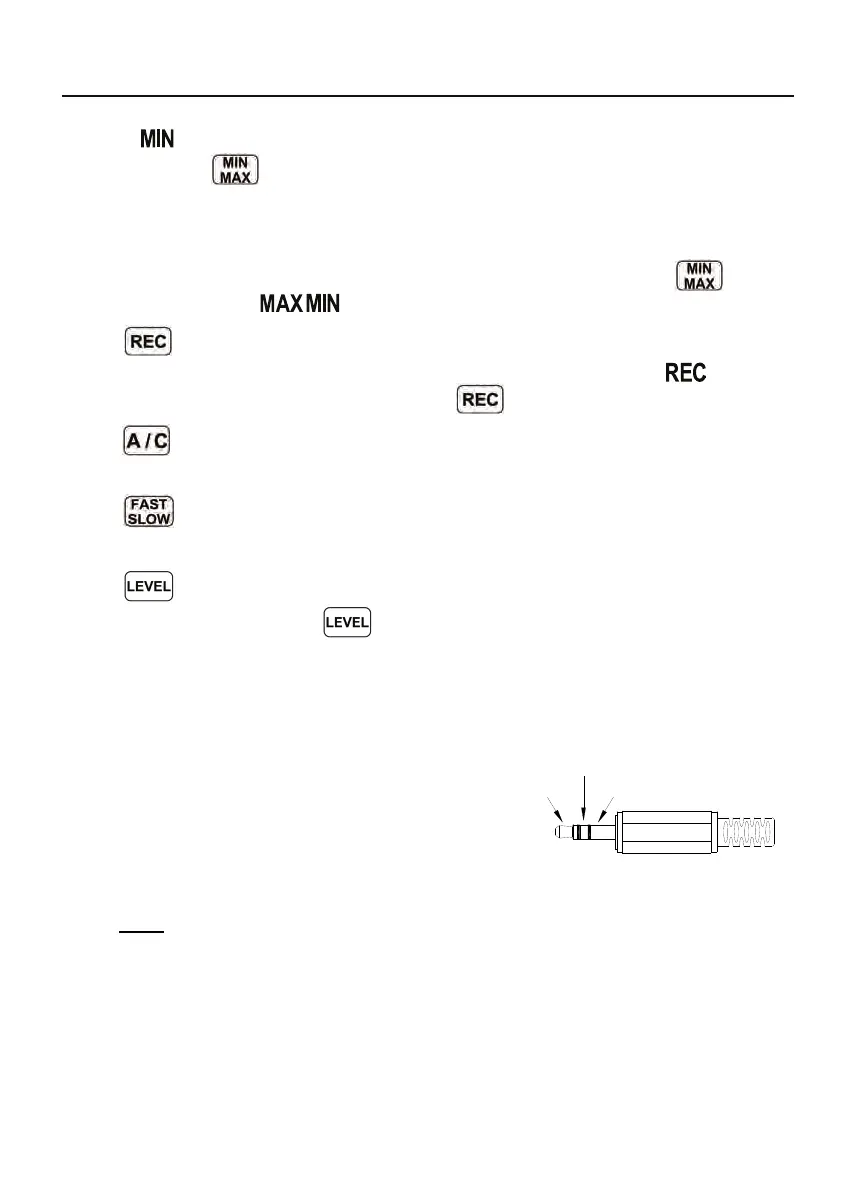
DC Signal
AC Signal
Ground
“ ” symbol indicator and the Minimum value on the display.
Pressing
button again will cause the maximum and minimum
indicators to blink together. Which means the meter is under maximum and
minimum recording mode. The value displays on the screen is the present
value.
To exit the maximum and minimum mode, press and hold
button
down until the “ ” symbol is disappears.
○
5
REC button:
When press the button, the unit will start recording, and the “ ” symbol
display. To stop recording press again
button.
○
6
A/C button:
Sets frequency weighting to A or C.
○
7
FAST/SLOW button:
Sets the time weighting to Fast or Slow.
○
8
Range control button
Each time you press
button, the level range will change between
“Lo” level, “Med” level, “Hi” level and “Auto” level in the circular.
○
9
Microphone:
1/2 inch Electret Condenser microphone.
○
10
AC/DC signal output jack:
AC︰1 Vrms Corresponding to each
range step. (with frequency weighting)
Output impedance ≒ 100Ω
Output signal by standard 3.5mm
coaxial socket signal on pin.
Note: At “Auto” level range, output signal is Auto select on “Lo” or “Med” or
“Hi” level range.
DC: Output: 10mV/dB
○
11
USB Interface
Connection to a Computer or external power supply intput.



 To Next Page