Pg. 2780231-EN-V2025-02-14
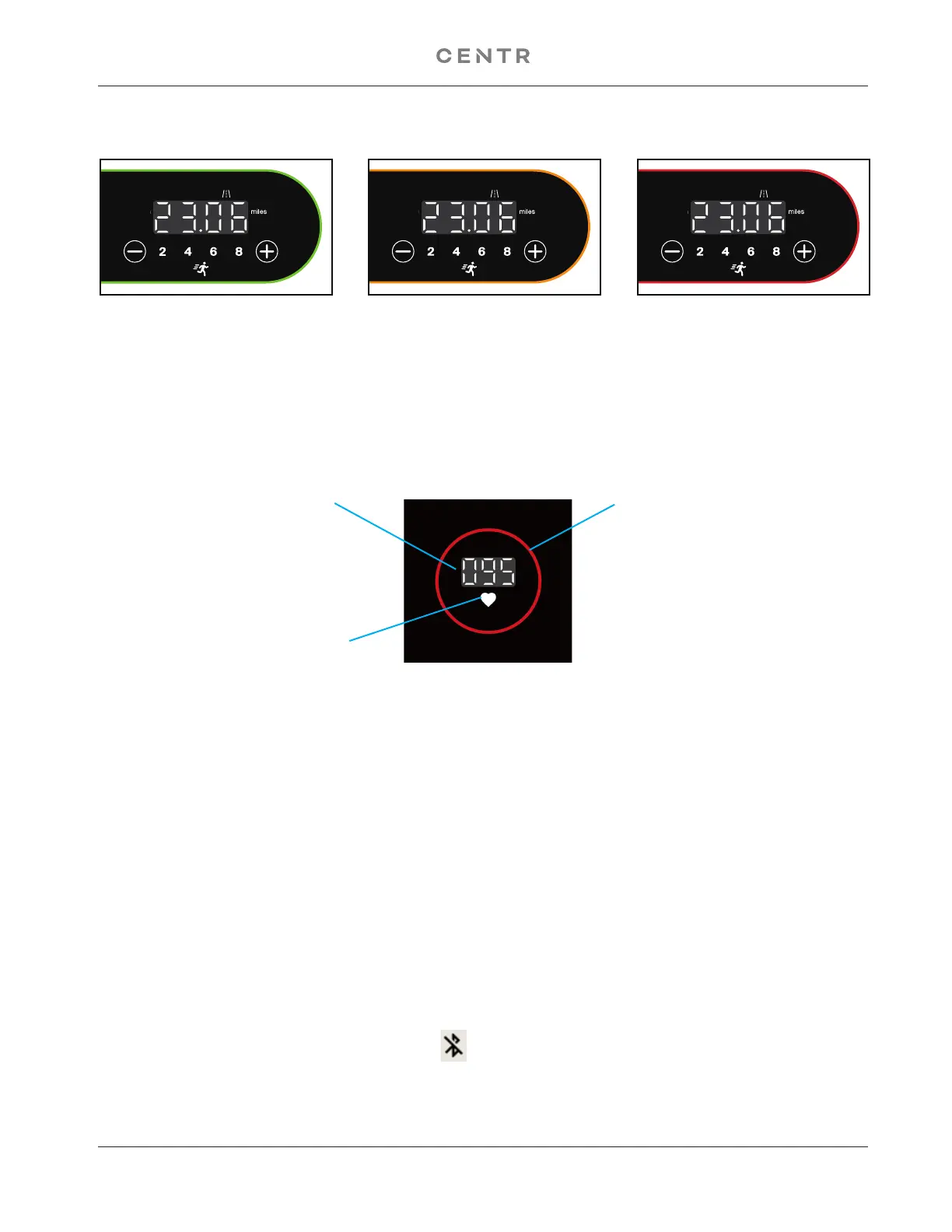
The light around the perimeter of the Console Keypad will show 3 different colors based on the current
speed of the treadmill (see images below).
HEART RATE DEVICE
This console will connect to an activated chest strap or any other similar device that uses BLE protocol.
searches for a signal. When a Bluetooth
®
heart rate
BPM will be shown, and the circle will display a different color based on the heart rate running formula ((220
- age) x %), with the default age set to 20.
The Bluetooth
®
word mark and logos are registered trademarks owned by Bluetooth SIG, Inc., and any use of such marks by Centr,
LLC, is under license. Other trademarks and trade names are those of their respective owners.
GREEN: 1.0 - 3.7mph ORANGE: 3.8 - 6.2mph RED: 6.3 - 10.0mph
Heart Icon will turn on when a
HR device is found
HR BPM
BLUE: LESS THAN 59%
GREEN: 60%-69%
YELLOW: 70%-79%
ORANGE: 80%-89%
RED: MORE THAN 90%
BLUETOOTH
®
Your machine is able to play audio across a Bluetooth
®
connection from your phone or other Bluetooth
audio device through the treadmill speakers. The name of the Bluetooth
®
audio device is “BT-Speaker”.
1. From your device, scan for available Bluetooth devices from the Bluetooth or Connected devices setting.
2. Tap on “BT-Speaker” to connect to it.
3. Once the device is found, tap on Pair.
4. The “BT-Speaker” is added to the Paired Devices list, and is currently active.
5. Play the desired audio on the device and adjust the volume with the console.
To remove a previously connected or paired device from the list, tap on the icon to the right of the
undesired device and select Unpair. The device is removed from the list.
BLUETOOTH
®
Your machine is able to play audio across a Bluetooth
®
connection to your Bluetooth headphones.
1. With the console active, tap on the Bluetooth icon.


 To Next Page