SKU 65903 For technical questions, please call 1-800-444-3353. Page 13
in the Oil Fill Cap, and screw the Oil Fill Cap back onto the oil ll hole.
(See Figure F.)
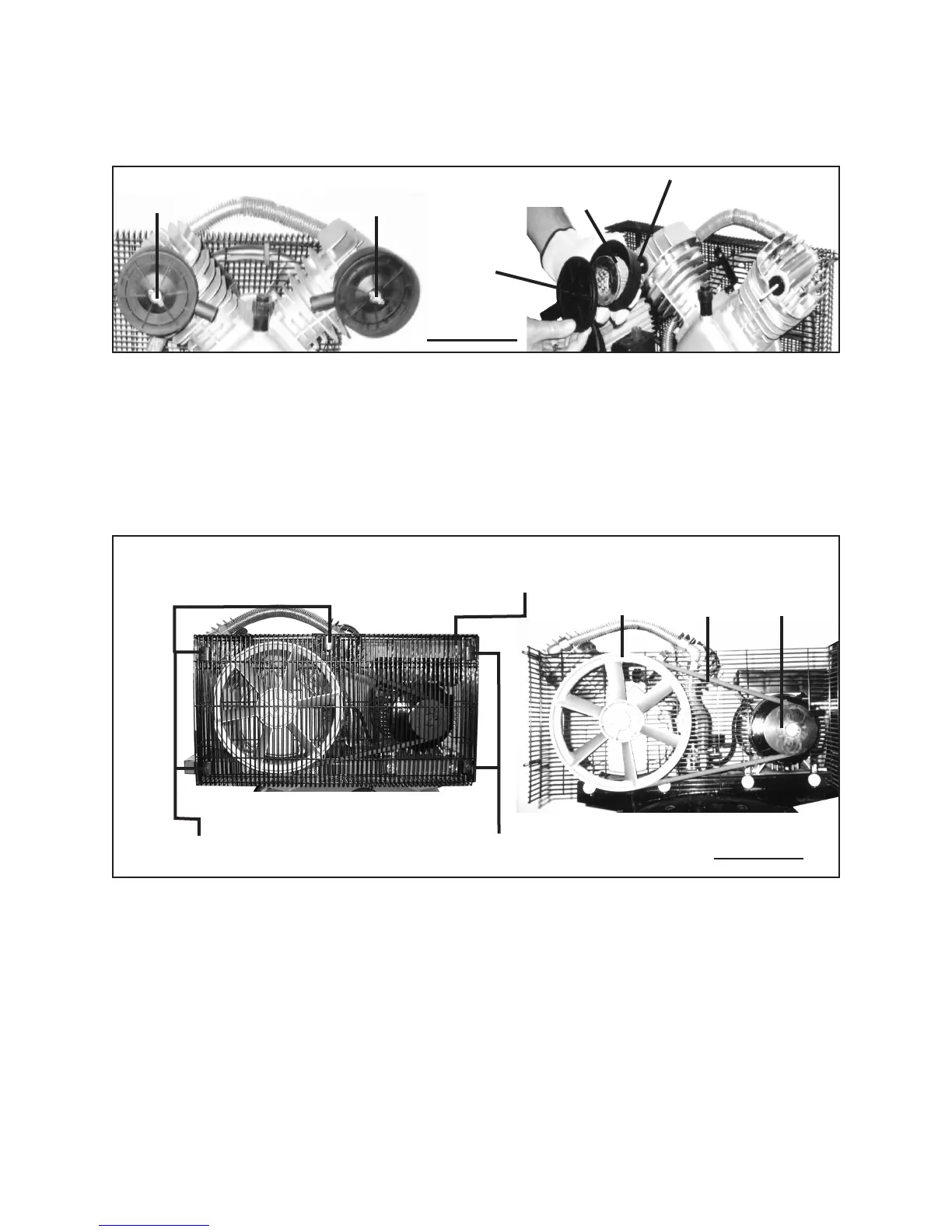
FIGURE G
WING NUT
(36)
WING NUT
(36)
AIR FILTER
(38)
AIR FILTER BOWL
(39)
AIR FILTER CAP
(37)
5. Weekly: The Air Compressor is equipped with two Air Filters (38) which should
be cleaned or replaced on a weekly basis. To clean or replace Air Filters, unscrew
and remove Wing Nut (36) on Air Filter Cap (37). Remove Air Filter Cap, Air Filter,
and Air Filter Bowl (39). Clean Air Filter with compressed air or, if necessary, re-
place old Air Filter with a new Air Filter. Clean Air Filter Cap and Air Filter Bowl with
a mild solvent, then dry. Replace Air Filter Bowl, Air Filter, Air Filter Cap, and Wing
Nut. Repeat these procedures for remaining Air Filter. (See Figure G.)
NUT (24)
CLIP (23)
NUT (24)
CLIP (23)
OUTER GUARD
SCREEN
(25)
LARGE
BELT WHEEL
V-BELT
(27)
MOTOR
PULLEY (14)
FIGURE H
6. To replace the V-Belt: The Air Compressor is equipped with a V-Belt (size: A1118
Li). To replace the V-Belt, remove the ve Nuts (24) and Clips (23) on the Outer
Guard Screen (25). Then, remove the Outer Guard Screen.
(See Figure H.)



 To Next Page