10 | P a g e
Factory Reset All .............................................................................................................. 17
11- Yes
All others - No
Display Configuration and Network Settings .................................................................... 18
Order of Display:
1- PSOC Version Number
2- Ember Version Number
3- Heat Type
4- Heat Source
5- Temperature Calibration
6- Relays Detected
7- Network State
8- Network Channel
9-10- PanID
Reset Counter .................................................................................................................. 19
0-
1- Reset to 0
Standby Brightness Level ............................................................................................... 20
0-99- Brightness percentage level
Appendix-B
Quick Start Guide
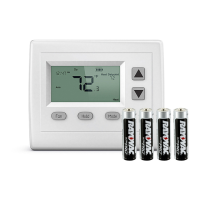
Battery Installation and Replacement
1. Pull the wall thermostat housing off of its wall mount plate. If the housing will not
easily pull off, slide the housing up on the wall mount plate and pull it off
2. Slide the new batteries, with the plus sign in the direction of the correct polarity
indicator on the battery holder and into the slots.
3. Set the thermostat housing onto the back wall plate with the pins on the back
aligned. Slide the housing down to snap it back into place.


 To Previous Page