8 | P a g e
Quick Start Guide
Technical Support & Installation
Programming Mode Menu Functions
A thermostat which shows “E0” is a thermostat which has not yet been connected to a “valid”
system or one which has not yet been “programmed.” This E0 is the factory default state the
thermostat was shipped in and can be removed to a valid status by either programming the
thermostat or by hooking up the thermostat to a valid system
How to enter thermostat Programming Mode: Before you enter programming mode to program
the thermostat, the device needs to be in an “off” state. To turn the thermostat off, press the
“Mode” button until “Off” appears on the screen.
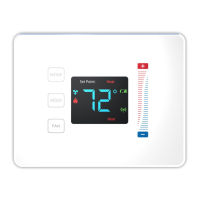
PRESS BETWEEN the hold button and the fan button. Continue to hold and swipe
down on the right slider - “01” will display
When “01” is displayed, it indicates you are in “programming mode.”
Use the + and – buttons to advance through the menu options listed below in the “Menu
Options” list.
Use the HOLD button to enter a menu option then use the + and – to set the appropriate
value and then HOLD to confirm you menu choice (HOLD is used like the ENTER key)
Note, utilizing the MODE button will exit you from the menu
When finished programming, tap the MODE button until the thermostat to EXIT the
menu and returned to normal operation – programming mode has been exited.
Technical Support Thermostat Menu Functions
Menu Options
Display Celsius and Fahrenheit ........................................................................................ 1
0- Celsius
1- Fahrenheit (Default)
Heat type (Heat pump / Non Heat pump) ......................................................................... 2
0- Non Heat pump(Default)
1- Heat pump
Heat source (Gas / Electric) ............................................................................................. 3
0- Electric
1- Gas(Default)
Temperature Calibration .................................................................................................. 4
-2.5 – +2.5 Celsius
-4.5 - +4.5 Fahrenheit
(Default) - 0
Set Minimum Heatpoint .................................................................................................... 5
(Default) – 44 Fahrenheit, 7 Celsius


 To Next Page