Installation
CSK-TOUCH DIGITAL CORRECTOR INSTALLATION CONNECTING TO
THE BOILER / CM2K MODULE THROUGH CM-WIFI BOX
Technical instructions CSK-Touch
4
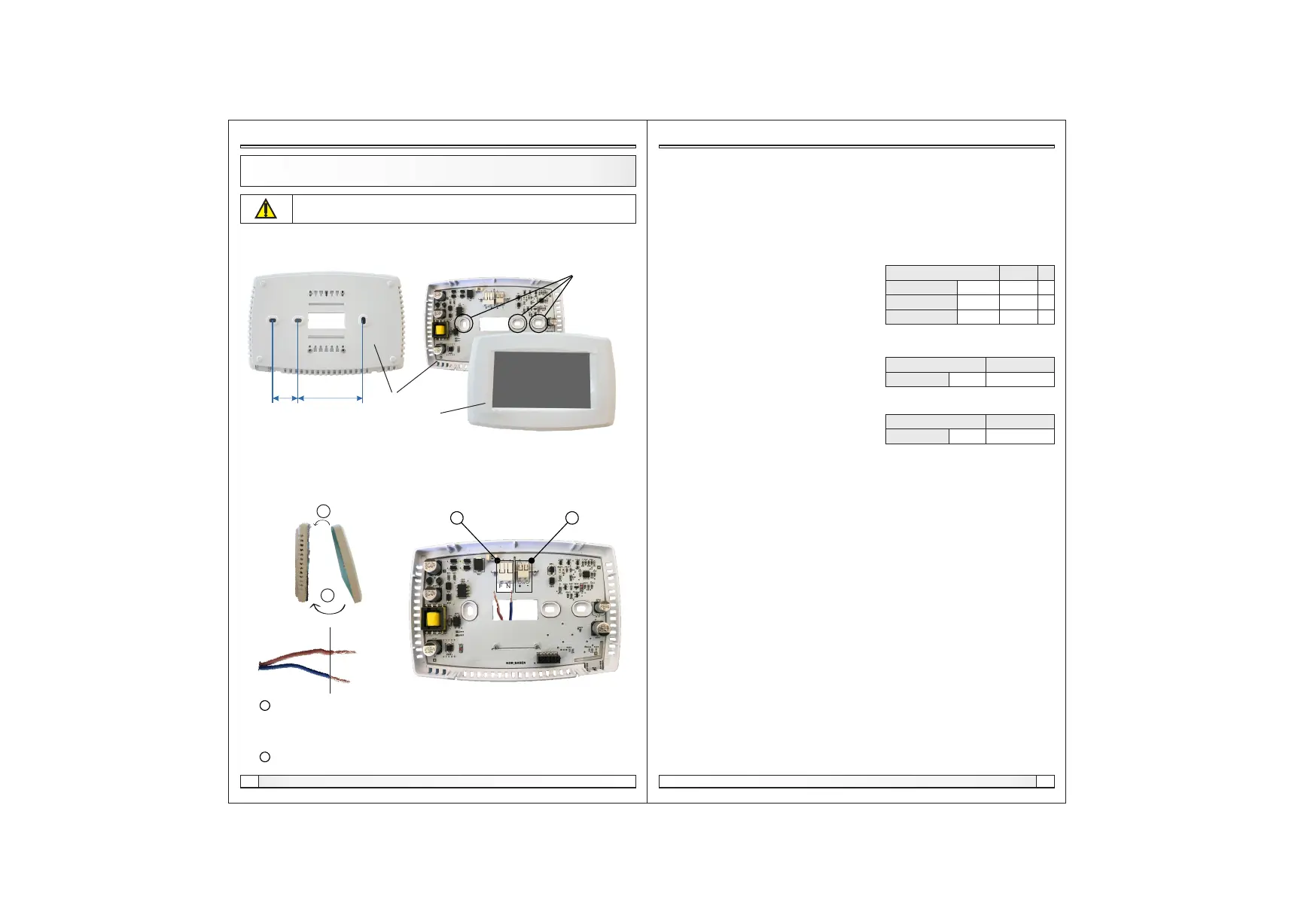
At a height of about 130-160cm from the floor, never directly above the heat source or near the
window. At the installation site, drill 2 holes at a distance according to the bottom sketch, diameter fi
6mm, depth 35-40mm. Insert dowels into the drilled holes.
24 mm 60 mm
places to
attach to the
wall
Be sure to turn off the power supply at the place of installation of the corrector!
Ensure an unobstructed wifi signal from the corrector to the CM-WiFi box!
base
Push the power wire through the hole at the base of the corrector and insert the wires into the power
connector (locations F and N, left connector). Before inserting the wire, press the terminal block
connector, insert the wire all the way down, and release the terminal block connector. Do the same
for the other wire. Attach the connector base to the wall with screws. Attach the screen to the upper
brackets and gently press the screen to the bottom of the corrector base. When the corrector is
properly installed, the current up to the corrector can be turned on.
a Power connectors.
It is necessary to remove the insulating part of the wire and insert the conductor
part into the connectors.
F - Phase
N - Zero
b A connector for wired connecting the module CM2K (currently unused)
insulating part conductive part
a
F N
b
screen
1.
2.
Settings
3.7. Shutdown
The Digital Room Concealer is intended for year-round use, ie room temperature measurement. If
you want to turn off the corrector completely (because it will not be used or want to save electricity
when we do not intend to use corrector), pressing the OK button will completely off the corrector.
When you want to restart the room corrector, you need to press the screen for a few seconds until a
beep sounds and the corrector lights up and starts working on the last view before shutting down.
3.5.2. Sound type
Select one of ten sound types offered when you
press the screen or an error / warning occurs
3.5. Sound
3.5.1. Sound volume
Adjusting one of three preset volume levels
or muting completely when a button is displayed on the
screen and when an error / warning occurs.
3.6. Info
Information on the version of the software entered in the corrector..
3.8. Load factory
Load the factory settings of the room corrector. After that, the room concealer must be
reconfigured.
3.4.4. Screensaver
After a certain screen idle time, the screen saver is turned on to reduce power consumption and
extend the screen life. The screen saver works in two levels: after Time 1, the backlight intensity
decreases, and after Time 2 has elapsed, the measured room temperature of the selected view and
the current clock will change on the screen. By tapping the screen, the screen saver turns off.
3.4.4.1. Backlight
The backlight intensity after Time 1 has elapsed, ie when the screen saver turns on.
3.4.4.2. Time 1
Time that starts to run after the last touch on the
screen (after which the screen saver is turned on).
3.4.4.3. Time 2
Time that begins to flow after Time 1 has passed
(in Time 2 the Backlight intensity decreases and after
that time, only the current room temperature / current clock starts to appear on the screen
Backlight 20
Factory:
min./max.
5 / 50
uni.
Time 1 60 10 / 600 sec
%
Time 2 10 0 / 720 min
Sound volume
3
Factory:
setting
OFF / 1/2/3
Sound type
Type 6
Factory:
setting
Type 1...Tip 10
Technical instructions CSK-Touch
13


 To Next Page
 Loading...