Technical instructions CSK-Touch
10
Temperature
2.x. DHW
2.x.1 DHW temp.
The default temperature of the
DHW tank.
DHW temp. 50
Factory:
min./max.
40 / 80 °C
2.x.2 Differential of DHW
The default differential for starting the DHW
tank to warm up (Tdhw-dTdhw).
2.x. Buffer tank
2.x.1. Buffer tank temp.
Default buffer tank temperature (measured on the upper sensor).
2.x.2. Min buf. tank temp.
Default minimum buffer tank temperature (measured on the upper sensor) - when reached, the
heating pumps behind the storage tank are switched off.
2.x.3. Diff. buf. tank temp.
Default differential to start warming up the buffer
tank (measured on the upper sensor)
(Tbuff-dTbuff).
2.x.4. Diff. stop buff. tank
Default differential to turn OFF warming up the
AKU. tank (measured on the lower sensor)
(Tbuff-dTbuff off).
Buffer tank temp. 80
Factory:
min./max.
40 / 85 °C
Min buf. tank temp. 20 5 / 66 °C
Diff. buf. tank temp 10 5 / 30 °C
Dif. stop buff. tank 5 3 / 30 °C
2.x.1. Crossover temp.
Hydraulic crossover temperature setpoint.
Crossover temp. 80
Factory:
min./max.
75 / 85 °C
Differential of DHW 5
Factory:
min./max.
4 / 40 °C
2.1.4. Heating curve
Adjustment of the coefficient (slope) of the heating curve of the selected heating circuit
(dependence of the flow temperature on the outside temperature). Depending on the type of
heating installed and the thermal insulation of the building, the slope of the heating curve must be
adjusted - it is usually recommended for radiator heating curves from 1.0 to 4.0 and for underfloor
heating from 0.1 to 0.9.
2.1.5. Correction coeff.
Determination of the coefficient of influence of the room corrector on the flow temperature. The
higher this coefficient, the room corrector will have a greater influence on the calculated required
flow temperature of the selected heating circuit.
2.1.2. Day room temp.
Selects the default daily room temperature.
2.1.3. Night room temp.
Selects the default night room temperature.
Day room temp. 20
Factory:
min./max.
5 / 30 °C
Night room temp. 20 5 / 30 °C
Heating curve 1.0 0,1 / 4.0
Correction coeff 1.0 0.1 / 5.0
Technical instructions CSK-Touch
7
BOILER MENU
Boiler menu
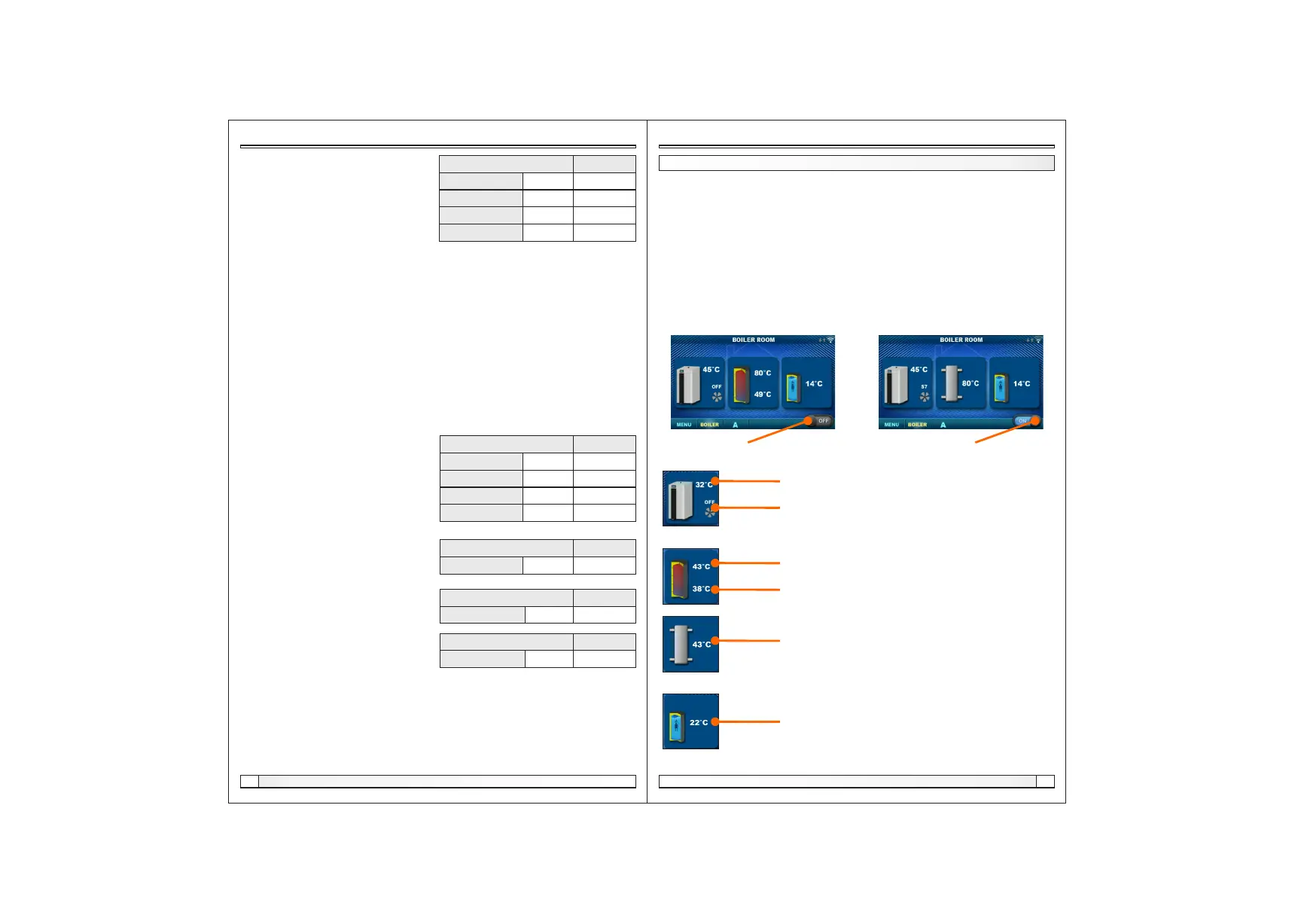
In the Boiler menu it is possible to monitor the operation of the boiler and the temperature of the
existing configuration, start and stop the boiler and check all faults / warnings that have occurred on
the boiler control. The display shows the current phase of operation of the boiler with the symbols of
flame and fan operation as well as the boiler temperature and, depending on the existing
configuration, the current temperature in the accumulation tank or hydraulic crossover and DHW
tank (if any). By pressing the ON / OFF button, the boiler can be switched on / off.
If a warning or an error occurs on the boiler control, a warning / error message is also displayed on
the corrector screen. Pressing the OK button on the error / warning screen of the corrector will
reduce the error / warning and remain recorded through the (Boiler) menu and the error / warning
menu can be read again.
Boiler ON/OFF
(position when boiler is switched off)
Boiler ON/OFF
(position when boiler is on)
Boiler + Buffer tank + DHW Boiler + Crossover + DHW
Boiler temperature
Boiler operating phase / has / no flame / boiler fan operation
Buffer tank temperature (up)
If an buffer tank is selected in the boiler configuration
Buffer tank temperature (down)
If an buffer tank is selected in the boiler configuration
If the DHW tank does not exist in the boiler control system,
the DHW tank image will not be displayed
Crossover temperature
If a hydraulic crossover is selected in the boiler configuration
Configuration:


 To Next Page
 Loading...