07
Charging is required before using the
BUBBLE
2
for
the rst time. The battery of the
BUBBLE
2
is charged
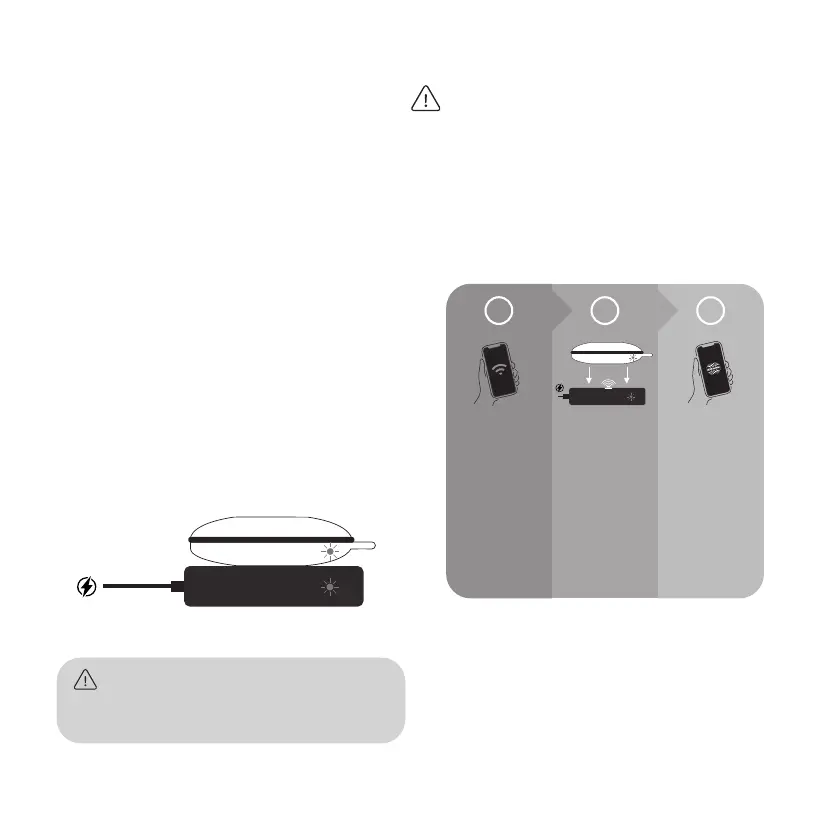
inductively with the supplied charging station. To
do this, plug the USB-C connector into the char-
ging station and the USB connector into a suitable
USB socket of a power plug or to a device with
a supply current (e.g. computer). As soon as the
charging function is ready, a green LED in the char-
ging station lights up.
Now place the
BUBBLE
2
on the inductive charging
station. As soon as the charging function starts, the
top LED on the back of the
BUBBLE
2
lights up in
blue. If the blue LED ashes or is o, the battery is
fully charged. The full charging time is 3-4 hours.
Now the
BUBBLE
2
is charged and switched on.
The
BUBBLE
2
is supplied with a frequency of
7.83 Hz and an intensity level of 40 µT. With this
setting, the
B
2
can also be used without an app.
Important: The
BUBBLE
2
CANNOT connect directly
to the internet (WiFi) or the CENTROPIX app (Blue-
tooth). Communication with the
B
2
takes place
exclusively by means of infrared via the supplied
charger! The correct communication path to the
B
2
is therefore as follows:
Commissioning & Battery Charging Correct communication channel
SMARTPHONE
Connect your cell
phone to the
Internet using
WiFi or mobile
data.
Activate Bluetooth.
CHARGER &
BUBBLE
2
Connect the
charger to a power
source.
Place the
B
2
on
the charger.
The data transfer
takes place
automatically
via infrared.
CENTROPIX APP
CENTROPIX APP
Open the
CENTROPIX app
on your cell phone.
Connect the
B
2
with the app.
Select the desired
frequency program.
1 2 3


 To Next Page