- 18 - INSTALLATION MANUAL – RDO
13. Options and Features
13.1. Accessory connections
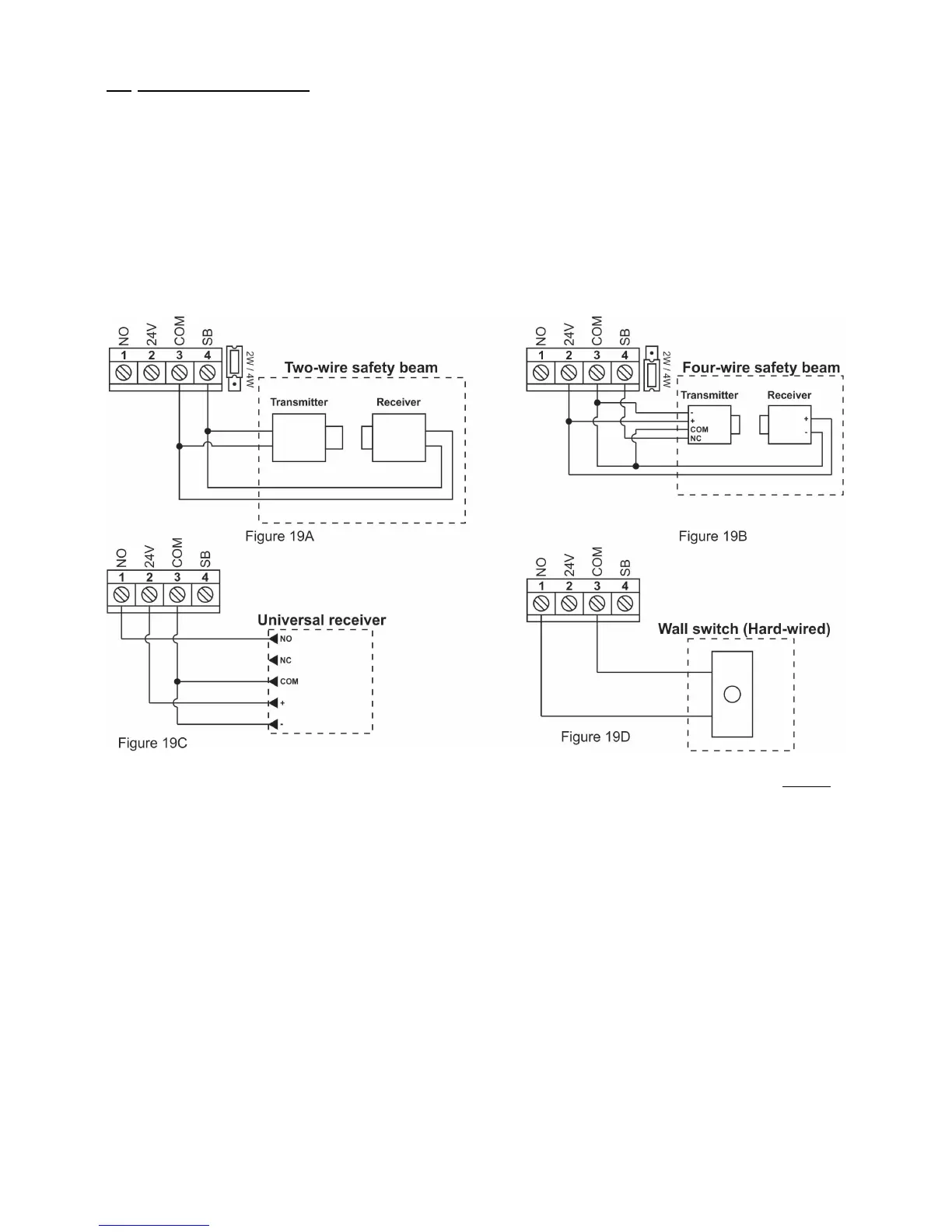
• Four Output Terminals are provided to support the connection of the most common external accessories
• The Output Terminals can be accessed by removing the Courtesy Lamp and Control Box Covers.
• Connection Diagrams
• CENTURION i5 or equivalent four-wire Safety Beams (Figure 19B)
• 24V DC universal receiver (Figure 19C)
• RDO two-wire safety beam (Figure 19A)
• Wall switch – hardwired (Normally-open contact – Figure 19D)
Fig. 19
13.2. Autoclose
• Autoclose can enhance the security of your property by ensuring that your garage door is never unintentionally
left open
• Autoclose will automatically close the garage door;
• Three seconds after reaching the open limit point - provided that a person or object has passed through the
Safety Beams during the open cycle, or
• upon expiry of the pre-set 30 seconds delay time – provided that a person or car has not passed through the
Safety Beams within the delay time
Important note: Autoclose will only function when used in conjunction with Safety Beams.
Enabling
• Remove the Courtesy Lamp and Control Box Covers to expose the Control Board
• Select Dipswitch Nos.2 (SB) and 3 (AC) to the “ON” position (Figure.20)
• Replace the Control Box and Courtesy Lamp Covers once selection has been completed


 To Next Page