SYSTEM OVERVIEW & OPERATION
Polophone Intercom - Page 3
Operation
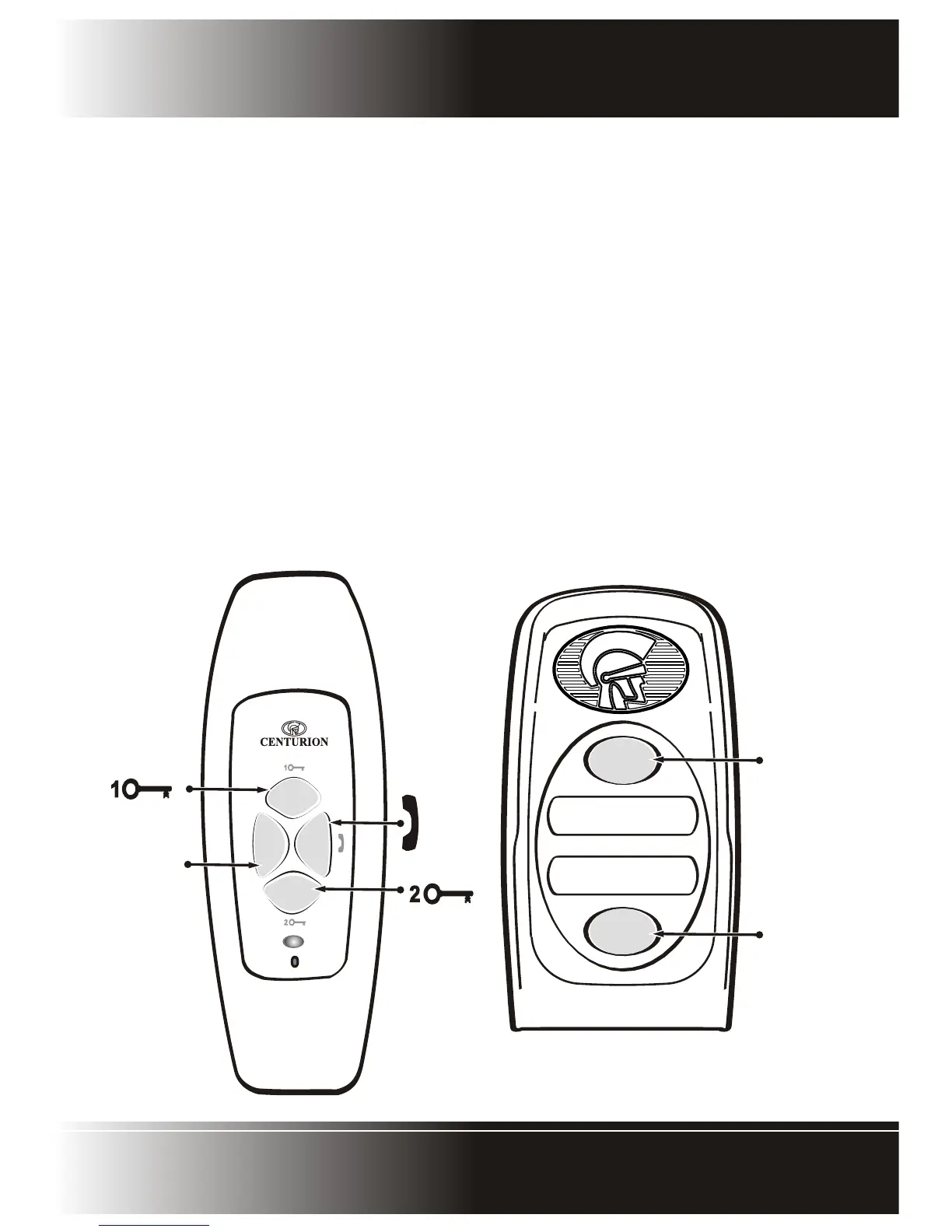
When setting up the system the handsets can be split into two groups. Each call button at an entry panel will be
linked to a handset group. Intercommunication can only occur between these handset groups.
When the call button(s) at an entry panel is pressed it will ring the handset(s) linked to the specific handset group.
In an installation with two entry panels the call tone will be different for each entry panel. There will be a
simultaneous ring at the entry panel to confirm the ringing at the handset(s).
When lifting the handset, voice communication can take place between the entry panel and the handset. If any
of the other handsets in the system are picked up while this communication is taking place, there will be
common communication with these handsets.
A dedicated call button is provided on the handset to call the other group of handsets. Any handset in one group
will ring all the handsets in the other group. The ring tone is different to that generated when being called from
the entry panels to that the user can identify that it is an internal call. If communication is taking place between
handsets the entry panels are automatically disconnected to ensure privacy of internal communication.
ENTRY PANEL
Button “B”
rings group
“B” handset(s)
Button “A”
rings group
“A” handset(s)
A
B
HANDSET
POL phone
A
U
X
A
U
X
Triggers the relay
on Entry Panel 1
Closes the auxiliary
contacts on the
terminal block
on the underside
of the Handset
Rings the other
Handset group
Triggers the
relay on
Entry Panel 2


 To Next Page