!
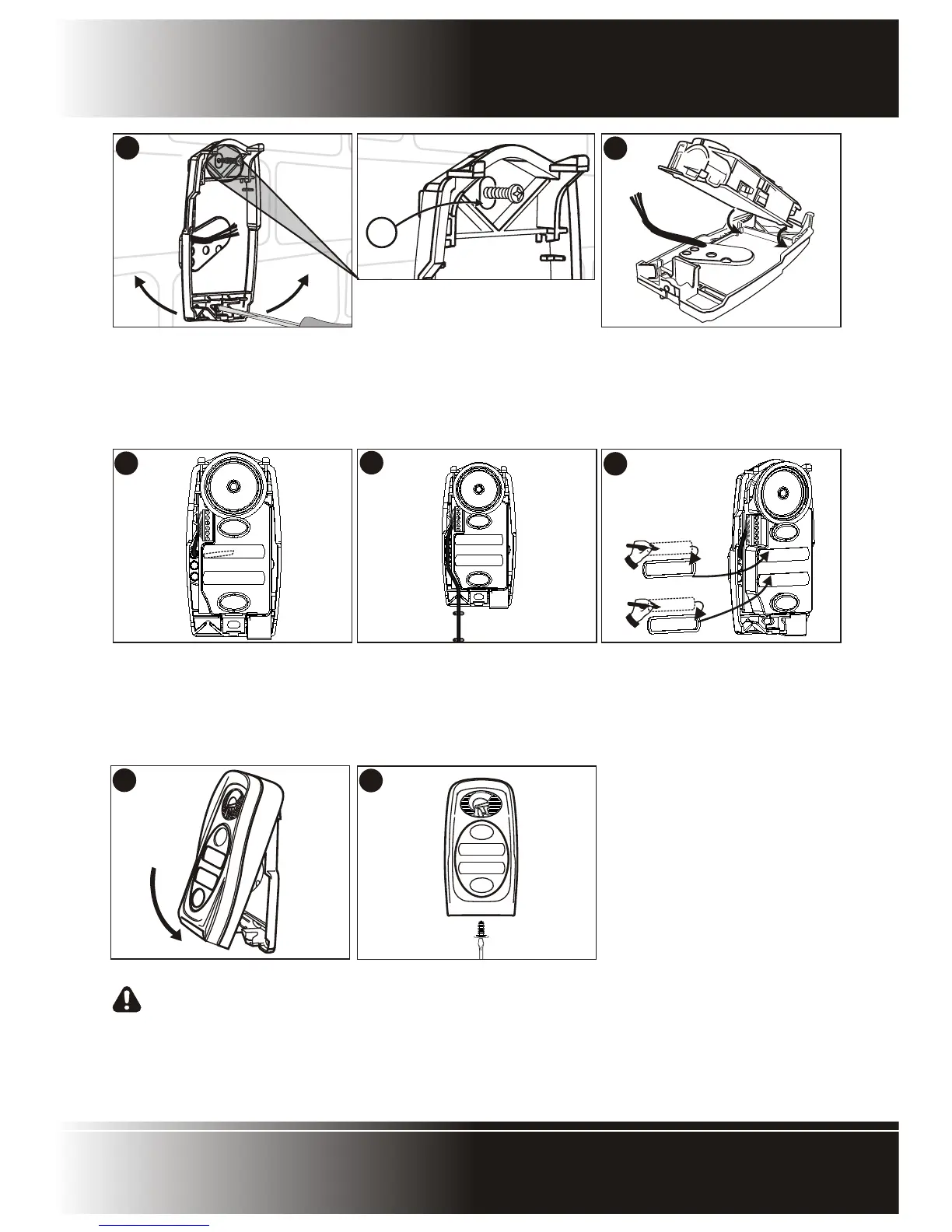
Screw the base firmly into position and
using the slots provided in the
mounting holes, adjust the base to be
perfectly vertical.
!
(B) Ensure that sealing washer is fitted
and closes off the mounting hole
against water ingress.
9
10
12
11
13
14
!
Hook the electronics module into the
base as shown and clip back into
position.
!
Terminate cable onto electronics.
Refer to wiring diagram (See page
10).
!
If the cable is surface mounted, route
the cable into the unit from
underneath as shown and terminate
onto the electronics. Refer to the
wiring diagram (See page 10).
!
Write call button labels, insert into
lens(es) and clip lens(es) back onto
chassis.
!
Clip outer cover back into position.
NB: It will be necessary when
commissioning the unit to have
the cover removed.
!
Secure the cover using the fixing
screw provided in kit.
Polophone Intercom - Page 9
ENTRY PANEL INSTALLATION


 To Next Page