Revision: 02/1015 DOK 1643-us 15 of 28
7.2 Connect the CT-MultiPTT Bluetooth to the radio
7.2.1 12-pin connector
Damage to connectors, sockets and/or cables
Observe the following instructions when handling plug-in connections.
Normally, the 12-pin connector is used in combination with radio adapters. For it, the adapter is
attached to the radio and the 12-pin connector itself plugged into the radio adapter.
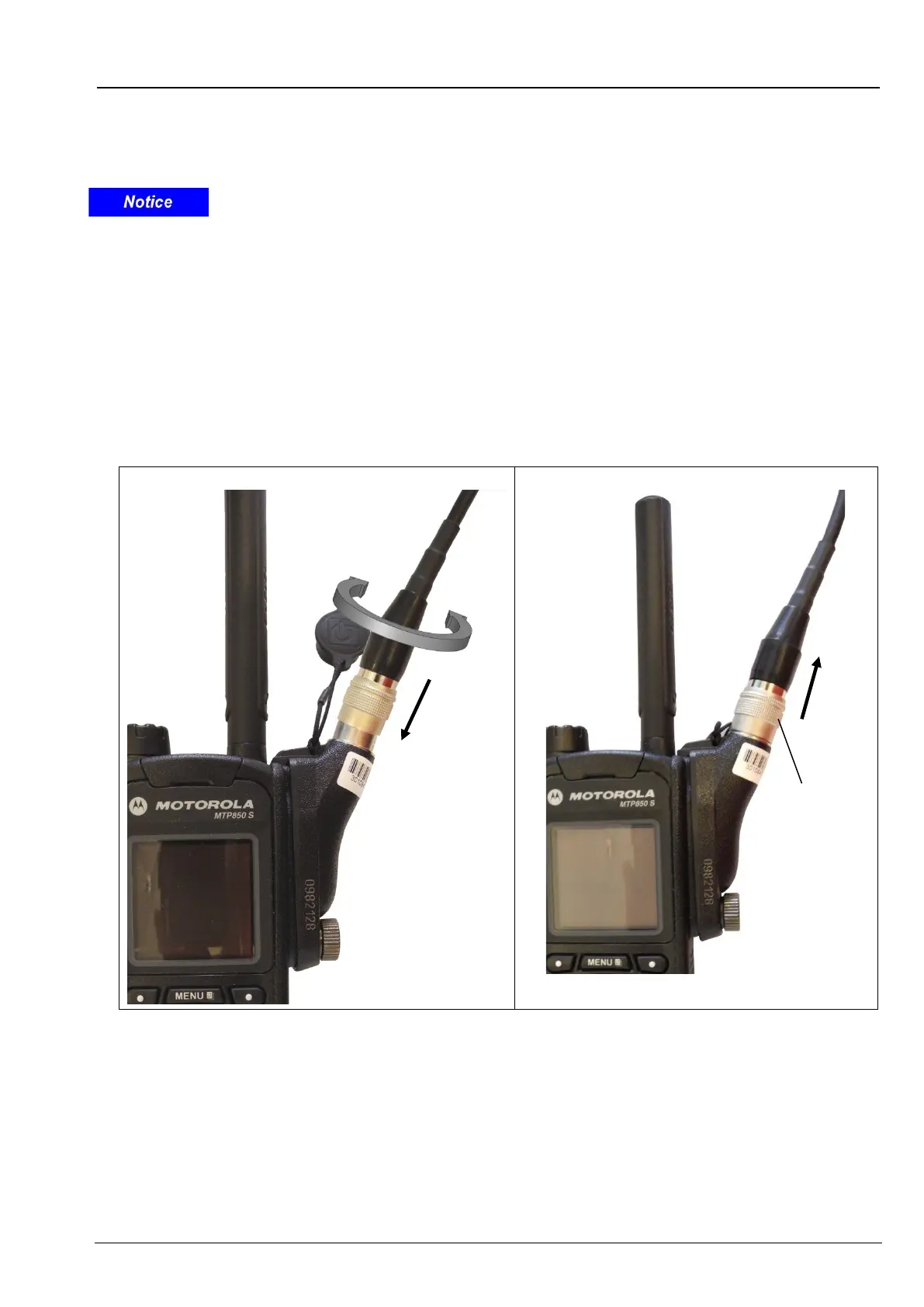
Turn the radio off, if it is turned-on. Plug the 12-pin connector into the radio adapter.
To do so, grab the connector behind the grooved sliding collar and put it on the socket.
Rotate the connector cautiously on the socket until it starts sliding into it (Figure 18).
Now, push the connector into the socket until the sliding collar snaps into place in direction of the arrow,
locking the connector.
To unlock the plug-in connection, grab the connector at the grooved sliding collar only and pull the
connector cautiously out of the socket (Figure 19).
Figure 18 - Locking
Figure 19 - Unlocking


 To Next Page