4
(NOTE: The Heater is delivered set to display in
Fahrenheit. For a Centigrade display, see 7:3
Commissioning Section of Installation Instructions)
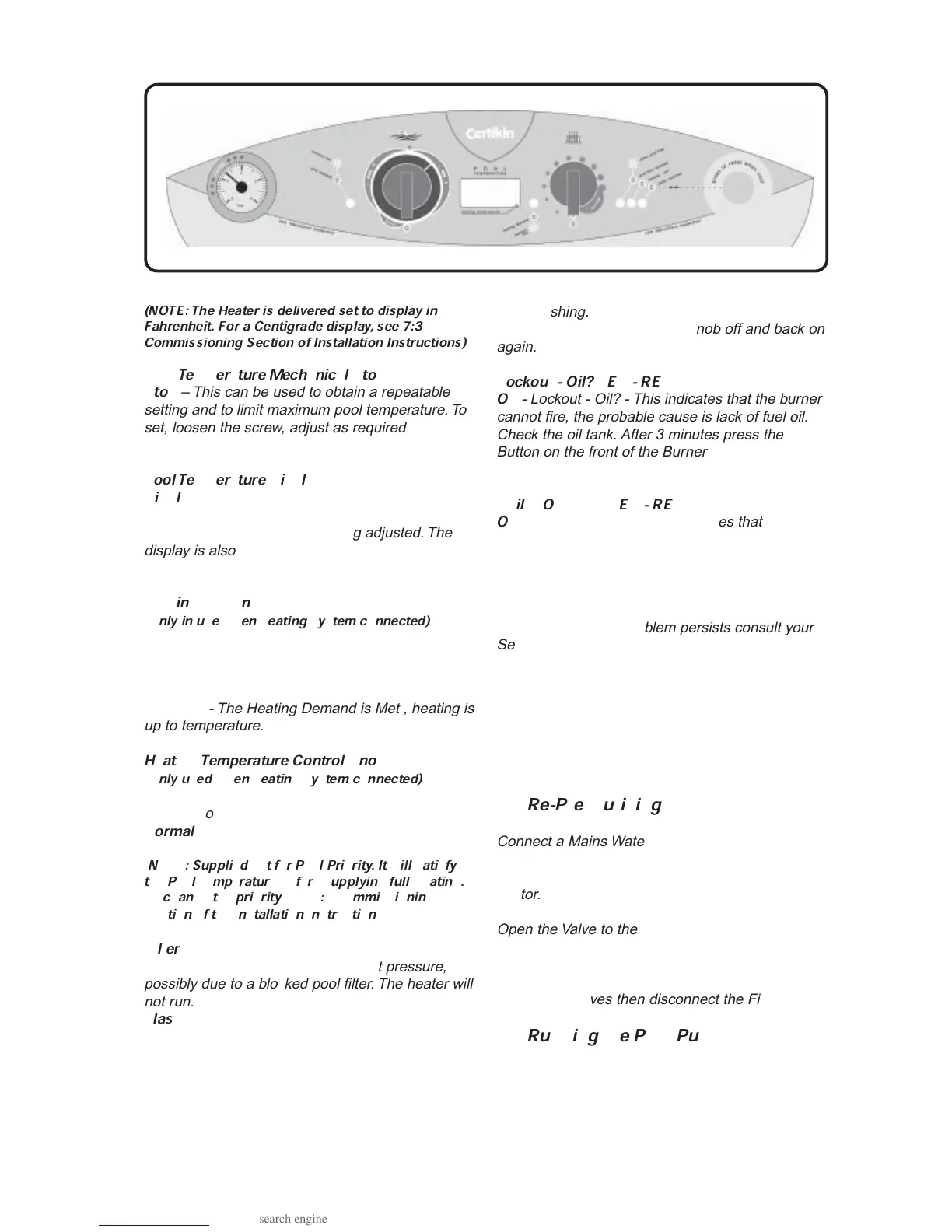
Pool Temperature Mechanical Stop
Stop
– This can be used to obtain a repeatable
setting and to limit maximum pool temperature. To
set, loosen the screw, adjust as required and then
re-tighten.
Pool Temperature Display
Display
- Normally shows the actual Pool Tem-
perature, but also displays the Setting Temperature
and a Setting Dot lit whilst being adjusted. The
display is also used for commissioning and diag-
nostic purposes.
Heating Demand LED - GREEN
(Only in use when heating system connected)
Off
- There is no Heating Demand , heating is
switched off.
On
- There is a Heating Demand , heating is on but
not yet up to temperature.
Flashing
- The Heating Demand is Met , heating is
up to temperature.
Heating Temperature Control Knob
(
Only used when heating system connected)
Off
- There is no Heating Demand, heating is
switched off.
Normal
- Normal setting for heating, it can be
adjusted lower if required.
(NOTE: Supplied set for Pool Priority. It will satisfy
the Pool Temperature before supplying full Heating.
To change the priority, see 7:3 Commissioning
Section of the Installation Instructions)
Filter LED - YELLOW
On -
Pool Filter Blocked - Insufficient pressure,
possibly due to a blocked pool filter. The heater will
not run.
Flashing
- Clean Pool Filter - The filter may require
back washing. The heater will run. Can be reset by
turning the Pool Temperature knob off and back on
again.
Lockout - Oil? LED - RED
On -
Lockout - Oil? - This indicates that the burner
cannot fire, the probable cause is lack of fuel oil.
Check the oil tank. After 3 minutes press the
Button on the front of the Burner to reset. If the
problem persists consult your Service Engineer.
Boiler Overheat LED - RED
On
- Boiler Overheat - This indicates that the
Heater has overheated and shut down. See Press
to Reset Button instructions below.
Press to Reset Button
Press
- Press Reset Button when boiler has
cooled down. If the problem persists consult your
Service Engineer.
Automatic Frost Protection
The Heater will automatically run a Frost Protec-
tion routine if the temperature falls below 3°C
(37°F). The Pool Temperature Display will show
0°C. This will include the use of the Pool Pump if
connected to the Heater.
1:7 Re-Pressurising
Connect a Mains Water supply then connect the
free end of the braided flexible hose (the Filling
Loop) (see Fig.2:1b) to the incoming mains con-
nector.
Open the Valve to the supply, then, slowly open the
Valve on the Side Panel until the Pressure Gauge
shows 1 Bar.
Close both valves then disconnect the Filling Loop.
1:8 Running the Pool Pump
If this option has been installed the Heater can run
the Pool Pump on its own. Turn the Pool Tempera-
ture Control Knob to ‘Pump’, just next to Off.
9-04-02



 To Next Page