Manual_MC2_DE_EN_V2.docx Page 8 of 44
CertoClav Sterilizer GmbH
Georg Grinninger-Str. 37
A-4050 Traun / Austria
www.certoclav.com support@certoclav.com
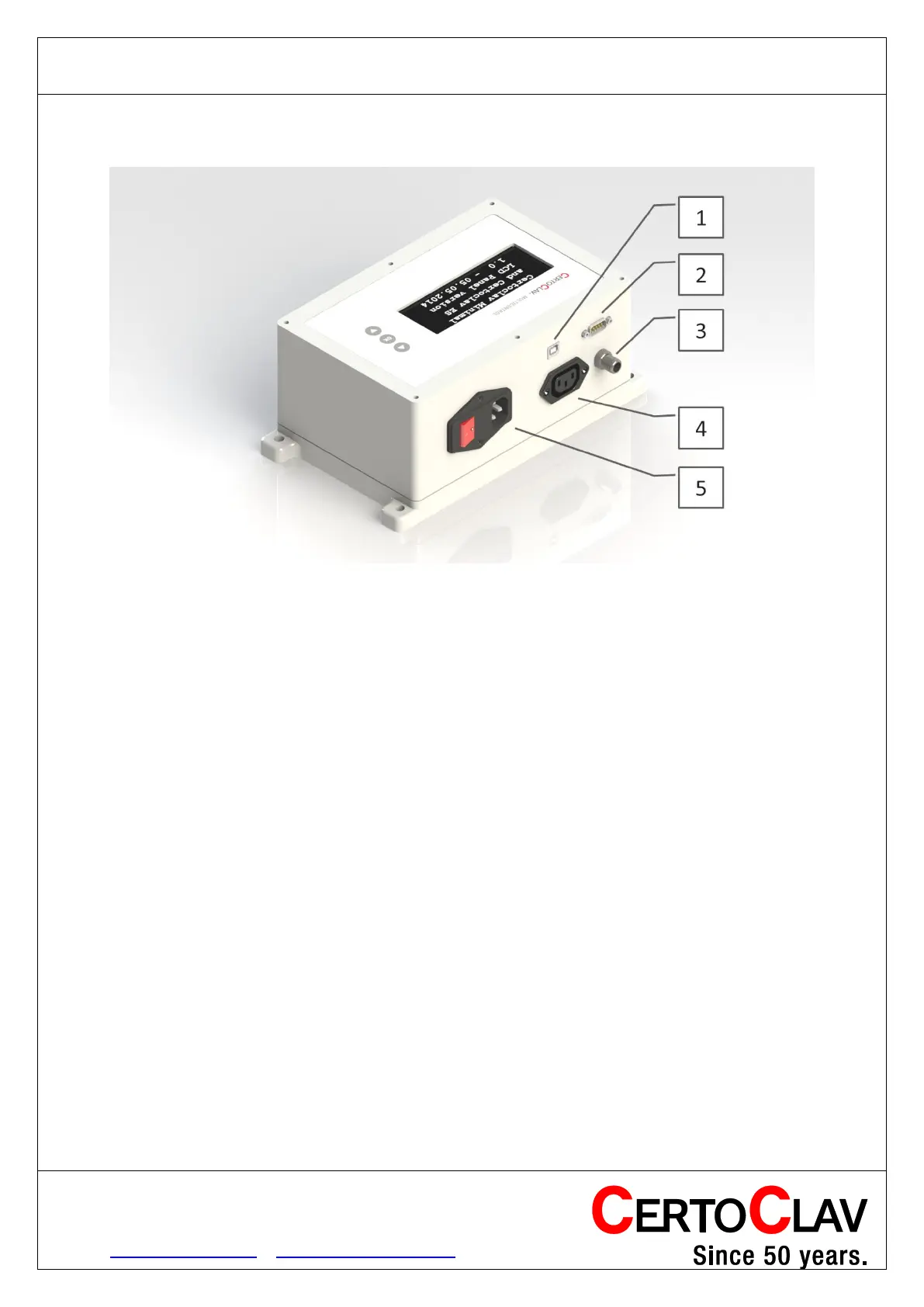
Controller - connections
1. USB port for PC
2. Connection for CertoClav protocol printer
3. Port for a 4-wire PT100 temperature sensor
4. Port for connection to a heater or autoclave (220V, 10A max)
5. Mains connection (mains cable) with switch and fuse holder
Controller - installation
1. Connect the controller (port 5) with mains cable to a power socket.
2. Connect the controller (port 4) with a heater/autoclave using connection cable.
3. Screw in the cable of the PT100 probe (port 3).
4. Optionally connect a printer (Port 2)
5. Optionally connect a Windows PC (port 1).
6. The controller can be mounted on the wall using the holes on the side of the
enclosure.


 To Next Page