5
XD8sSubwoofer
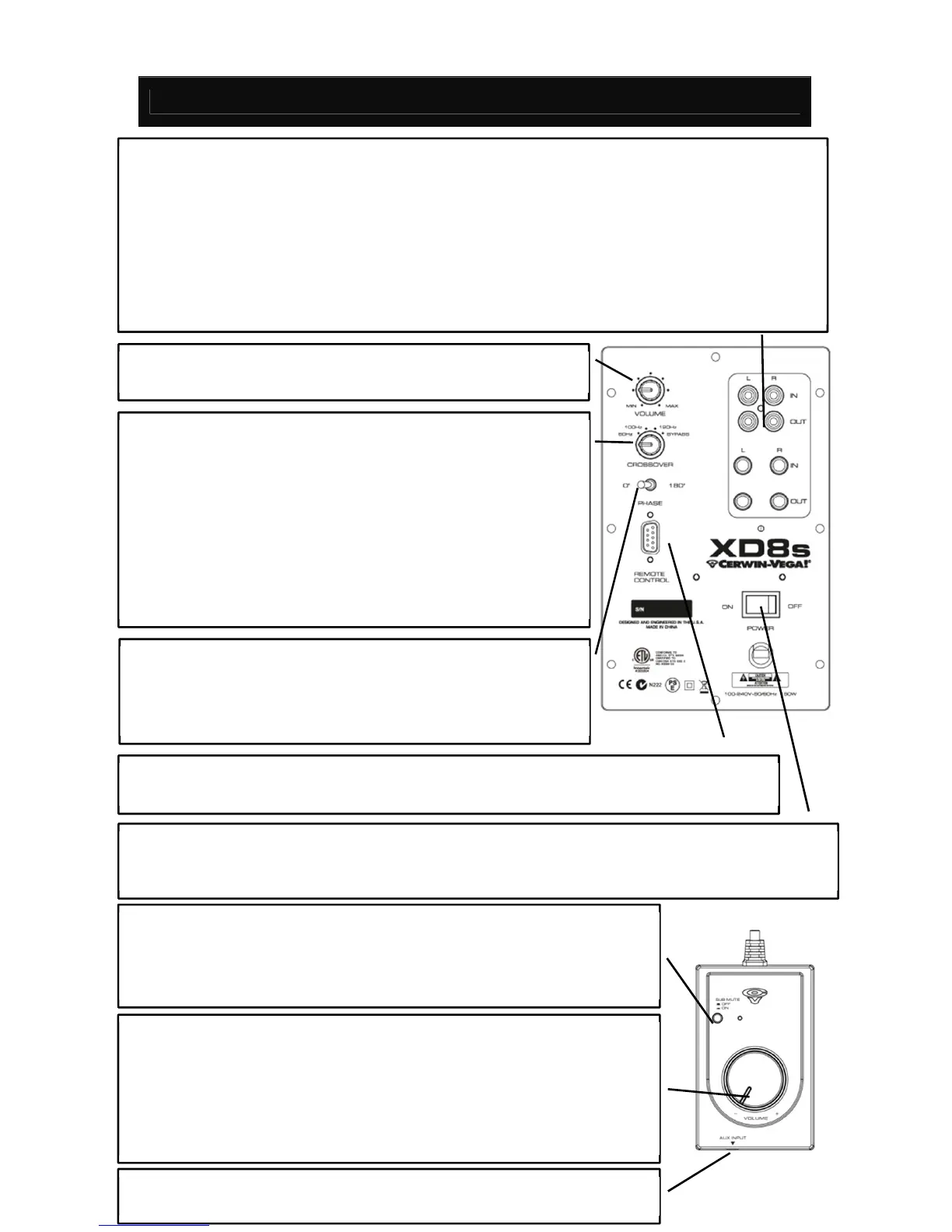
AUDIOINPUT/AUDIOOUTPUT–Therearetwotypesofaudioinputs.ThetopLEFT&RIGHTinputsare
RCA connectors for unbalanced signals, which are typically used for consumer products and musical
instruments. The bottom LEFT & RIGHT inputs are ¼” TRS (6.3mm) connectors for balanced signals,
whicharetypicallyused
forprofessionalproductssuch asaudiomixers. TheOUTprovide sa loop‐thru
ofthesignalscominginontheIN.Thecrossoverfilter isactive ontheseoutputsastheyareintended
fortop speakers. NOTE: Homethea ter receiversmay featureadedicatedsingle cableSUBOUTorLFE
connection. Simply use the LEFT input on the XD8s and set the crossover to BYPASS (as the AVR will
handlethelow‐frequencyfiltersintheaudiosignal).
POWER SWITCH & POWER CORD
Setthe power switchto ‘ON’ position when the speaker system is
readyforuse.Auto‐Standbyactivatesafter30minutesofnoactivity.Standbydeactivateswhenitdetects
aninput signalhavinganamplitudeof‐50dBuorgreater.In quiet(low listeninglevel)situations,adjust
CROSSOVER – Adjust the upper limit (HPF) of the subwoofer’s
frequencyresponse.A ruleofthumbwhenusingsmallspeakers is
tosettheswitch to120Hz(XD3).Medium sizespeakersare setto
100Hz (XD4). Larger size speakers are set to 80Hz (XD5). BYPASS
willdisengagethefiltertothe
subwooferandisusedwithasignal
preprocessed connection (LFE). BYPASS will also disengage the
filtertothe¼”TRSandRCAOUT.NOTE:TheOUTprovidesaloop‐
thruofthesignalscominginontheIN.Thecrossoverfilterisactive
ontheseoutputsastheyareintended
fortopspeakers.
POLARITYSWITCH–Allowsthesignaltoinvertedinpolairtysothe
outputof thesubwoofer willblendinwiththemain speakers.Set
thePOLARITY switchto “0”. At thelisteningposition,listento the
midbassoutput.Ifitsoundsweak,setPOLARITYbackto“180.”
VOLUMECONTROL–Controlsvolumeleve lofsubwoofer.Useto
balancetheout
utofthesubwooferwiththemains
ut.
REMOTECONTROL–Connectstothesystemremotecontrol.CAUTION:Besuretoconnectthe
systemremotecontrolbeforepoweringonthesubwoofer.
SYSTEM REMOTE VOLUME CONTROL – Master volume control for both
subwooferandspeakersconnectedtotheXD8sOUT.Tostart,setthe volume
atminimumlevel.Next,adjust the XD8s and speake rs to maximum position.
Finally, adjust the System Volume control to your preferred listening level.
The light ring will be
‘AMBER’ during standby and is ‘RED’ when in an active
state.TheXD8ssubwoofercanfunctionwithoutthesystemvolumecontrol.
SUB MUTE –Easyaccess controlto mute the XD8swhenasubwoofer isnot
needed.The OUT connectionstothetopspeakersareactiveinbothONand
OFFconditions.The¼”andRCAOUTwillseethefull‐range(non‐CROSSOVER
filtersignal)inSUBMUTE.
AUXIN
Usea⅛” stereo‐mini (male tomale) asthe connectiontoamobile
devicefromtheXDspeakersystem.





 To Next Page