Hardware Setup
19
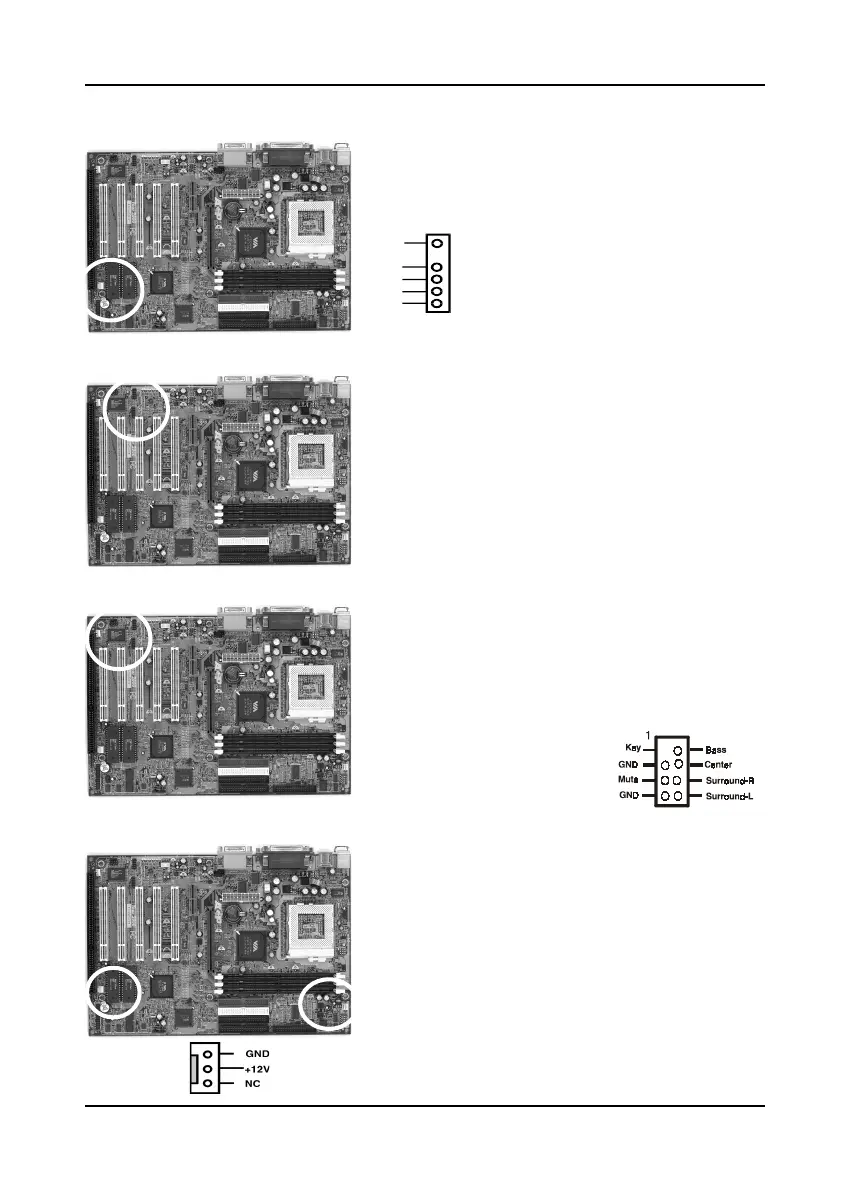
Infrared Connector (IR)
If you enable the COM2 Mode in BIOS's Integrated
Peripherals menu the COM2 port will support IR
functions.
Optional Fiber Optical Connector (J2)
This connector supports fiber optic module for
Internet music, PC, MD(Mini Disk) connections.
Optional AC3 Surround/Center + Bass Connector (J3)
This connector is for Surround and Center+Bass
speaker output ext. Plug in the optional AC3
Surround/Center+Bass jack extension into this
connector. The black colored jack is for surround
speaker output and the orange colored jack is for
center+bass speaker output.
System/CPU Cooling Fan Connectors (FAN1/FAN2)
These added connectors allow the fan to draw
their power from the mainboard instead of the disk
drive connector.
The board's management extension hardware is
able to detect the CPU and system fan speed in
rpm (revolutions per minute). These connectors
supports 3-pin cooling fans with minimum of
3500 RPM. The wiring and plug may vary
depending on the manufacturer. On standard fans,
the red is positive (+12V), the black is ground,
and the yellow wire is the rotation signal.
Vcc
Vcc
Ir-Rx
GND
Ir-Tx
FAN2:CPU
FAN1:System



 To Next Page