Helpline No 0844 801 8701 / IRE 189 094 6244
12
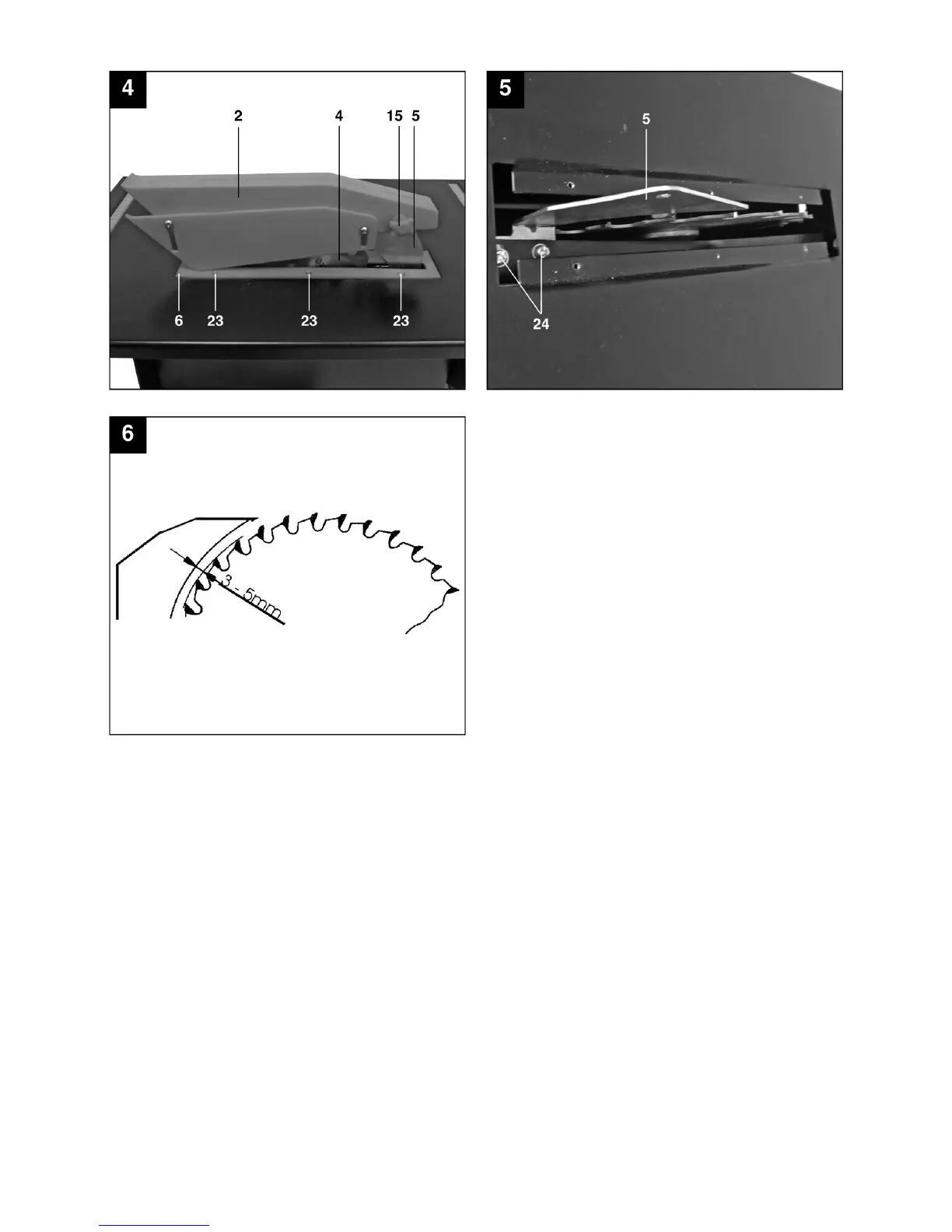
7.2 Adjusting the splitter (Fig. 4-6)
• Removethesawbladeguard(2)(see7.3).
• Takeoutthetableinsert(6)(see7.4).
• Slackenthetwohexagonsocket-headscrews
(24).
• Adjustthesplitter(5)sothatthegapbetweenthe
saw blade (4) and the splitter (5) equals 3 - 5 mm
(see Fig. 6)
• Thesplitter(5)hastobeinlinewiththesawblade
(4) in longitudinal direction.
• Retightenthetwoscrews(24).
• Thesettingofthesplitterhastobecheckedeach
time after changing the saw blade.
7.3 Fitting the saw blade guard (Fig. 4)
• Mountthesawbladeguard(2)onthesplitter(5)
and align.
• Insertthescrew(15)throughtheholeinthesaw
blade guard (2) and in the splitter (5) and secure it
with the nut.
• Toremovethesawbladeguard,proceedin
reverse order.
7.4 Replacing the table insert (Fig. 4)
• Caution!Pulloutthepowerplug.
• Removethe6screws(23).
• Takeoffthesawbladeguard(2)(see7.3).
• Lifttheworntableinsert(6)upandout.
• Fitanewtableinsertinreverseorder.



 To Next Page
 Loading...