30
Adjustments
STEP 1 Program the Travel
Withouta properlyinstalled safety reversal system, persons (particularly small children) could be
SERIOUSLY INJURED or KILLED bya closing garage door.
l Incorrect adjustmentof garage door travel limits will interfere with proper operation of safety
reversal system.
l After ANY adjustmentsare made, the safetyreversal system MUST be tested. Door MUST
reverse on contactwith 1-1/2" (3.8 cm) high object (or 2x4 laid flat) on floor.
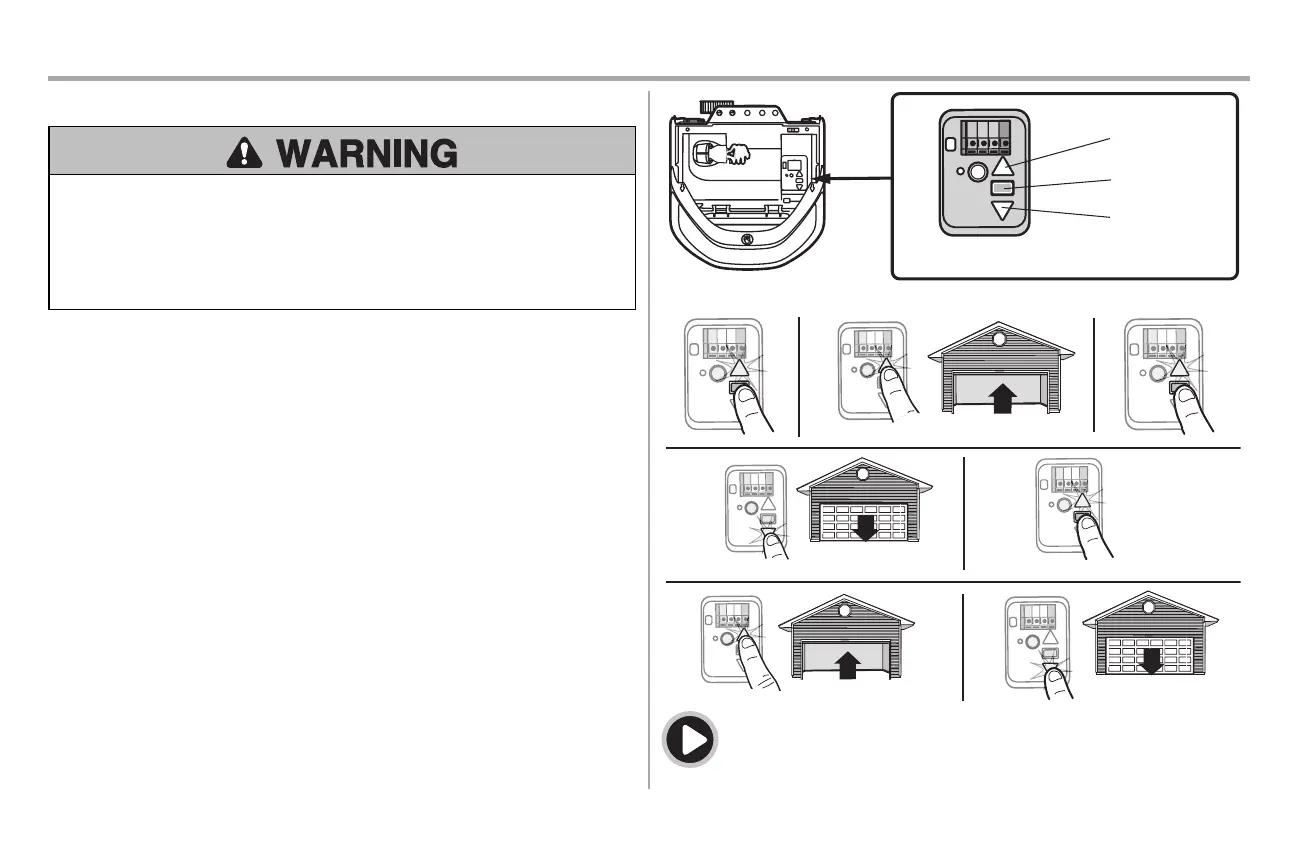
While programming,the UP and DOWN buttonscan be used to move the door asneeded.
1. Pressand hold the Adjustment Button until the UP Button begins to flash and/or a beep is
heard.
2. Pressand hold the UP Button until the door isin the desired UP position.
3. Once the door isin the desired UP position press and release the Adjustment Button.The
garage door opener lights will flash twice and the DOWN Button will begin to flash.
IMPORTANT NOTE: For one-piece door installations refer to page 29.
4. Pressand hold the DOWN button until the door is in the desired DOWNposition.
5. Once the door isin the desired DOWN position press and release the Adjustment Button.The
garage door opener lights will flash twice and the UP Button will begin to flash.
6. Pressand release the UP Button.When the door travelsto the programmed UP position, the
DOWN Button will begin to flash.
7. Pressand release the DOWN Button. The door will travel to the programmed DOWN position.
Programming iscomplete.
* Ifthe garage door opener lights are flashing 5 timesduring the stepsfor Program the Travel,the
programming has timed out. Ifthe garage door opener lights are flashing 10 times during the steps for
Program the Travel,the safetyreversing sensors are misaligned or obstructed (refer to page 28).When
the sensors are aligned and unobstructed, cycle the door through a complete up and down cycle using
the remote control or the UP and DOWNbuttons.Programming iscomplete. Ifyou are unable to
operate the door up and down, repeat the steps for Programming the Travel.
UP Button
Adjustment Button
DOWN Button
PROGRAMMING BUTTONS
To watch a video, go to tinyurl.com/lkwbnhj








 To Next Page