9
Assembly
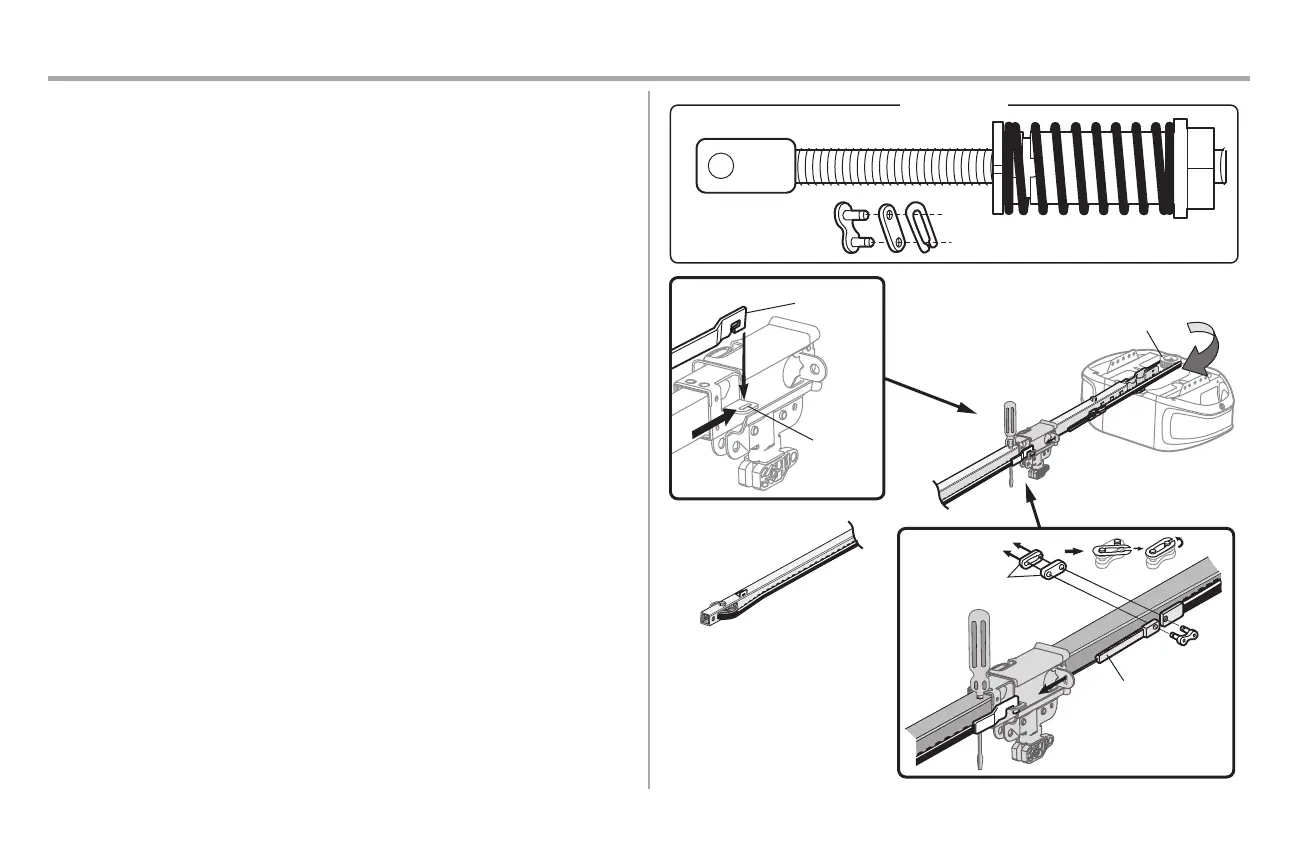
STEP 4 Install the belt
1. Pull the belt around the idler pulley and toward the trolley. The ribbed side mustcontactthe
pulley.
2. Hook the trolley connector into the retaining slot on the trolley asshown (Figure 1).
3. With the trolley againstthe screwdriver, dispense the remainder ofthe belt along the rail
lengthtoward the motor unit and around the sprocket (Figure 2). The sprocket teeth must
engage the belt.
4. Checkto make sure the belt isnot twisted.Connect the trolley threaded shaft with the master
link(Figure 3).
l Push pins ofmaster link bar through holesin end ofbelt and trolleythreaded shaft.
l Push master link cap over pins and pastpin notches.
l Slide the closed end of the clip-on spring over one ofthe pins.Push the open end ofthe
clip-on spring onto the other pin.
5. Remove the spring trolley nutfromthe threaded shaft.
6. Insertthe trolleythreaded shaft through the hole in the trolley.
HARDWARE
Master Link
Figure 3
Threaded Shaft with Spring Trolley Nut
Threaded Shaft
Master Link
Sprocket
Figure 2
Figure 1
Trolley
Connector
Retaining
Slot




 To Next Page