EasyManua.ls Logo

Chamberlain Elite SL3000101U - User Manual

Chamberlain Elite SL3000101U
48 pages
Print Icon
To Next Page IconTo Next Page
Loading...
ELITE SERIES COMMERCIAL HIGH-TRAFFIC
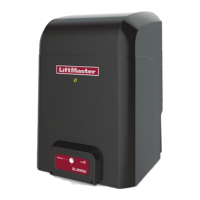
AC SLIDE GATE OPERATOR
Model SL3000
INSTALLATION MANUAL
LiftMaster
845 Larch Avenue
Elmhurst, IL 60126-1196
THIS PRODUCT IS TO BE INSTALLED AND SERVICED BY A TRAINED GATE
SYSTEMS TECHNICIAN ONLY.
This model is for use on vehicular passage gates ONLY and not intended for use
on pedestrian passage gates.
This model is intended for use in Class I, II, III and IV vehicular slide gate
applications.
Visit LiftMaster.com to locate a professional installing dealer in your area.
This gate operator is compatible with MyQ
®
and Security+ 2.0
TM
accessories.
SL3000101U
1 HP Single Phase
SL3000501U
1/2 HP Single Phase

Table of Contents

Questions and Answers

  • C
    colonbriannaSep 15, 2025
    What to do if Chamberlain Elite SL3000101U Gate Opener OPEN EYE/EDGE held more than 3 minutes (expansion board)?
    • S
      Susan GarzaSep 15, 2025
      If the OPEN EYE/EDGE on your Chamberlain Gate Opener expansion board is held for more than 3 minutes, check the wired input on the expansion board for alignment or obstruction.
  • R
    rasmussenkristieAug 25, 2025
    How to fix Chamberlain Gate Opener shadow loop error?
    • A
      Anthony WalkerAug 25, 2025
      To resolve a shadow loop error on your Chamberlain Gate Opener (using a LiftMaster Plug-in Loop Detector), inspect the loop wiring throughout the connection. Look for shorts or open connections in the loop.
  • V
    Virginia FullerAug 25, 2025
    How to fix Chamberlain Gate Opener interrupt loop error?
    • B
      Brian NixonAug 26, 2025
      To address an interrupt loop error on your Chamberlain Gate Opener (when using a LiftMaster Plug-in Loop Detector), examine the loop wiring throughout the connection. Check for any shorts or open connections within the loop.
  • M
    makayla86Aug 26, 2025
    Why Chamberlain Gate Opener shows Force Reversal?
    • E
      Elizabeth WalkerAug 27, 2025
      If your Chamberlain Gate Opener shows a Force Reversal, first look for any obstructions. If there are no obstructions, ensure that the mechanical assembly is engaged and free to move.
  • D
    David MorganSep 16, 2025
    What to do if Chamberlain Elite SL3000101U wireless edge triggered more than 3 minutes?
    • M
      Matthew GrantSep 17, 2025
      If your Chamberlain Gate Opener's wireless edge is triggered for more than 3 minutes, check the wired input for any wiring issues or obstructions.
  • K
    Kristina FloresSep 23, 2025
    What to do if Chamberlain Gate Opener Open input (EYE/EDGE) communication fault (expansion board)?
    • D
      Dr. Elizabeth SharpSep 23, 2025
      If your Chamberlain Gate Opener displays an Open input (EYE/EDGE) communication fault on the expansion board, check the connections between the main board and the expansion board.
  • D
    Derrick MckeeSep 8, 2025
    What does it mean if my Chamberlain Gate Opener limit switch is stuck?
    • J
      Jean HillSep 8, 2025
      If your Chamberlain Gate Opener indicates a Limit Error - Stuck Switch, check the switch for proper operation and the harness for shorts. Replace the switch if it's defective.
  • A
    Anthony Pittman PhDSep 9, 2025
    What to do if my Chamberlain Elite SL3000101U shows Limit Error - Wrong Switch?
    • C
      Christopher MartinSep 9, 2025
      If your Chamberlain Gate Opener displays a Limit Error - Wrong Switch, check the motor wiring.
  • A
    alyssamillerSep 2, 2025
    What to do if my Chamberlain Elite SL3000101U Gate Opener has a motor control board fault?
    • R
      Rachel LewisSep 2, 2025
      To resolve a motor control board fault in your Chamberlain Gate Opener, replace the motor control board.
  • J
    Julie Carlson DVMAug 31, 2025
    What to do if my Chamberlain Elite SL3000101U shows Product ID Error?
    • K
      Kenneth HerreraAug 31, 2025
      If your Chamberlain Gate Opener displays a Product ID Error and the control board was just replaced, erase the limits, enter limit setup mode, and set the limits. If the control board was not just replaced, disconnect all power, wait 15 seconds, then reconnect power before changing the product ID harness.

Summary

Safety Symbol and Signal Word Review

Understanding Safety Symbols

Explains the meaning of safety symbols and signal words used in the manual.

Gate Operator Safety and Usage Classes

UL325 Entrapment Protection Requirements

Details UL325 requirements for entrapment protection systems.

Critical Gate Operator Safety Warnings

Provides critical safety warnings and instructions for gate operator use.

Safety Guidelines for Gate Operator Installation

Safety Installation Information

Outlines crucial safety guidelines for installing gate operators.

Gate Construction Standards for Safety

Gate Operator Technical Specifications

Key Operator Specifications Overview

Provides detailed technical specifications for the gate operator.

Installation Procedures and Types

Step 1: Determine Operator Location

Step 2: Install the Gate Operator

Step 3: Attach the Gate Operator Chain

Step 4: Install Entrapment Protection Systems

Entrapment Protection System Requirements

Emphasizes the need for two independent entrapment protection systems.

Entrapment Protection Wiring Details

Step 5: Install Earth Ground Rod

Step 6: Gate Operator Power Wiring

Power Wiring Safety Precautions

Provides safety warnings for power wiring.

Step 6: Gate Operator Power Wiring (continued)

Step 7: Dual Gate Communication Setup

Wireless Dual Gate Communication Setup

Instructions for setting up wireless communication for dual gates.

Step 7: Dual Gate Communication Setup (continued)

Step 9: Adjust Gate Handing and Limits

Gate Handing and Limit Adjustment Safety

Safety warnings regarding gate force and reversal systems.

Installation Adjustments and Testing

Obstruction Test Procedure

Procedures for testing the gate's obstruction sensing feature.

Control Board Overview and Reference

Additional Wiring and Field Wiring Safety

Fire and Electrocution Safety Warnings

Safety warnings for fire and electrocution protection.

Programming Gate Operator Remote Controls

Programming the LiftMaster Internet Gateway

Gate Operator Setup Examples

Example Settings for Various Applications

Example settings for different gate operator applications.

Dual Gate Settings and Configuration

Recommended Dual Gate Settings

Recommended settings for dual gate configurations.

Maintenance Safety Information

Critical Safety Precautions Before Maintenance

Critical safety precautions before performing maintenance.

Fire and Electrocution Safety During Maintenance

Safety warnings regarding fire and electrocution during maintenance.

Maintenance Schedule and Procedures

Troubleshooting: Diagnostic Codes

Viewing and Interpreting Diagnostic Codes

How to view and interpret diagnostic codes displayed by the operator.

Troubleshooting: Diagnostic Codes Explained

Diagnostic Code Explanations and Solutions

Lists and explains various diagnostic codes and their solutions.

Troubleshooting: Operator Alarm Conditions

Understanding and Resetting Operator Alarms

Explains the operator alarm conditions and how to reset it.

Troubleshooting Chart: Common Issues

Symptoms and Solutions for Operator Issues

Lists common symptoms and their potential causes and solutions.

Troubleshooting Chart: Advanced Issues

Advanced Troubleshooting Scenarios and Solutions

Lists causes and solutions for advanced troubleshooting scenarios.

Gate Operator Warranty Information

Chamberlain Elite SL3000101U Specifications

General IconGeneral
BrandChamberlain
ModelElite SL3000101U
CategoryGate Opener
LanguageEnglish

Related product manuals