21
Inst allation
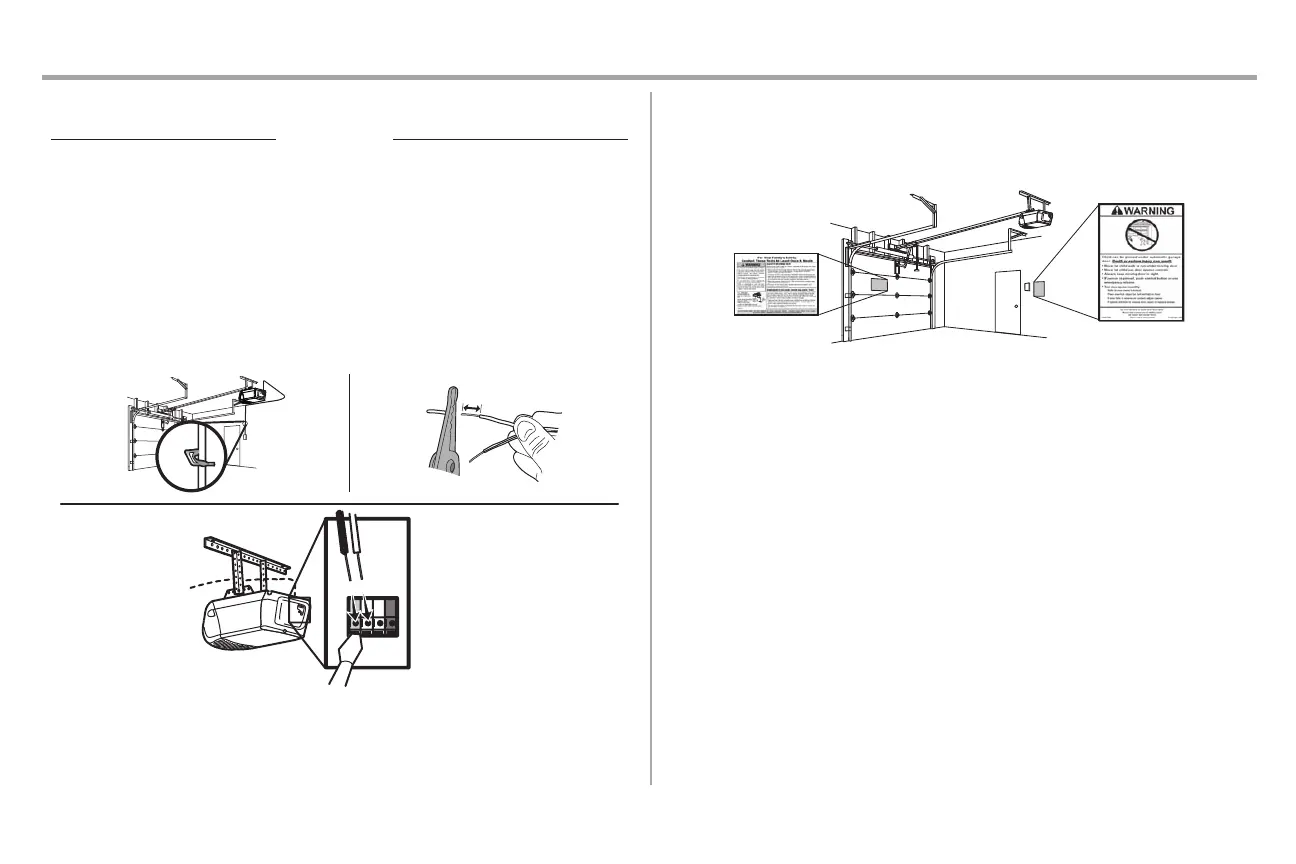
STEP 11 Wire the door control to the garage door opener
Insulated Staple
1. Run the white and red/white wire from the door control to the garage door opener. Attach the
wire to the wall and ceiling with the staple (not applicable for gang box or pre-wired in stallations).
Do not pi erce the wire with the staple as this may cause a short or an open circuit.
2. Strip 7/16 inch (11 mm) of insulation from the end of the wire near the garage door opener.
3. Connect the wire to the red and white terminals o n the garage door opener. If your garage is pre-
wired make sure you use the same wires that are connected to the door control. To insert or
release w
ires from the termina
l, push in the tab with screwdriver tip.
RED
WHITE
WHITE
GREY
7/16" (11 mm)
2
3
1
Staple
STEP 12 Attach the warni ng labels
1. Attach the entrapment warning label on the wall near the door control with tacks or staples.
2. Attach the manual release/safety reverse test label in a visible location on the inside of the
garage door.





 To Next Page