31
MyQ
®
Smartphone Control
Get Connected
…and control your garage door opener with the MyQ
®
App.
You will need:
l A smartphone or tablet
l Broadband Internet connection
l A strong Wi-Fi signal in the garage, see page 2
l Password for your home network
l MyQ
®
serial number located on the garage door opener
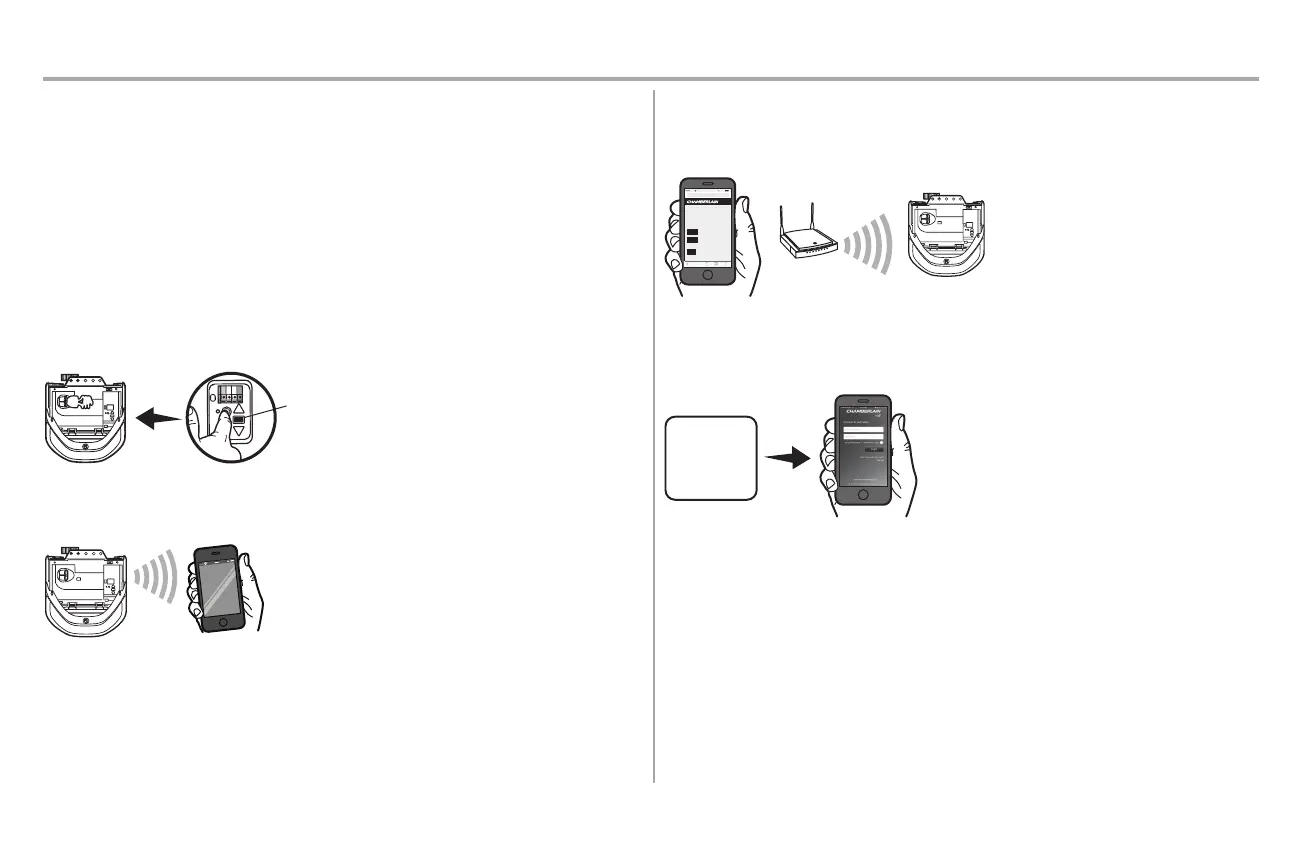
1. ACTIVATE "WI-FI LEARN" MODE
Press and release the yellow LEARNbutton on the garage door opener 3 times.The garage door
opener will beep once and a blue light will flash.You have 20 minutesto complete the connection
process.
2. CONNECT TO THE MyQ
®
Wi-Fi NETWORK
On your mobile device, go to Settings > Wi-Fi, and selectthe network with the "MyQ-" prefix.
3. CONNECT THE GARAGE DOOR OPENER TO YOUR HOME WI-FI NETWORK
Launch the web browser (such as Safari or Chrome) on your mobile device and go to
"setup.myqdevice.com".Follow the on-screen prompts to add the garage door opener to your home
Wi-Fi network.
ATT 100%9:25 PM
http://setup.myqdevice.com
Welcome. This step-by-step guide will
help you connect your Wi-Fi Garage Door
Opener to the internet through your
home’
s Wi-Fi network.
Press Start to begin the process by
scanning for available networks.
Tap EXIT to reconnect your mobile device to your
home’s Wi-Fi network.
©2014 The Chamberlain Group, Inc.
About
Exit
4. SETUP YOUR MyQ
®
ACCOUNT
Download the MyQ
®
app from the App Store
SM
or Google Play™ store. Sign up for your MyQ
®
account
and add the MyQ
®
serial number to your account.
Congratulations you've successfully completed the setup. Enjoy MyQ
®
Smartphone Control!
In addition to controlling your garage door opener you can control your house lighting with additional
MyQ
®
accessories,see page 40.
NOTES:
The MyQ
®
Smartphone Control WILL NOT work if the garage door opener is operating on battery power.
To erase the Wi-Fi settings,see page 36.
To learn more go to wifihelp.chamberlain.com.




 To Next Page