EasyManua.ls Logo

Chamberlain K1A6424-2 - User Manual

Chamberlain K1A6424-2
2 pages
Print Icon
To Next Page IconTo Next Page
Loading...
TTC
DIAGNOSTIC
AUX
ANT
R
27
L5
TP1
C20
C9
C
2
9
R24
J2
C
21
J
4
2
LT
P1
C3
2
U
4
D
7
D
6
D
5
D
4
R2
5
U
1
C3
1
D14
C
1
8
014A1030
^^^^
D
9
LEARN
1 2 3 4 5 6 7
LMEP1 LMEP2
INTRLK
COM
STOP CLOSE OPEN
STOP CLOSE OPEN
^^
2
3
AUX ANT
Auxiliary
Antenna
Connection
Purple Wire Antenna
Diagnostic LED Field Wiring Terminal Factory Wiring Connector
Timer to Close
Button
Learn
Button
Stop
Button
Close
Button
Open
Button
APPLICATION
Available to all limited duty commercial door operators using the
logic control board. Example model identifier: MT-5011-E.
NOTE: A monitored safety device MUST be installed for B2 wiring
mode.
1
INSTALLATION
1. Disconnect power to operator.
2. Remove all wires from the existing logic board:
• Unplug Factory Wiring Connector (P1).
• Field control wiring from terminal strip.
NOTE: Remember location of all wiring connections for
reinstallation.
3. Remove the logic board from the mounting posts (5).
4. Install the new logic board into the operator, making sure that
the logic board is correctly oriented. Press firmly until all of
the mounting posts are completely through the mounting
holes and secure the board with the plastic nuts (2).
5. Plug factory wiring connector into P1 connector on logic
board.
6. Reconnect all field wiring to the field wiring terminal strip.
7. Make sure the electrical box is clear of all debris and tools.
8. Reconnect power to the operator and verify operation. Refer to
page 2 to reprogram remote controls and settings as
necessary.
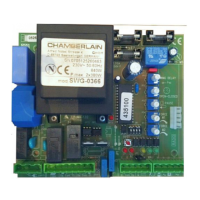
LOGIC CONTROL BOARD
LOGIC BOARD
REPLACEMENT KIT
K1A6424-2 (315MHZ)
& K1A6424-3 (390MHZ)
To avoid SERIOUS personal INJURY or DEATH from
electrocution, DISCONNECT electrical power to operator
BEFORE proceeding.
WARNING: This product can expose you to chemicals
including lead, which are known to the State of California to
cause cancer or birth defects or other reproductive harm.
For more information go to www.P65Warnings.ca.gov
Question and Answer IconNeed help?

Do you have a question about the Chamberlain K1A6424-2 and is the answer not in the manual?

Summary

Logic Board Application and Installation

Application Overview

Details the intended use of the logic control board for commercial door operators.

Installation Procedure

Step-by-step instructions for replacing the logic board, including wiring and connection guidance.

Safety Warnings

Critical safety precautions regarding electrocution and chemical exposure during installation.

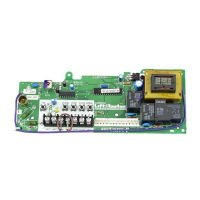
Logic Control Board Diagram

Visual reference identifying key components and connection points on the logic board.

Summary

Logic Board Application and Installation

Application Overview

Details the intended use of the logic control board for commercial door operators.

Installation Procedure

Step-by-step instructions for replacing the logic board, including wiring and connection guidance.

Safety Warnings

Critical safety precautions regarding electrocution and chemical exposure during installation.

Logic Control Board Diagram

Visual reference identifying key components and connection points on the logic board.

Overview

This document describes the Logic Board Replacement Kit (K1A6424-2 for 315MHz and K1A6424-3 for 390MHz) for LiftMaster commercial door operators. The kit is designed for use with all limited duty commercial door operators that utilize a logic control board, such as the MT-5011-E model. A key safety requirement for B2 wiring mode is the installation of a monitored safety device.

Installation Process

The installation process for the logic board is straightforward and emphasizes safety and careful handling of wiring.

  1. Disconnect Power: Always begin by disconnecting electrical power to the operator to prevent serious injury or death from electrocution.
  2. Remove Existing Wires: Detach all wires from the old logic board. This includes unplugging the Factory Wiring Connector (P1) and removing field control wiring from the terminal strip. It is crucial to note the location of all connections for proper reinstallation.
  3. Remove Old Logic Board: Once all wires are disconnected, remove the old logic board from its five mounting posts.
  4. Install New Logic Board: Carefully position the new logic board, ensuring it is correctly oriented. Press firmly until all mounting posts pass through their respective holes, then secure the board with the two plastic nuts.
  5. Reconnect Factory Wiring: Plug the factory wiring connector back into the P1 connector on the new logic board.
  6. Reconnect Field Wiring: Reattach all field wiring to the field wiring terminal strip.
  7. Clear Electrical Box: Ensure the electrical box is free of any debris or tools before proceeding.
  8. Restore Power and Verify: Reconnect power to the operator and verify its operation. Further programming of remote controls and settings may be necessary, as detailed on page 2 of the manual.

Basic Programming and Features

The logic board offers various programming options to customize the operator's functionality, including wiring type modes, remote control programming, and a Timer to Close (TTC) feature.

Wiring Type Modes:

The operator supports two primary wiring type modes:

  • C2 Mode: This mode allows for momentary contact to open and stop, with constant pressure required to close. It includes an open override feature and wiring for a sensing device to reverse. The Timer to Close feature is not available in C2 mode.
  • B2 Mode: This mode also allows for momentary contact to open, close, and stop, with an open override and wiring for a sensing device to reverse. Crucially, the Timer to Close (TTC) feature is available in B2 mode, but it requires a LiftMaster Monitored Entrapment Protection (LMEP) device.

The operator's factory default is C2 mode if no LMEP device is installed, and B2 mode if an LMEP is present. To switch to C2 mode with an LMEP installed, press and hold LEARN and CLOSE for 3 seconds until the DIAGNOSTIC LED turns off. To revert to standard operation, press and hold LEARN and STOP for 3 seconds until the DIAGNOSTIC LED turns off.

Remote Control Programming:

The built-in 315 MHz radio receiver can store up to 20 Security+® remote controls or dip switch remote controls.

  • Single Button Remote Controls:

    1. Press and release the LEARN button (the DIAGNOSTIC LED will light).
    2. Press and hold the button on the remote control until the Diagnostic LED flashes rapidly, then release to complete programming (the LED will turn off).
    3. Repeat for additional remotes.
  • 3-Button Remote Controls:

    1. Press and release the LEARN button (the DIAGNOSTIC LED will light).
    2. Press and release the desired function button (OPEN, CLOSE, or STOP) on the remote.
    3. Press and hold the desired button on the remote control until the DIAGNOSTIC LED flashes rapidly, then release.
    4. Repeat for other desired buttons.
  • Erasing Remote Controls: To erase all learned remote controls, press and hold the LEARN button for over 5 seconds until the DIAGNOSTIC LED flashes rapidly.

Timer to Close (TTC) Feature:

The TTC feature allows the operator to automatically close the door after a preset time, adjustable from 5 to 60 seconds. This feature requires an LMEP device to be connected and unobstructed.

  • Programming TTC:

    1. Ensure the door is in the fully closed position.
    2. Press and release the LEARN button (the DIAGNOSTIC LED will light).
    3. Press and release the TTC button.
    4. Each press and release of the STOP button adds 5 seconds to the timer. For example, 6 presses for a 30-second TTC.
    5. Press and release the TTC button to exit programming mode.
    6. The DIAGNOSTIC LED will flash once every 5 seconds, indicating the timer setting. The TTC will become active after the next open cycle. The LED does not indicate when the timer is running.
  • Clearing TTC:

    1. Press and release the LEARN button (the DIAGNOSTIC LED will light).
    2. Press and hold the TTC button for at least 6 seconds.
    3. The DIAGNOSTIC LED will flash rapidly when the button is released.
  • Timer Defeat: The TTC can be temporarily disabled by pressing the STOP button on the logic board or on the 3-button control station. The TTC will reactivate after the next open cycle.

Safety Warnings:

  • Always disconnect electrical power before working on the operator to prevent serious injury or death.
  • The product may expose users to chemicals, including lead, known to cause cancer, birth defects, or other reproductive harm in California. Refer to www.P65Warnings.ca.gov for more information.
  • Install reversing sensors when the radio is used, when the 3-button control station is out of sight of the door, or when any other automatic or manual control is used. Reversing devices are recommended for all installations to prevent severe injury or death.

This device complies with FCC and Industry Canada (IC) rules. Any adjustments or modifications to the receiver/transmitter are prohibited, except for changing the code setting or replacing the battery. There are no other user-serviceable parts. Operation is subject to two conditions: the device must not cause harmful interference, and it must accept any interference received.

Chamberlain K1A6424-2 Specifications

General IconGeneral
Model NumberK1A6424-2
CategoryControl Unit
Power SourceBattery
SecurityRolling code technology
CompatibilityChamberlain and LiftMaster garage door openers
ConnectivityWireless

Related product manuals