Rev C Doc 6001565 Page 9 of 31
D. CONNECTING UNITS IN A CHAIN
If The Units Are Under 30 Feet Apart:
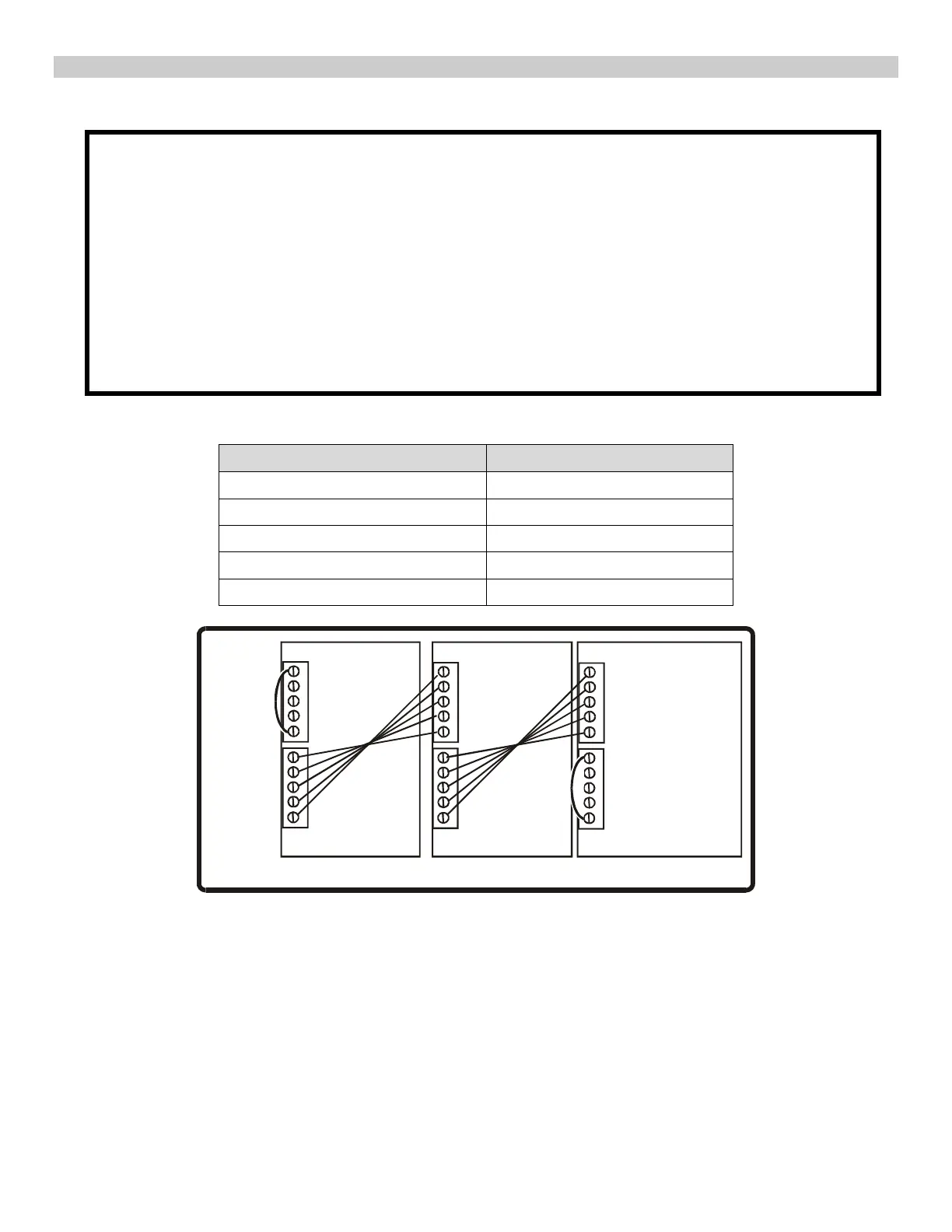
1. Connect the units via the RS-232 serial ports (see Figure 3 & Figure 4 circuit board diagrams).
2. On the first unit: remove the jumper from the CTS and RTS terminals on TB3.
3. Plug the 5 conductor cable into TB3.
4. On the second unit: remove the jumper from the CTS and RTS terminals on TB2.
5. Plug the loose end of the 5 conductor cable into TB2.
6. To connect additional units, repeat steps 2 through 5. The same connections are made between
the second unit and the third unit, the third unit and the fourth unit, etc.
IMPORTANT: Do not remove:
• The jumper from the CTS and RTS terminals on TB2 on the first unit in the chain.
• The jumper from the CTS and RTS terminals on TB3 on the last unit in the chain.
Table A. RS-232 Connections
TB3 ON FIRST UNIT TB2 ON SECOND UNIT
Clear to send (CTS) Request to send (RTS)
RS-232 Out (OUT) RS-232 In (IN)
Ground Ground
RS-232 In (IN) RS-232 Out (OUT)
Request to send (RTS) Clear to send (CTS)
1016F2
RTS
IN
GND
OUT
CTS
RTS
IN
GND
OUT
CTS
RTS-CTS
Jumper
RTS-CTS
Jumper
RS-232 PORT 1
RS-232 PORT 2 RS-232 PORT 2 RS-232 PORT 2
RS-232 PORT 1
RS-232 PORT 1
Multi-Link Unit 1
Multi-Link Unit 2
Multi-Link Unit 3
Figure 6: Connecting Multiple Units Via RS-232 Ports



 To Next Page