Page 10 of 31 Doc 6001565 Rev C
If The Units Are 30 Or More Feet Apart:
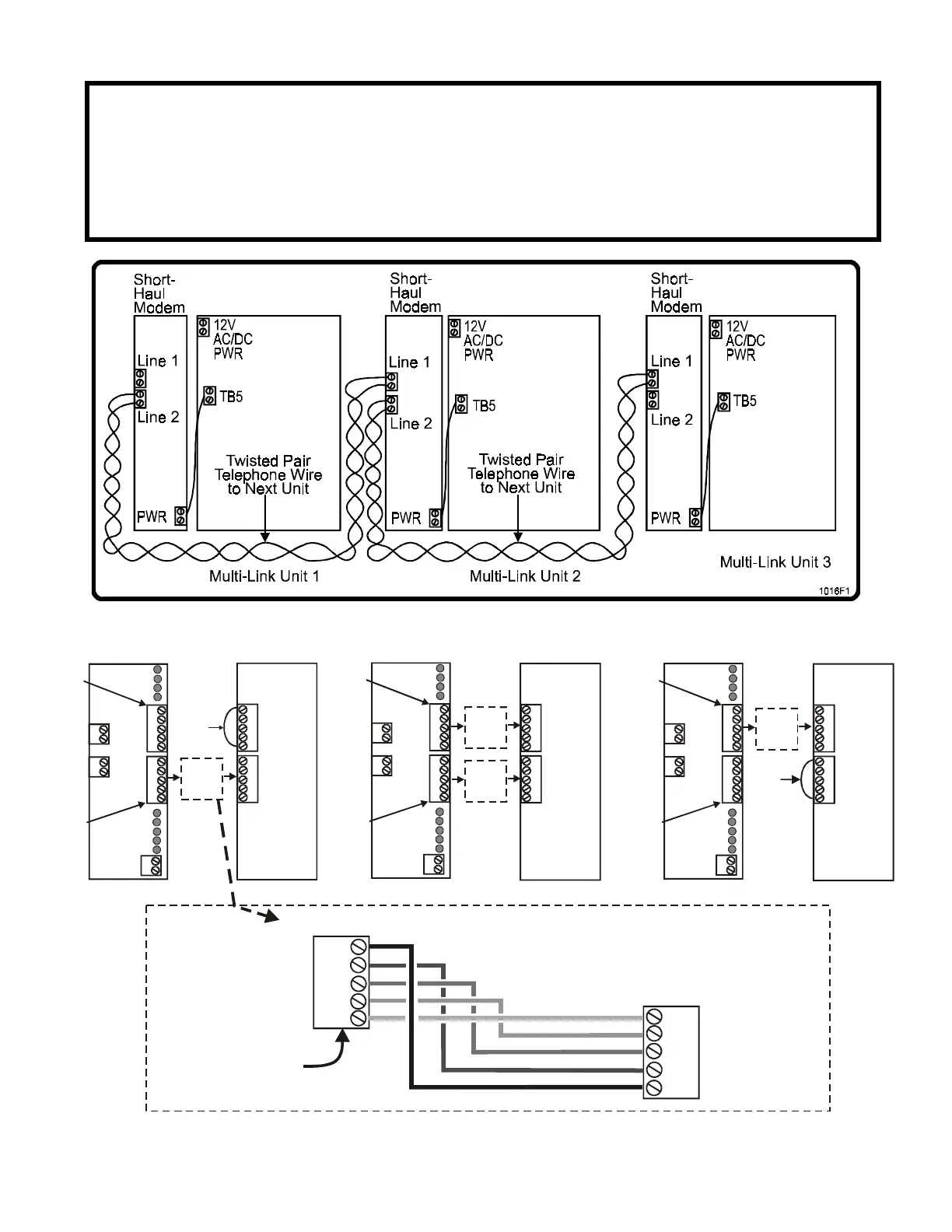
Connect the units through the dual short-haul modems (See Figure 7).
1. On the first unit, insert the 2 conductor cable into the LINE 2 plug and tighten the screws
securely. It does not matter which wire is inserted into which opening of the plug (See Figure 8).
2. On the second unit, insert the the loose end of the 2 conductor cable into the LINE 1 plug and
tighten the screws securely (See Figure 8).
3. To connect additional units, repeat steps 2 and 3. The same connections are made between the
second unit and the third unit, the third unit and the fourth unit, etc.
Figure 7: Connecting Multiple Units Through Short-Haul Modems
CTS
CTS
OUT
RS232 PORT
OUT
GND
GND
IN
IN
RTS
RTS
MIDDLE MULTI-LINK UNIT(S)
XMIT (GRN)
TSD (YEL)
RSD (RED)
RCV (GRN)
Line 1
Line 2
TB 5
+12 V
DC PWR
DS8
DS7
DS6
DS5
DS9
DS2
DS3
DS1
DS4
PORT 1
PORT 2
XMIT (GRN)
TSD (YEL)
RSD (RED)
RCV (GRN)
POWER (RED)
CTS
CTS
OUT
OUT
GND
GND
IN
IN
RTS
RTS
DUAL SHORT-HAUL MODEM
XMIT (GRN)
TSD (YEL)
RSD (RED)
RCV (GRN)
Line 1
TB 5
+12 V
DC PWR
DS8
DS7
DS6
DS5
DS9
DS2
DS3
DS1
DS4
PORT 1
PORT 2
XMIT (GRN)
TSD (YEL)
RSD (RED)
RCV (GRN)
POWER (RED)
CTS
OUT
GND
IN
RTS
DUAL SHORT-HAUL MODEM
JUMPER
CTS
TO RTS
CTS
OUT
RS232 PORT
GND
IN
RTS
Line 2
CTS
OUT
GND
IN
RTS
CTS
OUT
GND
IN
RTS
1st MULTI-LINK UNIT
XMIT (GRN)
TSD (YEL)
RSD (RED)
RCV (GRN)
Line 1
Line 2
TB 5
+12 V
DC PWR
DS8
DS7
DS6
DS5
DS9
DS2
DS3
DS1
DS4
PORT 1
PORT 2
XMIT (GRN)
TSD (YEL)
RSD (RED)
RCV (GRN)
POWER (RED)
CTS
CTS
OUT
OUT
GND
GND
IN
IN
RTS
RTS
DUAL SHORT-HAUL MODEM
JUMPER
CTS
TO RTS
Port 1
(TB2)
Port 2
(TB3)
Port 1
(TB2)
Port 2
(TB3)
Port 1
(TB2)
Port 2
(TB3)
CTS
CTS
OUT
RS232 PORT
OUT
GND
GND
IN
IN
RTS
RTS
LAST MULTI-LINK UNIT
See
Enlarged
Image
Below
See
Enlarged
Image
Below
See
Enlarged
Image
Below
See
Enlarged
Image
Below
RTS
IN
GND
OUT
CTS
OUT
GND
IN
RTS
CTS
DSH Modem
Infinity
Multi-Link Unit
NOTE: DSH Modem
nomenclature will
appear upside-down in
the unit as shown.
1016F8
Figure 8: RS232 Connections with Dual Short-Haul Modems and Multiple Units



 To Next Page