3
PROGRAMMING THE STAR450 (CONT’D)
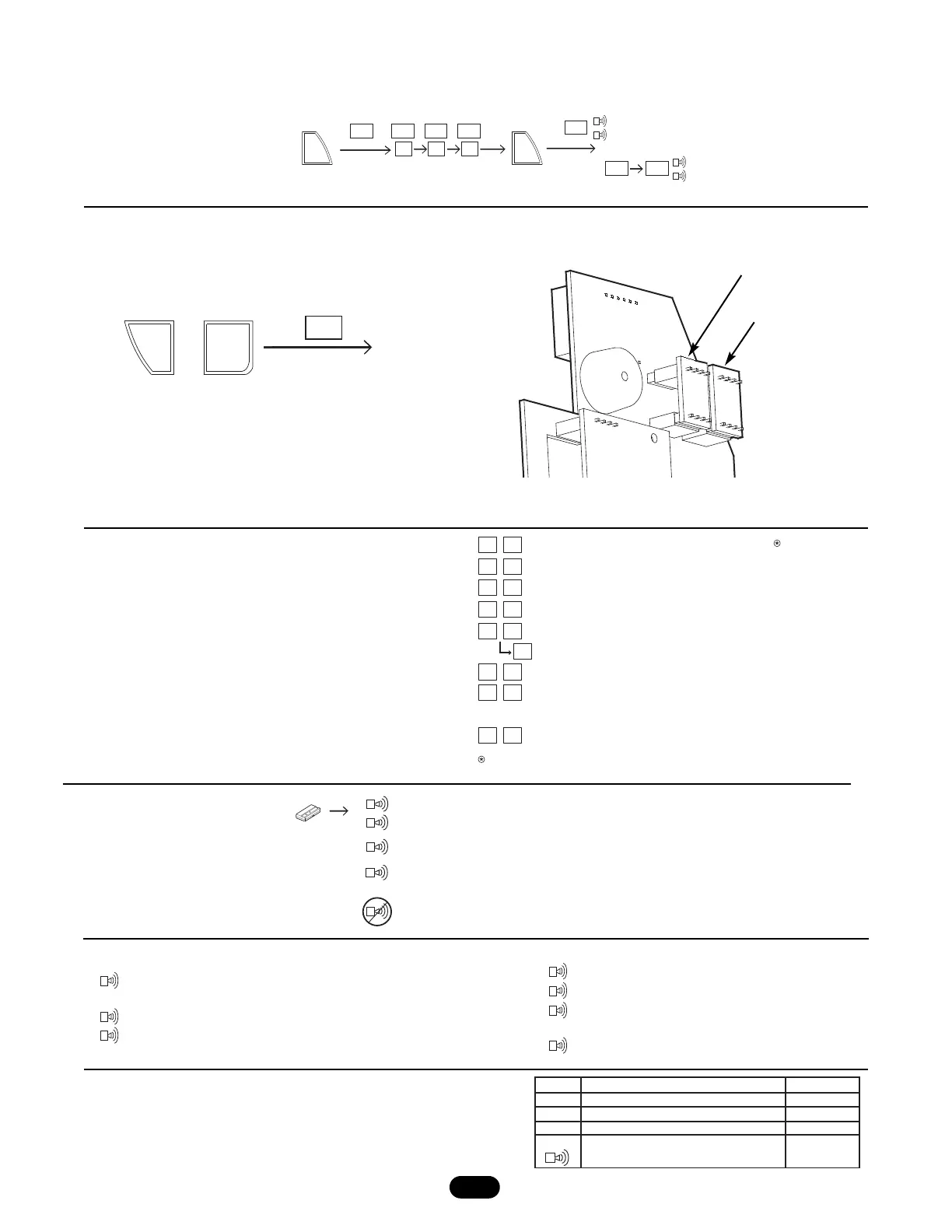
ADVANCED FUNCTIONS
For advanced functions, press and hold the ✱ key and a
number key at the same time to select the corresponding
advanced function. (See table at right for available functions.)
Press the # key to exit the function.
REMOTE CONTROL LOCATION QUERY
Enter a remote control location number (001-450) to view location
status (see table to the right for possible status displays).
ENTER LOCATION (1-450)
(UNBLOCK)
END
PRESS
TO
CONFIRM
PRESS
Block
Block
Un- bLc
bLc
bLc
2
3
4
002 023
234
Memory location of last remote control received.
# of open remote control locations.
# of locations occupied.
# of blocked remote control locations.
First blocked remote location.
Next blocked location (Repeat to scroll).
Duplicate memory- See Duplicating memory.
Version #
Press to exit functions.
Audible diagnostics OFF/ON
(LED will be displayed when OFF)
If no remote controls are programmed into the star450,
then (---) will be displayed.
1
*
2
*
3
*
4
*
5
*
6
*
7
#
*
0
*
5
*
6
PRESS SIMULTANEOUSLY
,
END
dup
~6 SECONDS
Remote control location is empty
Remote control location is occupied
no beep
OPn
Out
Display
Description Beeper
Occ
bLc
no beep
no beep
long beep
Remote control location is blocked
Remote control location is out of
range(not between 1 & 450)
Triple Beep: Confirmation of delete.
Long Beep: Blocked Tx, error, or out of range
Double Beep: Remote control is valid and programmed into STAR450
accompanied by remote control location display.
Slow Beep: Security+
®
Remote control (Not programmed in STAR450).
Long Beep: Blocked remote control.
No Beep: Remote control not working.
Single Beep: Key pressed.
Double Beep: Confirmation of an accepted Tx or
valid add/block input.
KEYPAD SOUND ALERTS
Blocking (Unblocking) a Remote Control: To block or unblock a user.
Duplicating Memory: Allows user to backup programmed remote
control memory into the provided backup memory module.
Note: If two memory modules are installed, press
✱
,6 to duplicate
the memory and remove the backup module.
Note: To duplicate memory, plug backup memory module into
backup slot and press
✱
,6. Once duplication is complete, remove
the backup memory module and store in a separate location.
Restoring Memory: To restore memory, simply place the duplicate
memory module in the main memory position.
Backup Memory Module
Main Memory Module
AUDIBLE DIAGNOSTICS
Step 1. Activate remote control.
Step 2. Listen for beep.
(LED will be displayed when OFF)




 To Next Page