IMPORTANT! Clean or change the cartridge filter regularly for best performance. ALWAYS USE
CARTRIDGE FILTER F
11
OR DRY VACUUMING. If the machine is used for dry vacuuming with out the
. The
m
a
wer head and place in upside down position. Follow instructions to remove cloth filter.
filter cage making sure the whole cage is covered.
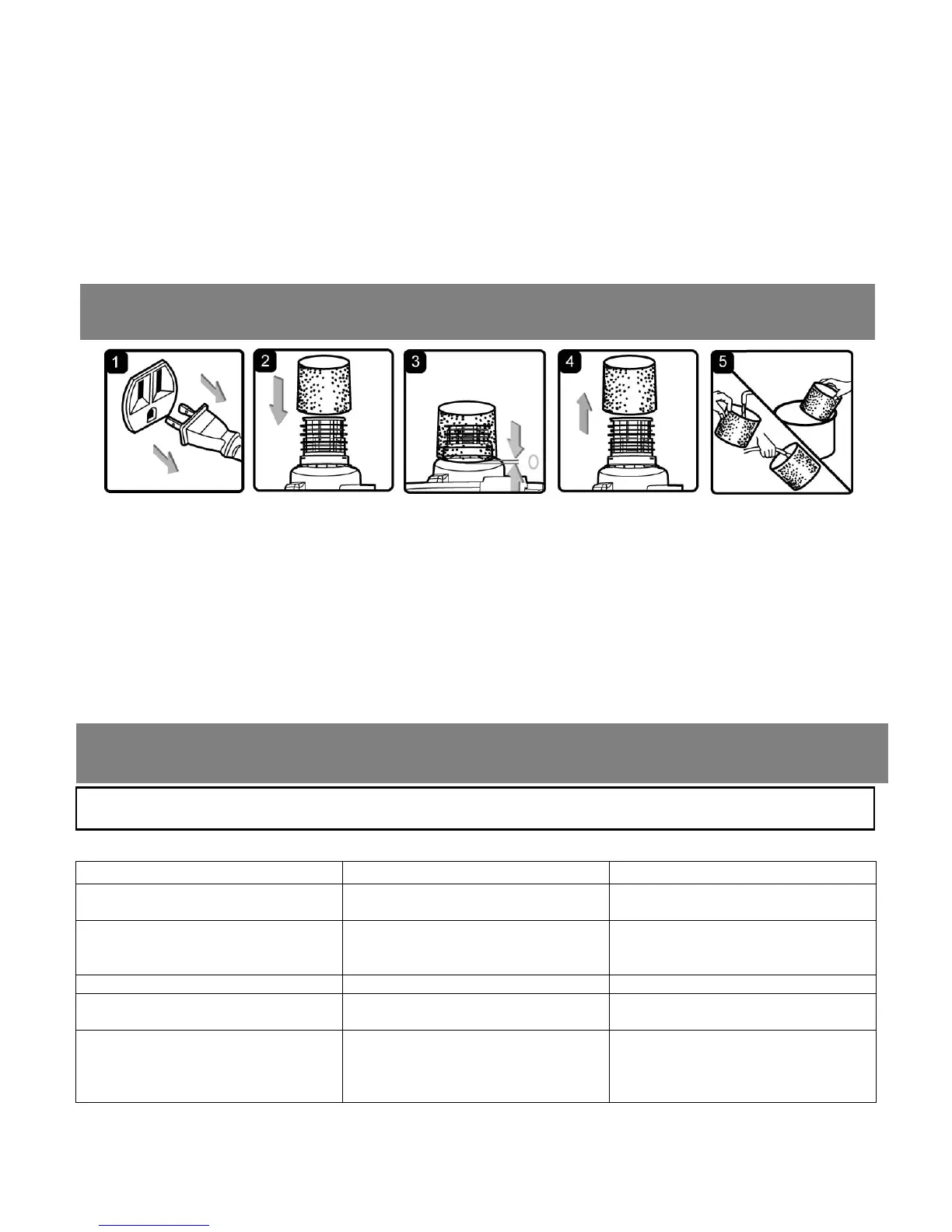
tion, carefully remove foam sleeve filter. (fig. 4)
. Use a mild soap and water solution to wash foam sleeve filter and rinse with clean water. (fig. 5)
Allow filter to air dry befo
Symptom Possible Causes tion
cartridge filter and retainer attached, the motor will burn out and the warranty will be voided. Always keep
spare filters on-hand.
NOTICE! The filters included are made of high quality materials designed to stop small dust particles
cartridge filter should be used for dry pick-up only. A dry cartridge filter is necessary to pick up dust. If the
cartridge filter is wet, it will clog quickly and be very difficult to clean. Handle the filter carefully when
re oving it for cleaning and replacing it. Check the filters for tears or small holes, a small hole can let dust
ss through and out of the cleaner. Do not use a filter with holes or tears, replace it immediately.
p
INSTALLING & CLEANING FOAM SLEEVE FILTER
Installing Foam Sleeve Filter
1. Verify that the power cord is disconnected from the outlet. (fig. 1)
2. Remove po
3. Carefully slide foam sleeve filter down over the
(fig. 2 & 3)
4. Replace the power head on to the container.
Cleaning Foam Sleeve Filter
1. With the removed power head in the upside down posi
2
3. re installing and using again.
TROUBLESHOOTING
WARNIN
! T
RED
E THE RI
K
F ELE
TRI
H
-
NPL
BEF
RE TR
BLE
H
TIN
Corrective Ac
Vacuum will not operate 1) No power supply. 1) Check power supply – cord,
breakers, fuses.
2) Faulty power cord. ck the power
ve it repaired
2) Unplug and che
cord. If damaged, ha
by a professional.
er full. 3) Empty container. 3) Contain
Dust comes out from motor cover. r e filter. 1) The cartridge filter is missing o
damaged.
1) Attach or replace cartridg
Reduced efficiency and
motor/speed vibration. , hose, or the container inlet.
The cartridge filter is clogged by fine
dust.
lockage. Take
off the filter and clean it. Or install a
new cartridge filter.
1) There is a blockage in the
nozzle
1) Check nozzle, hose and
container inlets for b


 To Next Page