14
CALIBRATION PROCEDURE
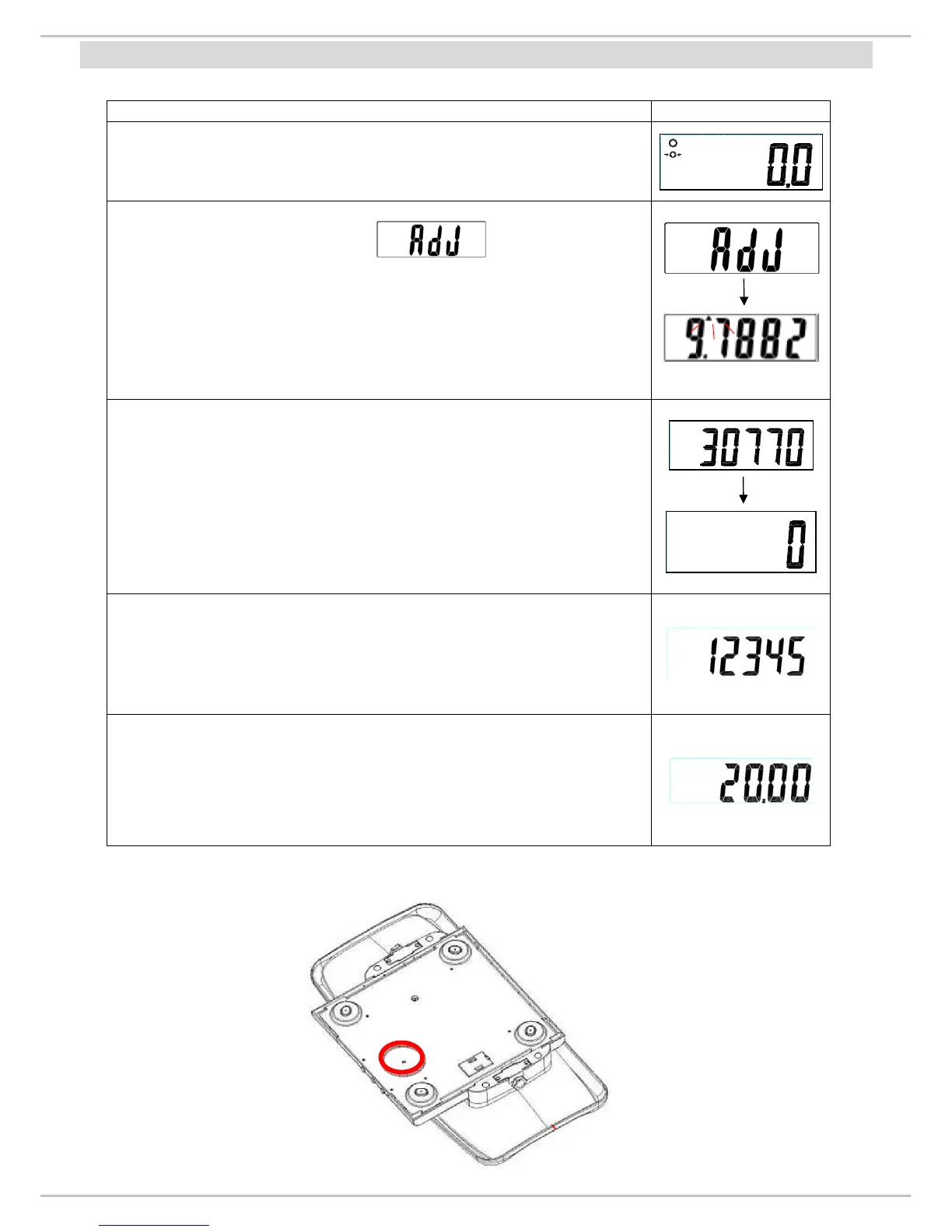
Operation Display
Turn ON MS3500 using the ON/ZERO/OFF key.
Press TEST PIN twice, First and then the last
origin gravity value and left hand side arrow will appear on
the display. Set the gravity of the place where the
calibration procedure is been carried out.
(Setting gravity value: Press UNIT to move to next digit
and press HOLD to increase the value)
Press the ON/ZERO/OFF key the display will show the
present ZERO Count value (23250 ~ 39250).
Then press the ZERO key.
Place the calibration weight (20kg) carefully in the centre
of the scale plate, and the display will show SPAN Count
value (5000-26000). Press the ZERO key. The
adjustment process is started.
When the adjustment is finished successfully, the scale is
automatically switched over to the weighing mode again
and the calibration weight value will be displayed.
Remove the calibration weight.
Re-power on, the instrument is in normal mode.
Test pin location


 To Next Page