22
GRAVITY COMPENSATION PROCEDURE
Set the gravity value of the place for use.
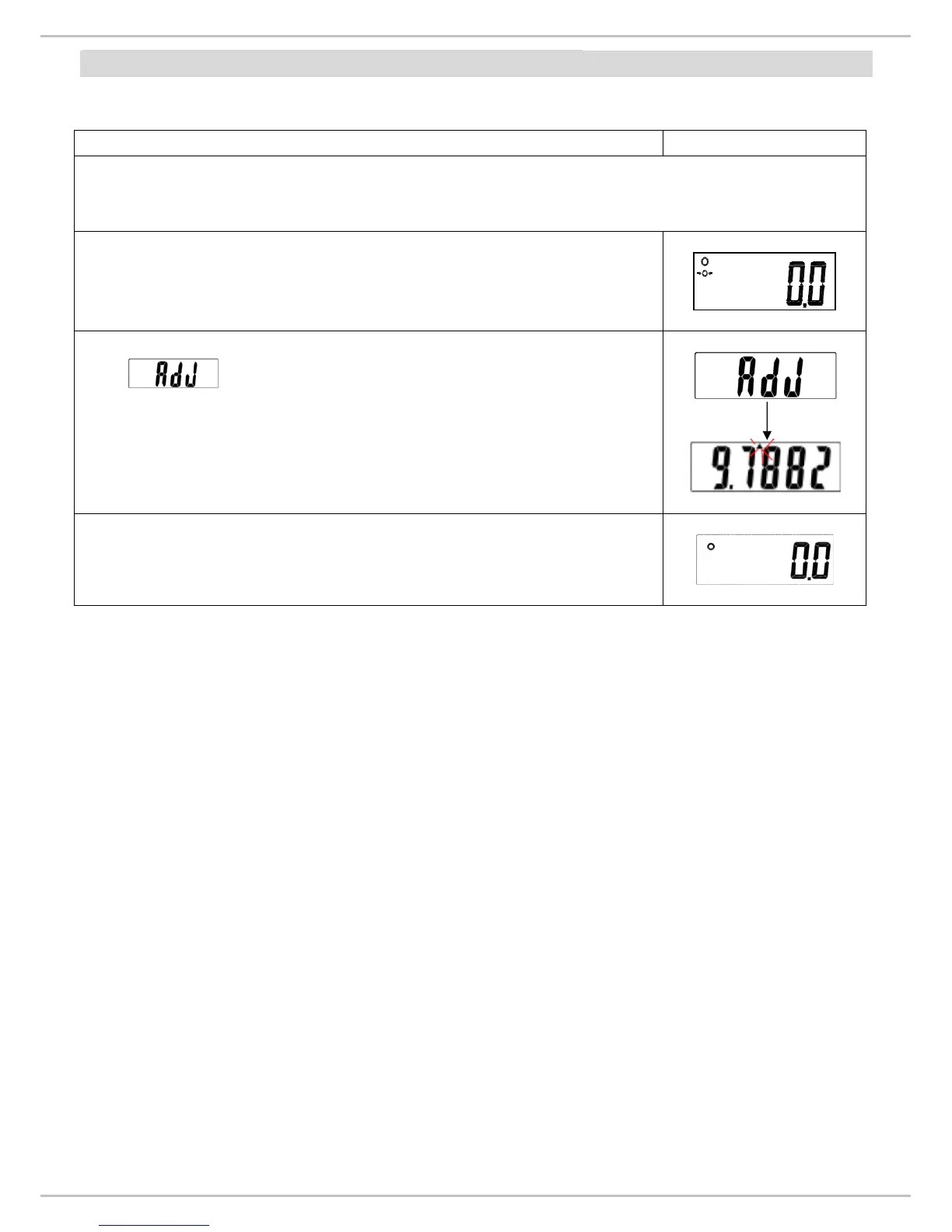
Operation Display
Before starting gravity compensation procedure make sure the “GrAu” feature is set
to “on”.
(Please refer p.11& 12)
Press and hold ON/ZERO/OFF, and then press HOLD key
three times. To enter into gravity setting mode.
First and then the last using gravity value and the
top left hand side arrow will appear on the display. Now set the
gravity of the place where scale is going to be used.
(Setting gravity value: Press UNIT key for moving to next digit,
and press HOLD key to change numerical value)
After setting the gravity value, press ON/ZERO/OFF key and
the display will return to weighing mode.
Note: If the scale has been moved to another city/country where the gravity is not the
same with the place where the scale was originally calibrated, Please follow gravity
compensation procedure.
But if the scale has been re-calibrated then TURN-OFF the Gravity.
(Please refer to
‘Approval Scale Company setting’)


 To Next Page