3D ActiveTrac
®
36
TROUBLESHOOTING
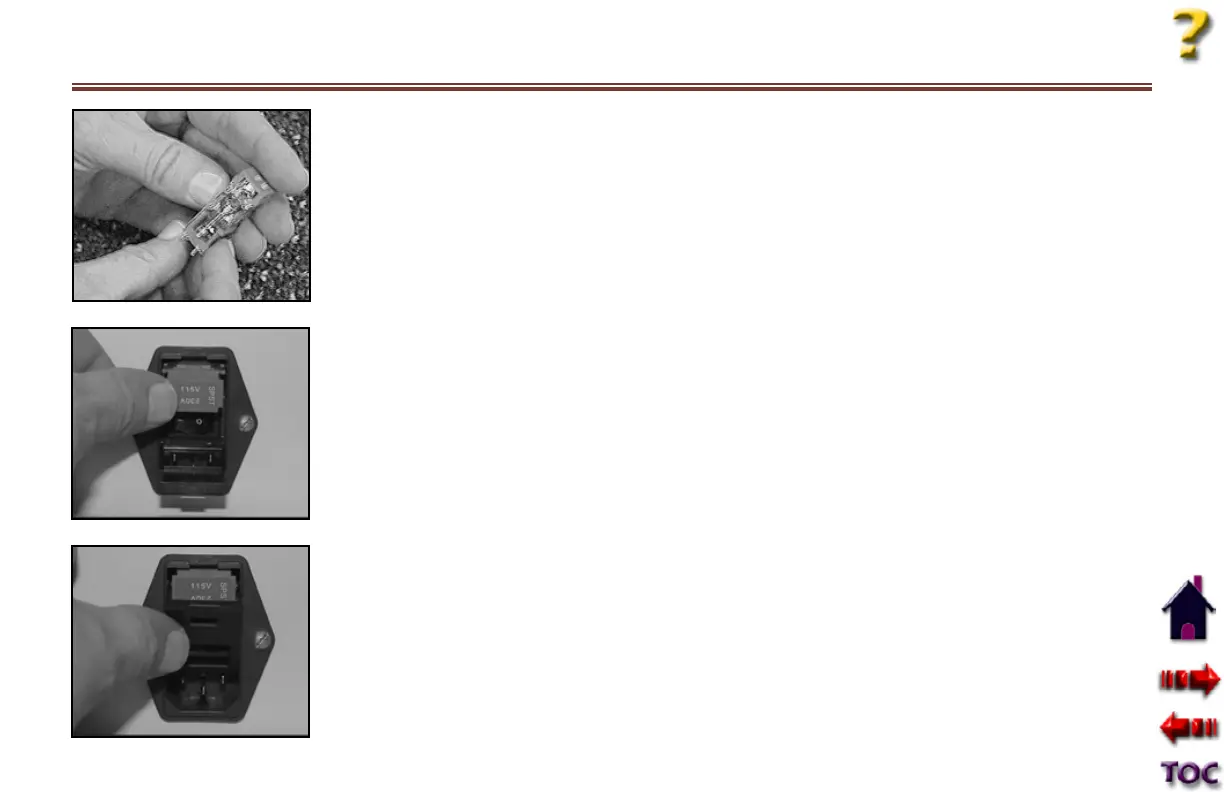
•Removetheblownfusefrom
the fuse holder and replace it
with a new fuse.
NOTE: See Specifications
Section for fuse rating. If both
fuses are blown, replace them.
•Gentlypushfuseholderback
into place on the front of the
Power Control Box ensuring
that the voltage mark is on
top. The holder will snap into
place.
•Gentlyliftupandsnapthe
fuse holder cover in place.
Important: If the unit
continues to blow fuses contact
customer service.
If the traction unit doesn’t work:
•Makesuretheunitisgettingpower.
•MakesurethePatientControlSwitchisnotphysically
damaged or something is not pressed against the button.
•Ifthepumpisrunningbutthereisnotractionforce,check
for air leaks between the pump and cylinders (determined
by hissing sound during operation).
•IftheTouchscreenControlPanelwillnotacceptorholda
command, STOP and call service. Do not attempt to use
the unit until the problem is resolved.










 To Next Page