3D ActiveTrac
®
35
TROUBLESHOOTING
If the Hi/Lo or Flexion/Extension motors don’t work,
make sure the motor is receiving power:
•Checktheplugtomakesureitissecurelypluggedintoa
specified electrical wall outlet.
•Checktheplugtomakesureitissecurelypluggedintothe
receptacle at the front of the Power Control Box.
•Ifthetableispluggedin,checkbuildingcircuitbreakerto
make sure wall outlet is receiving electricity.
•Thermalcutoutmayhaveactivated.Allowthemotortocool.
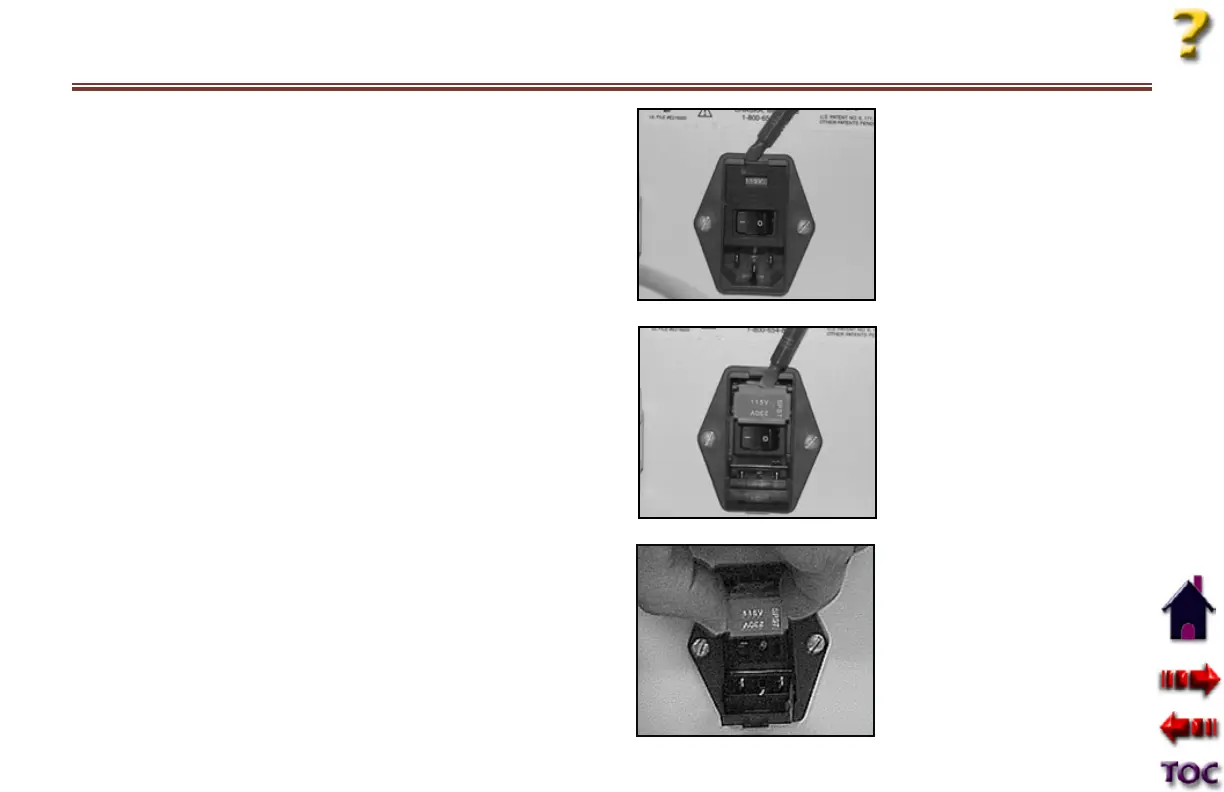
•The5ampcontrolboxfusemayhaveblown.ONLY
QUALIFIED SERVICE PERSONNEL should replace as follows:
•ShutoffpowertothePowerControlBox.
•RemovethePowerCordfromthewalloutlet.
•RemovethePowerCordfromthePowerControlBox.
•Usingasmallflatscrewdriver,
lightly pry open the fuse
holder cover. The cover will
drop down.
•Then,usingthescrewdriver,
lightly pry open the fuse
holder.
•Gentlypulloutthefuse
holder.









 To Next Page