Intelect® Advanced Therapy System
60
OPERATION
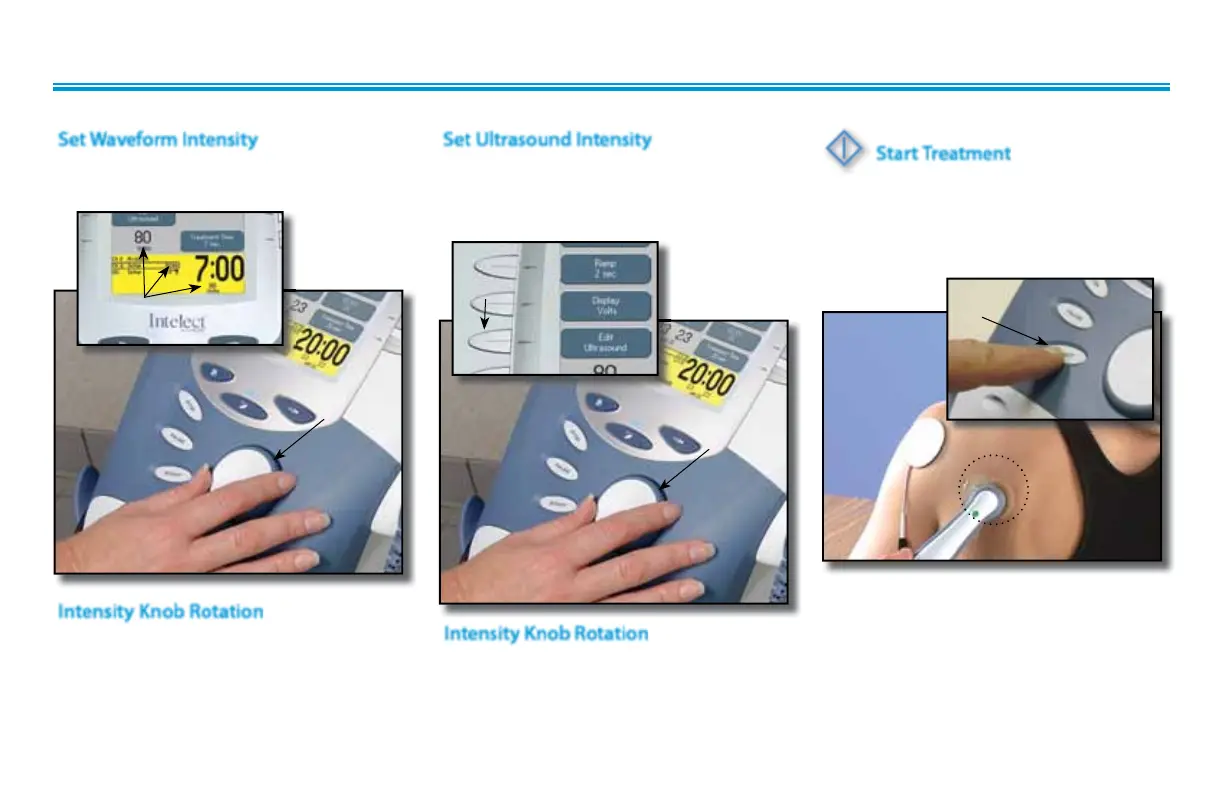
Press the Edit Ultrasound button.
Set Ultrasound intensity by rotating the
Intensity Control Knob to the prescribed level.
Set Ultrasound Intensity
EDIT
ULTRASOUND
BUTTON
Clockwise- Increases Intensity
Counterclockwise- Decreases Intensity
Intensity Knob Rotation
ROTATE
INTENSITY
KNOB
Start Treatment
Press the Start button to begin therapy
session.
Move the Applicator in a circular motion
on the treatment area.
NOTE:
If US Coupling is On and the Sound
Head looses coupling with the treatment
area the session will pause. When
coupling is reestablished, the session will
automatically restart. See page 32 for
US Coupling settings.
Set intensity by rotating the Intensity Control
Knob to the prescribed level.
Set Waveform Intensity
INTENSITY
DISPLAYED
Clockwise- Increases Intensity
Counterclockwise- Decreases Intensity
Intensity Knob Rotation
ROTATE
INTENSITY
KNOB
START
BUTTON
COMBINATION (continued)



 To Next Page
 Loading...






