Intelect® Advanced Therapy System
88
OPERATION
CLINICAL RESOURCES LIBRARY- DELETING SEQUENCES
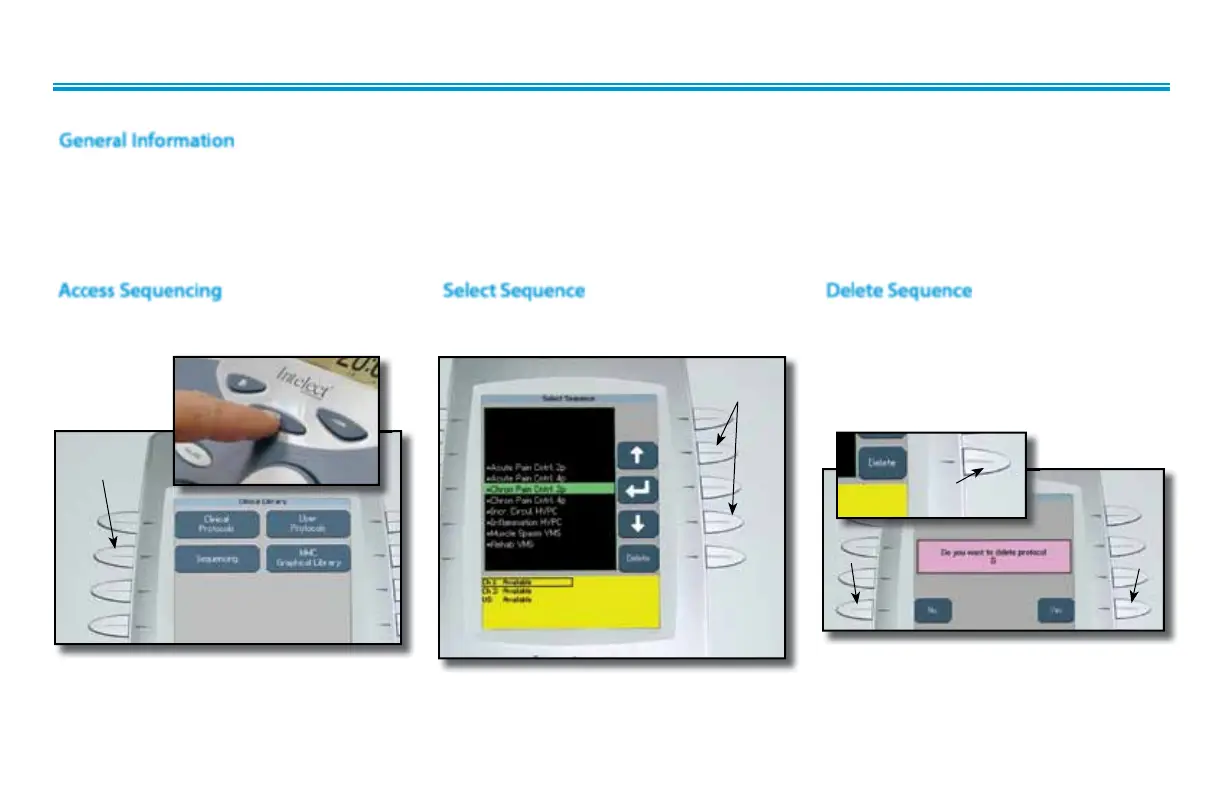
Access Sequencing
Press the Clinical Resources Library button.
Press the Sequencing button.
SEQUENCING
BUTTON
Select Sequence
Press the Up and Down Arrow buttons until
the desired Sequence is highlighted.
UP AND DOWN
ARROW BUTTONS
General Information
The following information provides instructions for the deletion of one user defined sequence at a time. Once any single sequence is deleted,
it cannot be recovered. Should the Default Protocols be restored, through the User Utilities, all user defined sequences will be permanently
removed from the system.
There is no method for recovery of the user defined Sequences nor can they be saved to any other medium. There are nine Default
Sequences, indicated by an asterisk(*), that cannot be deleted.
Press the Delete button to delete highlighted
Sequence.
A verification screen will appear. Press Yes button
to delete Sequence or No button to keep
Sequence.
Delete Sequence
DELETE
BUTTON
NO
BUTTON
YES
BUTTON
Repeat this process until all desired user defined
Sequences are deleted.
Press the Home button to return to the
Home screen.



 To Next Page
 Loading...






