Intelect® Advanced Therapy System
91
OPERATION
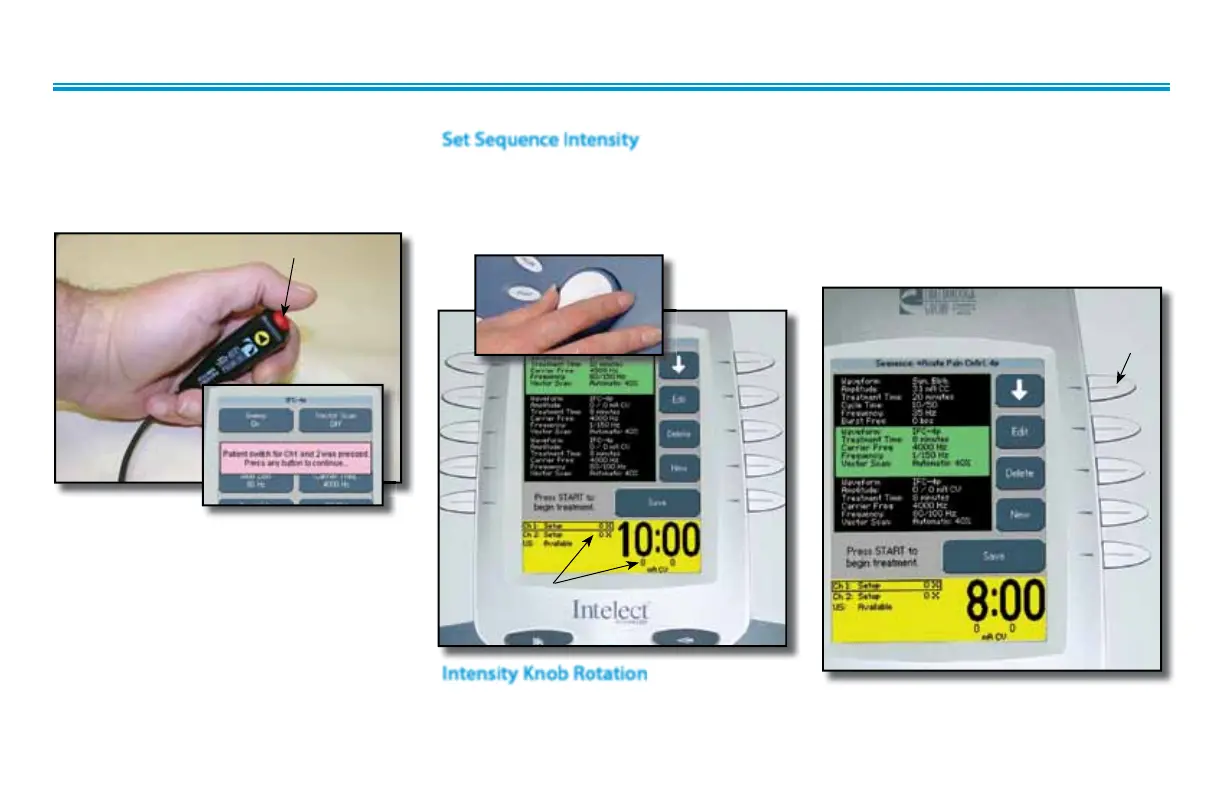
Give Patient Interrupt Switch to patient
and explain that pressing the Red button
once pauses the therapy session.
The first waveform/current in the Sequence
should be highlighted. Set intensity by
rotating the Intensity Control Knob to the
prescribed level.
Set Sequence Intensity
PRESSING BUTTON ONCE PAUSES SESSION
INTENSITY DISPLAYED
Clockwise- Increases Intensity
Counterclockwise- Decreases Intensity
Intensity Knob Rotation
If Patient Interrupt Switch is depressed, the
treatment will be paused and a message
will appear on the System screen.
Press any button to clear the message.
NOTE:
If the Patient Interrupt Switch is depressed
a second time, the message will clear from
the screen and the treatment will remain
paused.
CLINICAL RESOURCES LIBRARY- USING SEQUENCES (continued)
Press the Down Arrow button until the
second waveform/current in the sequence is
Highlighted.
Set intensity by rotating the Intensity Control
Knob to the prescribed level.
DOWN
ARROW
BUTTON
Repeat for the third waveform/
current in the Sequence.











 To Next Page