Appendix
25
Appendix A Log Controller on Internet
Comparing to GPRS Mode, DCI Mode also connects to internet by
GPRS NET to get Correction Message, the difference is that the SIM
card is inserted into Controller directly not the Receiver.
Log Controller on Internet
Insert the SIM card into the slot located at the same place as
battery compartment
Establish the internet connection on Controller (e.g. Windows
Mobile 6.1)
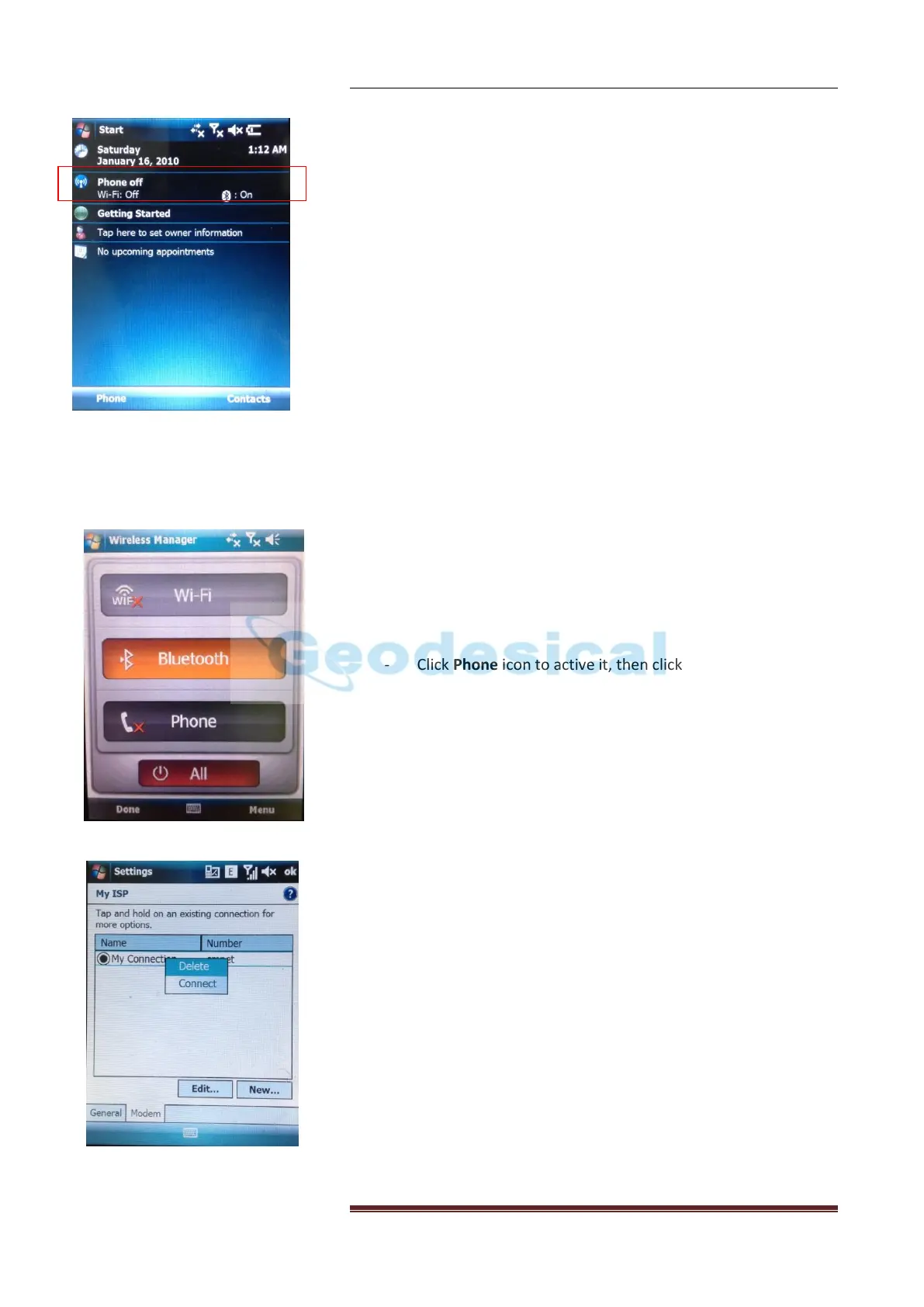
- Active Phone function on Controller: click the icon
Phone/Wi-Fi/Bluetooth on the desktop of Controller,
shown as the figure on the left.
- Click Phone icon to active it, then click Done
- To establish a new connection on Controller, follow
the route Start → Settings → Connections Tab →
Connections:
Select Add a New Modem Connection option, give the
new connection a name and select Cellular Line (GPRS)
Modem then click Next. Input the Access Point Name,
Next again, input User name, Password and Domain if
offered by GPRS Servers Provider. Click Finish, in the
new window shown on the left choose Manage
Existing Connections.
- You will see the new connection listed here, long press
the connection name and select Connect from the pop
out list.


 To Next Page