
 Need help?
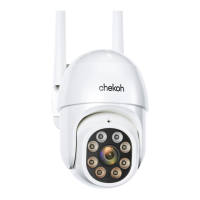
Do you have a question about the chekoh HERCULES and is the answer not in the manual?
Steps to connect power and initial camera setup.
Instructions to download the Chekoh mobile application.
Steps to create a user account within the Chekoh app.
Instructions for adding the camera to the Chekoh app.
Basic guidance on using the Chekoh application interface.
Step-by-step guide for mounting the camera on a wall.
Detailed instructions and considerations for adding a new camera.
Guide on how to modify camera settings and details in the app.
Steps to remove a camera from the Chekoh app.
Instructions on how to perform a factory reset on the camera.
How to invert the camera's video feed orientation in the app.
How to define specific areas for the camera to monitor.
Instructions for enabling and using the two-way audio feature.
How to select different video quality settings (HD, SD, Smooth).
Guide on recording live video and capturing still images.
How to share camera access with multiple users.
Steps to view recorded video footage from the SD card.
How to configure the quality for recorded video clips.
Instructions for enabling and configuring the alarm feature.
How to set up and configure motion detection alarms.
How to use the flood light feature, including with alarms.
How to define specific zones for motion detection alarms.
Adjusting the sensitivity level for motion detection.
Managing app notifications for alarm events.
Information on using SD cards for local video storage.
How to check the status of the inserted SD card.
Details about SD card functions, requirements, and troubleshooting.
 General
| Brand | chekoh |
|---|---|
| Model | HERCULES |
| Category | Security Camera |
| Language | English |

 To Next Page