Chevrolet Corvette Owner Manual (GMNA-Localizing-U.S./Canada/Mexico-
14622938) - 2021 - CRC - 9/22/20
12 Keys, Doors, and Windows
Caution
Always replace the battery with the
correct type. Replacing the battery with
an incorrect type could potentially create
a risk of battery explosion. Dispose of
used batteries according to instructions
and local laws. Do not attempt to burn,
crush, or cut the used battery, and avoid
exposing the battery to environments
with extremely low air pressures or high
temperatures.
Replace the battery if the DIC displays
REPLACE BATTERY IN REMOTE KEY.
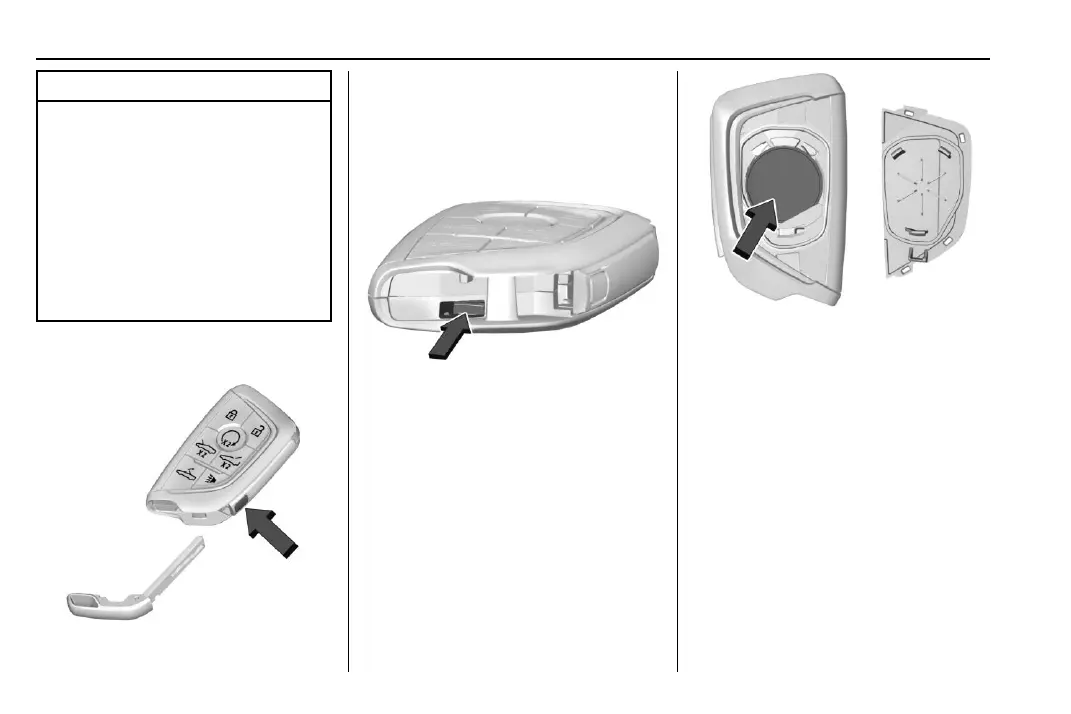
1. Press the button on the side of the
remote key and pull the mechanical key
out. Never pull the mechanical key out
without pressing the button.
2. Use the mechanical key blade in the slot
to remove the battery cover by hand.
3. Remove the seal by pulling on the tab to
access the battery.
4. Remove the old battery. Do not use a
metal object.
5. Insert the new battery, negative side
facing down. Replace with a CR2450 or
equivalent battery.
6. Replace the seal, pushing it into the
groove around the battery compartment.
7. Replace the battery cover by snapping it
back into the remote key.
Remote Vehicle Start
This feature allows the engine to be started
from outside the vehicle.















 To Next Page