~~
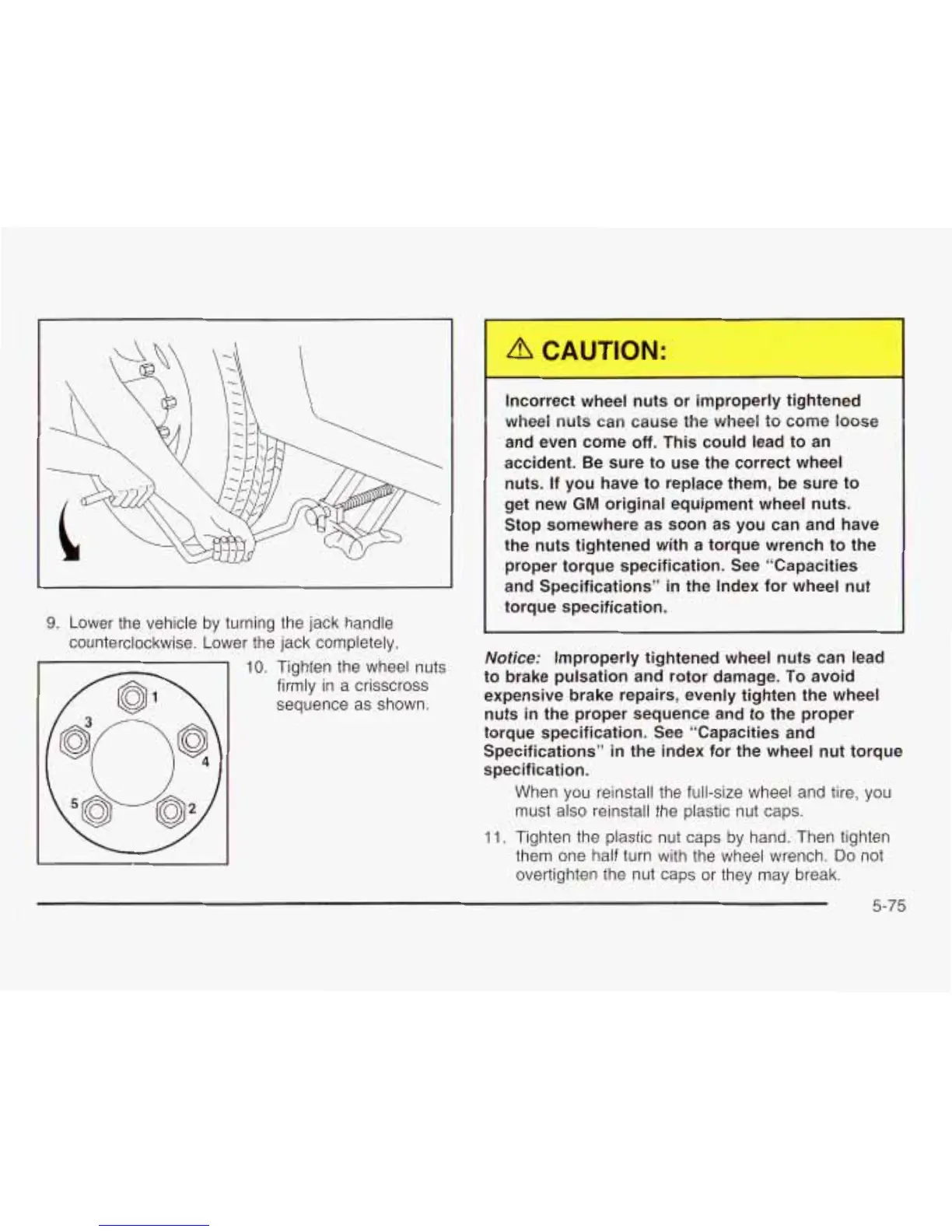
9.
Lower the vehicle by turning the jack handle
counterclockwise. Lower the jack completely.
-
10.
Tighten the wheel nuts
firmly in a crisscross
sequence as shown.
-
Incorrect wheel nuts or improperly tightened
wheel nuts can cause the wheel to come loose
and even come
off.
This could lead to an
accident. Be sure to use the correct wheel
nuts. If you have to replace them, be sure to
get new
GM
original equipment wheel nuts.
Stop somewhere as soon as you can and have
the nuts tightened with a torque wrench to the
proper torque specification. See “Capacities
and Specifications” in the Index for wheel
nut
torque specification.
Notice:
Improperly tightened wheel nuts can lead
to brake pulsation and rotor damage. To avoid
expensive brake repairs, evenly tighten the wheel
nuts
in
the proper sequence and to the proper
torque specification. See “Capacities and
Specifications”
in
the index for the wheel
nut
torque
specification.
When you reinstall the full-size wheel and tire, you
must also reinstall the plastic nut caps.
11.
Tighten the plastic nut caps by hand. Then tighten
them one half turn with the wheel wrench.
Do
not
overtighten the nut caps or they may break.
5-75















 To Next Page