Installation Instructions MSM1U / MTM1U / LSM1U / LTM1U
13
Locking Screen Interface Brackets (Optional)
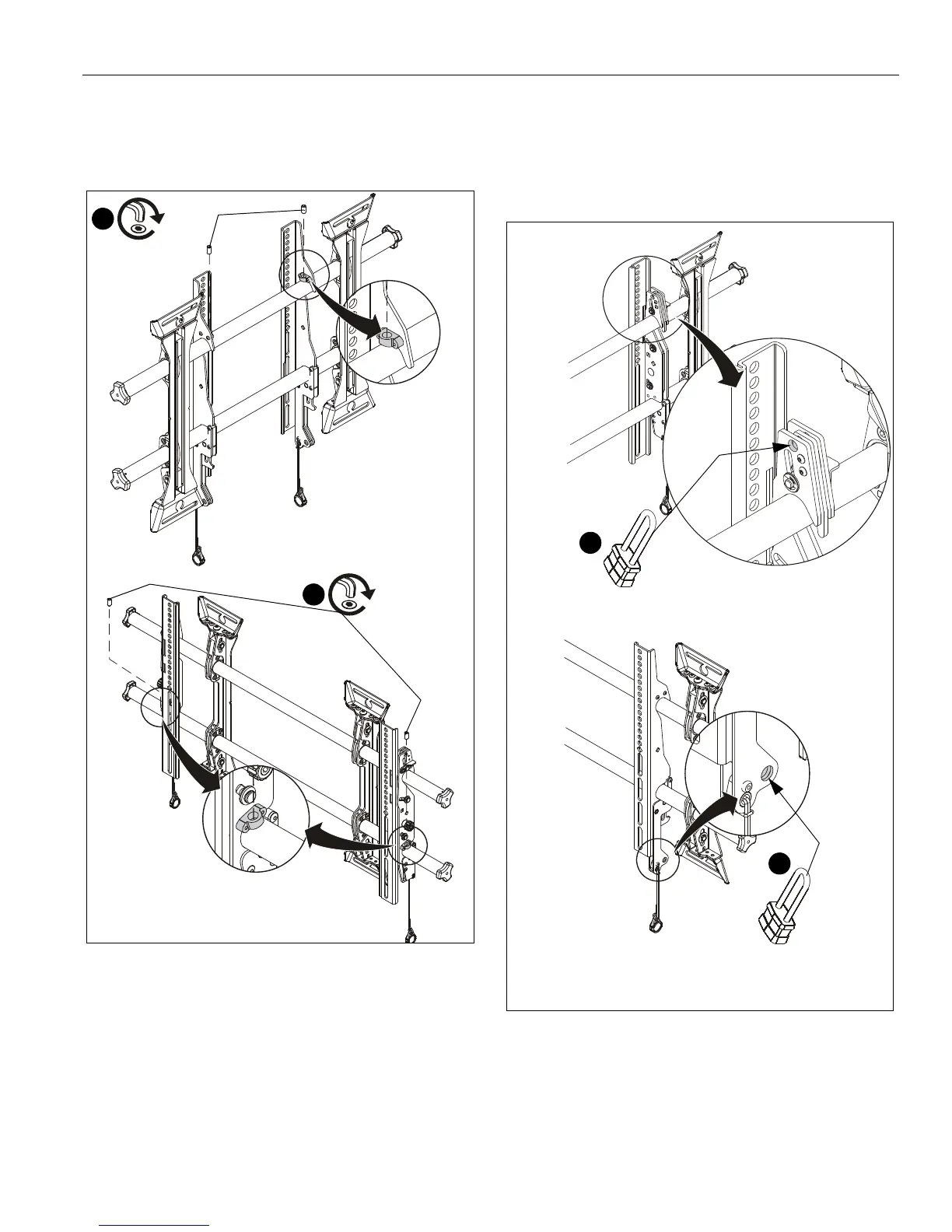
1. Lock screen interface brackets onto mount rails using one
3/8-16 x 3/4" set screw (U) on each interface bracket. (See
Figure 15)
Figure 15
Locking Mount (Optional)
1. Add padlock (not included) to interface bracket to complete
security. (See Figure )
NOTE: The padlock maximum shackle diameter is 5/16"
(7.9 mm).
Figure 16
(MTM1U shown)
(MSM1U shown)
1
(U) x 2
1
(U) x 2
1
(MTM1U shown)
Padlock shackle
- 5/16" (7.9mm)
maximum diameter:
1
Padlock shackle
- 5/16" (7.9mm)
maximum diameter:
(MSM1U shown)


 To Next Page