3. Use instructions
12
5. “Ventilation” mode:
1) “Running On/ Off” button: Press this button and the remote controller will switch “On” → “Off” →
“On”. After shutdown, it will cancel such functions as “Lamp”, “Purification”, “Sleep”, “High Wind” or
“Timing”. In time of “Off” → “On”, other button settings will follow the settings before “Off”.
2) “-” button: The set temperature will have 1°C decreased once this button is pressed, and the
Celsius models will decrease progressively from “32°C → 31°C→…→17°C→16°C”;
3) “+” button: The set temperature will have 1°C increased once this button is pressed, and the
Celsius models will increase progressively from “16°C → 17°C→…→31°C→32°C”;
4) “Swing” button: Press this button to switch “Swing” → “Fixed Wind” → “Natural Wind” → “Swing”.
5) “Wind Direction” button: Press this button to switch “Swing” → “Stop” → “Swing” .
6) “Fan Speed” button: Press this button to switch “Auto Wind” → “High Wind” → “Moderate Wind” →
“Low Wind” → “Auto Wind” .
7) “TIMER” button: Press this button to set the timer by 1 hour, respectively 1H, 2H, ..., 24H, Cancel
and 1H. In the “Off” state, press the “TIMER” button to set the “On” time, the remote controller
displays the running state before “Off” (In case of initial power-on, it will enter the default state of the
auto mode), and the timer displays 1H. Press the “TIMER” button again to repeat 2H ... 24H, Cancel,
1H, ... in order. In the “On” state, press the “TIMER” button to set the “Off” time, and the timer displays
1H. Press the “Off” button again to repeat 2H ... 24H, Cancel, 1H, ... in order.
8) “High Wind” button: Press this button, and the “High Wind” button will have no effect.
9) “Sleep” button: Press the “Sleep” button to switch “Sleep”→ “Sleep Cancel” → “Sleep”. If it is in the
state of “Sleep”, the “Sleep” will not be cancelled after the mode is switched.
10) “Lock” button: Press this button and the remote controller will switch “Lock” → “Unlock” → “Lock”.
When the “Lock” button is actuated, all buttons except for the “Lock” button on the remote controller
have no effect.
11) “Lamp” button: Press this button and the remote controller will switch “Lamp Display” → “Lamp
Display Cancel” → “Lamp Display”. If the “Lamp Display” is actuated, the “Lamp Display” will not be
cancelled after the “Mode” button is pressed.
12) “Purification” button: Press this button and the remote controller will switch “Purification” →
“Purification Cancel” → “Purification”. If the “Purification” is actuated, the “Purification” will not be
cancelled after the “Mode” button is pressed.
3-1-3. Battery replacement
1) The air conditioner can’t receive the signals sent from the remote controller, and the remote
controller has its screen blurring. It indicates that the
battery is depleted and needs replacing.
2) Remove the rear cover, and take out the old
batteries. In time of battery replacement, please note
the “+” and “-” marks on the battery.
3) Close the rear cover and set the current time.
Confirm whether it displays the information of 0:00
a.m.
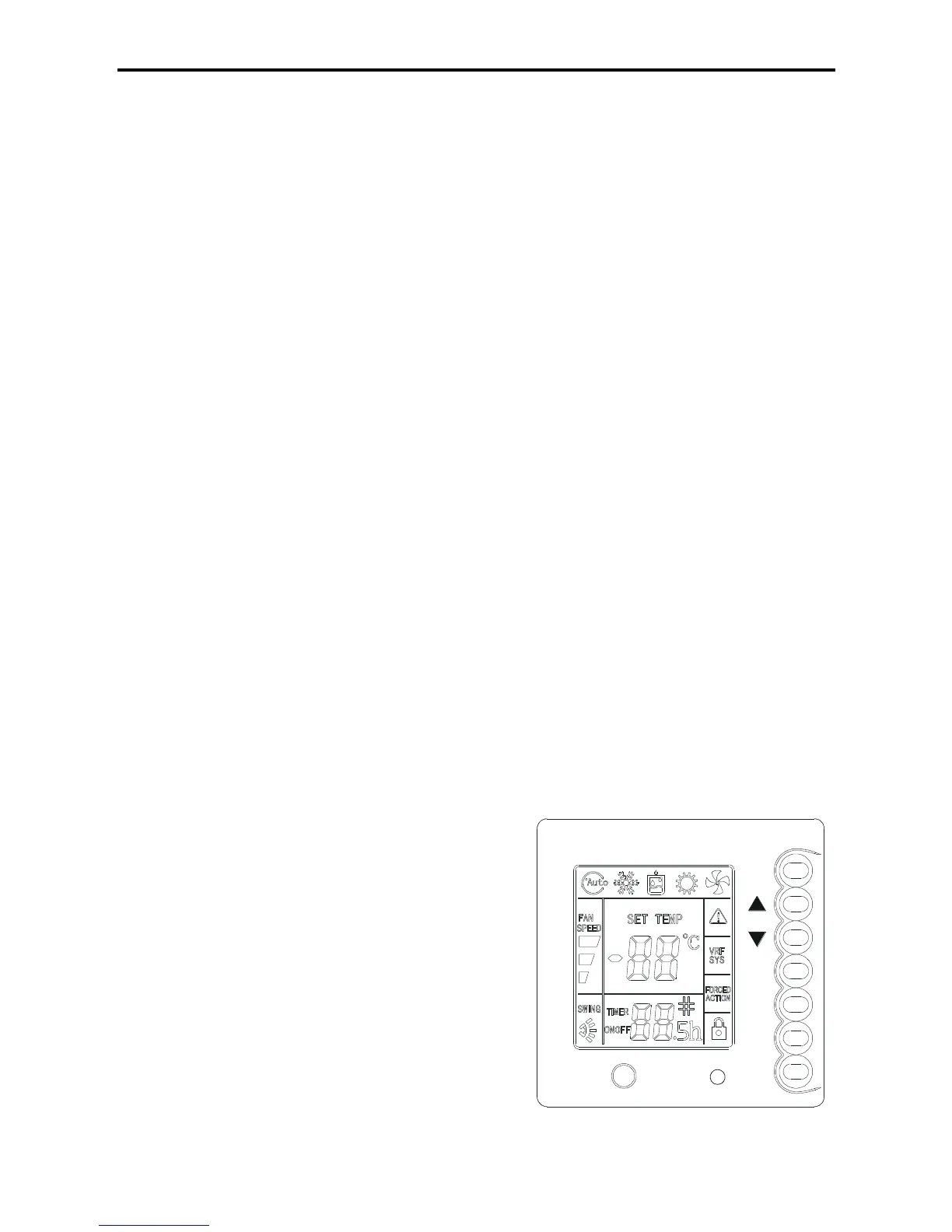
3-2. Remote controller use
This remote controller undertakes to communicate with the
system control main board by controlling the system
operation state through buttons and displaying the working
status of the whole system on the LCD.



 To Next Page