EasyManua.ls Logo

Chloride ACTIVE 3000-19 - User Manual

Default Icon
60 pages
Print Icon
To Next Page IconTo Next Page
Loading...
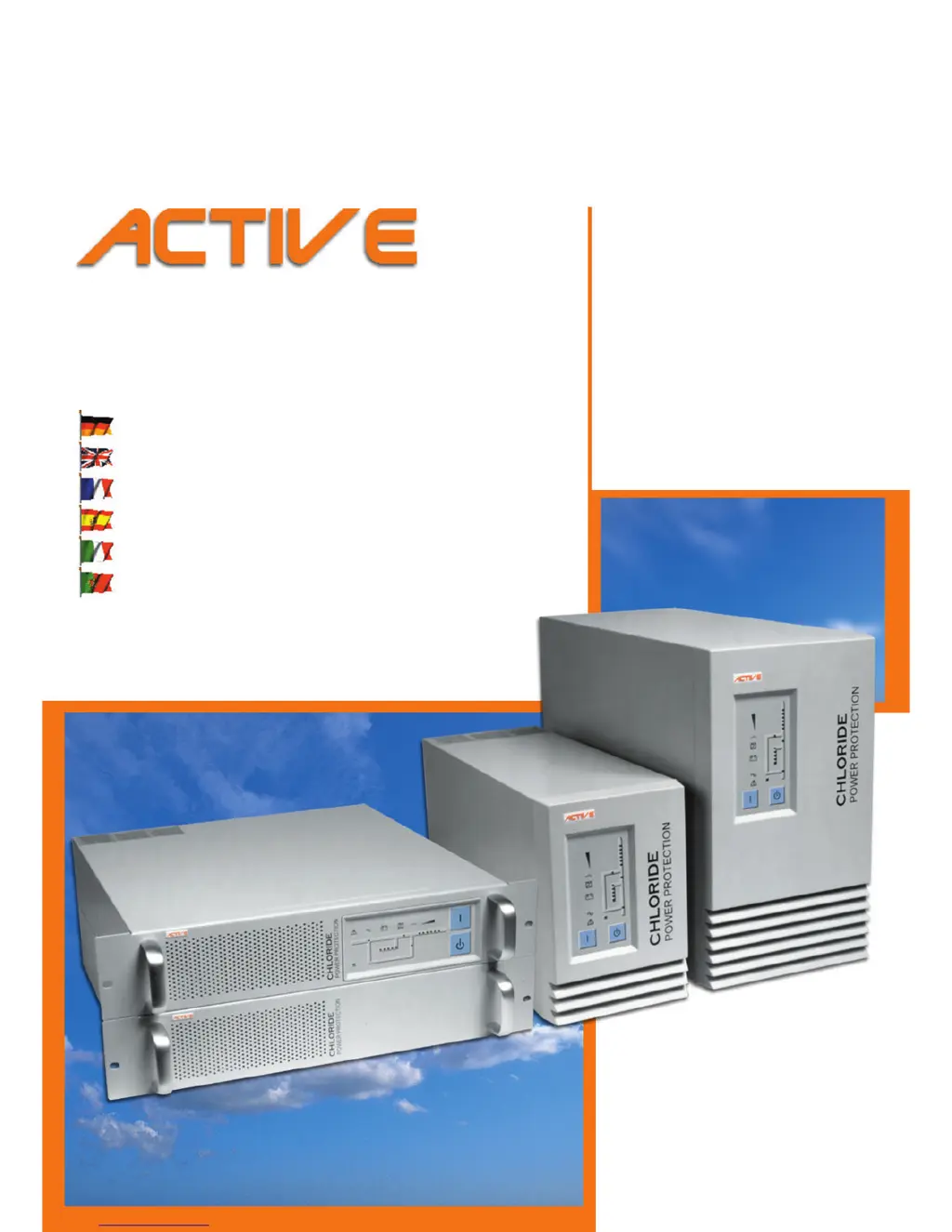
&+/25,'(
219'42416'%6+10
Bedienungsanleitung
Operating Manual
Manuel utilisateur
Instrucciones de servicio
Istruzioni per l’uso
Manual de instruções
Unterbrechungsfreie Stromversorgung
Uninterruptible Power System
Alimentation Sans Interruption
Sistema de Alimentación Ininterrumpida
Gruppo di continui
Sistema ininterrupto de alimentação
TOWER
DFWLYH 
DFWLYH 
DFWLYH 
DFWLYH 
RACK
DFWLYH 
DFWLYH 
DFWLYH 
DFWLYH 

Table of Contents

Questions and Answers

  • P
    Patrick HowardAug 4, 2025
    Why is the backup time less than specified on my Chloride UPS?
    • J
      Jonathan MurrayAug 4, 2025
      If the backup time of your Chloride UPS is less than specified, there might be several reasons: * The fuse switch of the battery extension(s) may be in the 'OFF' position. Ensure it is switched to 'ON'. * The number of externally connected battery extensions might be set incorrectly. Make sure the settings are correct. * The batteries may not be fully charged. Charge the batteries and test the backup time. If the issue persists after checking these points, it may indicate defective batteries or a defective charging device.
  • L
    Laura OlsonAug 8, 2025
    What to do if the OVERLOAD LED illuminates on Chloride ACTIVE 3000-19 UPS?
    • J
      Jimmy ClarkAug 8, 2025
      If the OVERLOAD LED is illuminated on your Chloride UPS, it indicates an overload at the UPS output. To resolve this, reduce the load to the permissible value.
  • S
    Samantha BrownAug 12, 2025
    How to fix a Chloride UPS with no display and no alarm?
    • T
      Taylor SwansonAug 12, 2025
      If your Chloride UPS has no display and no alarm, and appears to be switched off, check the following: * Ensure the main switch is turned on. * Verify that mains voltage is present. If not, have it inspected by a qualified electrician. * Check the input fuse or circuit breaker. Replace the fuse with the same type or switch on the circuit breaker. If the problem continues, contact customer service.
  • P
    Patricia DavisAug 16, 2025
    What to do if there is no communication between Chloride UPS and PC?
    • M
      Melinda MorrisAug 17, 2025
      If you are experiencing no communication between your Chloride UPS and PC, consider the following: * Verify that you are using the correct serial connection cable. Standard modem/null modem cables are not suitable. * Check if the interface on the PC is being used by another process or is defective. Try selecting a different serial interface. * There may be interference on the data cable. Try laying the cable differently.
  • E
    Emily HamiltonAug 21, 2025
    Why is the ALARM indicator illuminated on my Chloride ACTIVE 3000-19?
    • D
      Daniel MartinezAug 21, 2025
      If the ALARM indicator is illuminated and the acoustical alarm sounds continuously on your Chloride UPS, this could be due to a UPS error or overheating. You can try to decrease the ambient temperature to resolve the issue of overheating.
  • R
    rosssamanthaAug 26, 2025
    What to do if MAINS indicator does not illuminate on Chloride ACTIVE 3000-19 UPS?
    • V
      Vincent HicksAug 26, 2025
      If the MAINS indicator on your Chloride UPS does not illuminate and an acoustical alarm sounds in intervals, it could mean the input fuse is defective or the input circuit breaker has tripped. Replace the fuse with one of the same type, or switch the circuit breaker back on. If the problem continues after these steps, contact customer service.
  • B
    biancamonroeAug 29, 2025
    Why is MAINS indicator flashing on Chloride ACTIVE 3000-19?
    • C
      Christine McintoshAug 29, 2025
      If the MAINS indicator on your Chloride UPS is flashing, it means the phase and neutral lines are swapped at the UPS input. To correct this, pull out the mains plug and plug it back in correctly.

Summary

About these operating instructions

Device overview

Overview of Chloride Active UPS device variants and their specifications.

EU conformity and documentation structure

Information on compliance with European directives, standards, handbook symbols, and structure.

Safety

Intended use and safety precautions

Defines UPS purpose and outlines critical safety notices for operation and maintenance.

Introduction to UPS operation

UPS operational principle and protection

Explains the online principle of UPS operation and protection against power failures.

Indicator and operating elements

Front panel controls and indicators

Description of the UPS control panel, indicators, and buttons on the front side.

Rear panel connections for upright UPS

Details connections and interfaces on the rear of ACTIVE 700 and ACTIVE 1000 upright UPS models.

Rear panel connections for rack UPS

Details connections and interfaces on the rear of ACTIVE 700-19 and ACTIVE 1000-19 rack UPS models.

Rear panel connections for rack models 2000-19;3000-19

Details connections and interfaces on the rear of ACTIVE 2000-19 and ACTIVE 3000-19 rack UPS models.

Installation and commissioning

Scope of delivery and site selection

Lists items included in the UPS delivery and guidance for selecting an installation site.

Mechanical fixing and slide rail installation

Instructions for securely mounting UPS devices in cubicles using slide rails.

UPS installation and connection

Procedures for unpacking, placing, and connecting the UPS to the mains supply.

Commissioning UPS and battery extensions

Steps for powering up the UPS, including battery charging and connecting extensions.

Adjusting external battery extension settings

Procedure to configure the UPS for the number of connected external battery extensions.

Operational behaviour

Checking UPS readiness and tests

Methods for verifying UPS functionality, including mains backup and lamp tests.

Battery test procedures

How to perform a battery test to check battery health and capacity.

UPS operating modes

Description of normal, battery, and bypass operating modes with control panel illustrations.

Interface description

COM 3 and USB interfaces

Details the RS 232 serial (COM 3) and USB interfaces for communication.

Optional COM and EXT. OUTLETS interfaces

Information on optional COM interfaces and the EXT. OUTLETS CONTROL interface for load management.

Maintenance

Battery lifetime and storage

Information on battery usable lifetime, replacement, and proper storage procedures.

Cleaning procedures and safety

Instructions for safely cleaning the UPS device, emphasizing precautions.

Troubleshooting

Problem diagnosis and solutions

Guide to identifying and resolving common UPS problems using fault indicators and tables.

Technical data

Electrical data for ACTIVE 700-3000 models

Detailed electrical specifications for standard UPS models.

General and mechanical data for ACTIVE 700-3000

Includes safety standards, noise levels, and physical dimensions for standard UPS models.

Connection details for ACTIVE 700-3000

Outlines connection types and interfaces for standard UPS models.

Electrical data for ACTIVE 700-19 to 3000-19 models

Detailed electrical specifications for rack-mount UPS models.

General and mechanical data for ACTIVE 700-19 to 3000-19

Covers standards, noise, environmental, and physical data for rack-mount UPS.

Connection details for ACTIVE 700-19 to 3000-19

Specifies connections and interfaces for rack-mount UPS models.

Battery lifetime and backup times

Information on usable battery lifetime and tables of typical backup times for various configurations.

Chloride Addresses

Global contact information

Lists Chloride offices worldwide, including headquarters, regional branches, and sales contacts.

Chloride ACTIVE 3000-19 Specifications

General IconGeneral
Rated Power3000 VA / 2700 W
Transfer Time0 ms
Capacity3000 VA
Input Voltage230 V (176-288 V)
Output Voltage230 VAC ± 2%
Input Frequency50/60 Hz
Output Frequency50/60 Hz ± 0.1%
TechnologyOnline Double Conversion
Battery TypeSealed Lead-Acid (SLA)
Efficiency90%
Communication InterfaceRS232, USB
Battery RuntimeDepends on load and battery configuration

Related product manuals