
 Need help?
Do you have a question about the Chloride EDP70 and is the answer not in the manual?
Instructions for installation, inspection by technicians, and external battery considerations.
Warnings about AC/DC supplies, battery protection, and environmental requirements for installation.
Safety rules for operation, foreign objects, fuse replacement, battery handling, and waste disposal.
Emergency shutdown, electric shock response, and first aid for corrosive liquid contact.
Purpose of the handbook for safe installation, startup, and use of the EDP70 PLUS UPS.
How the EDP70 PLUS UPS isolates the load from utility supply variations and maintains power.
Explanation of the main functional sub-assemblies within the EDP70 PLUS UPS.
Detailed functions of the Rectifier/Inverter, Battery, Static Switches, and other components.
Describes normal operation and behavior during utility supply failure.
General safety guidelines for operating the equipment and required qualifications.
Explanation of the meaning of various warning and operational symbols used in the manual and on the unit.
Precautions for handling electrical components and ensuring safety during operation.
Safety measures to be taken when working with or near batteries.
Lists essential safety equipment to be worn and available when handling batteries.
Guidelines for storing the UPS to prevent battery damage and maintain performance.
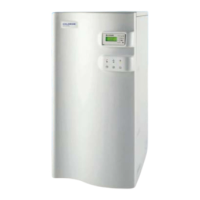
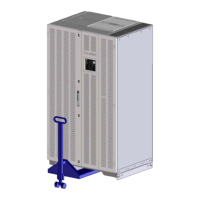
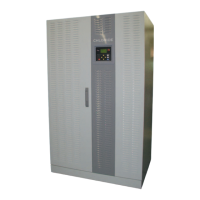
Details physical dimensions, weight, floor loading, and acoustic noise for UPS models.
Instructions and considerations for installing the EDP70 PLUS UPS, including ventilation and clearance.
Recommendations for selecting appropriate wire sizes and protection for the UPS installation.
Technical details and formula for calculating required airflow for UPS cooling.
Illustrates standard and optional connection configurations and provides critical notes for installation.
Crucial cautions and warnings regarding qualified personnel, grounding, phase rotation, and isolation for connections.
Emphasizes that all electrical connections must be made by a qualified electrician per local codes and UL 1778.
Specific instructions for connecting the 24/12, 18, and 24kVA UPS models, including switch identification.
Specific instructions for connecting the 36/24, 30, and 36kVA UPS models, including switch identification.
Specific instructions for connecting the 50 and 80kVA UPS models, including switch identification.
Details for emergency power off, battery charge inhibit, and thermistor connections.
Overview of user controls on the front panel, including display and switches.
Detailed explanation of each user control button (Start, Shutdown, Alarm Cancel, etc.) and its function.
Step-by-step procedure for safely starting up the EDP70 PLUS UPS.
Instructions for using the maintenance bypass to safely service the UPS.
Procedure for orderly shutdown of the UPS.
Wiring instructions for the Emergency Power Off (EPO) function.
How to silence the audible alarm and its effect on the warning light.
Explains mimic panel indicators and accessing alarm information from the LCD.
Description of the LCD display and accessing system messages via user switches.
Explains how to navigate and interpret different display headings on the LCD for system status.
Details on how to access and interpret the power history data, including structure and access.
Displays output voltage/current of rectifier and battery voltage/charge current.
Displays frequency, voltage, and current measurements from the inverter.
Displays load and reserve supply measurements including frequency, voltage, current, and capacity.
Explains normal, warning, and fault conditions and how messages are displayed.
A list of specific messages related to rectifier and battery faults, warnings, and normal conditions.
A list of specific messages related to inverter faults, warnings, and normal conditions.
A list of specific messages related to load and reserve supply faults, warnings, and normal conditions.
How to perform automatic and manual battery tests to check battery condition.
How to perform a battery autonomy test to check battery discharge performance.
How to reset data loss issues related to language and mains failure counts.
Pinout and function for connecting to an IBM AS/400 system via a 9-pin D-type socket.
Pinout and function for RS232 communication with a PC using standard EIA RS232 signals.
Pinout and function for remote alarm signaling using a 15-pin D-type socket.
Safety and step-by-step instructions for installing and starting up batteries for 12/18/24kVA models.
Procedure for connecting optional battery cubicles to increase autonomy for 12/18/24kVA models.
Safety and installation instructions for batteries in cubicles for models above 20kVA.
Procedure for connecting battery cubicles for models above 20kVA.
Information on user maintenance and availability of spare parts for the EDP70 PLUS series.
A template for recording system maintenance actions, failures, and results.
 General
| Frequency | 50/60 Hz |
|---|---|
| Communication Interface | RS232 |
| Operating Temperature | 0°C to 40°C |
| Relative Humidity | 0 to 95% (non-condensing) |
| Storage Temperature | -15°C to 45°C |


 To Next Page