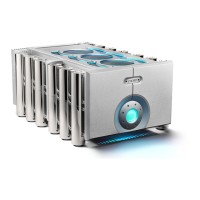
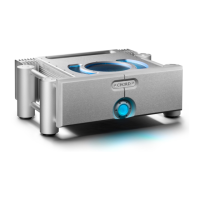
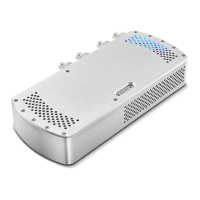
The Chord Electronics ULTIMA 6 is a technologically advanced stereo power amplifier designed for high-fidelity audio systems. It represents an entry point into Chord Electronics' full-size amplification range, featuring a dual-feed-forward error-correction topology for reliable and precise sound reproduction.
Function Description:
The ULTIMA 6 serves as a stereo power amplifier, designed to drive two loudspeakers. It receives audio signals from a preamplifier or other source device and amplifies them to a level suitable for loudspeakers. The amplifier is equipped with both balanced XLR inputs and unbalanced RCA inputs, though only one type of input should be used at a time as the ULTIMA 6 does not have the ability to switch between them. It supports two speaker outputs and is compatible with high-quality loudspeaker cables terminated with 4mm banana plugs or 6mm spades. Bare wire connections are possible but not recommended.
Important Technical Specifications:
While specific numerical technical specifications like power output, frequency response, or signal-to-noise ratio are not detailed in the provided manual excerpts, the following can be inferred:
- Amplification Topology: Dual-feed-forward error-correction.
- Input Connectivity: Balanced XLR (Right and Left) and Unbalanced RCA (Right and Left).
- Output Connectivity: Two speaker outputs (Right and Left channel positive and negative terminals).
- Power Input: 16A IEC mains input.
- Trigger Input: 12V Trigger input for remote power control.
- Chassis: Thick, solid aluminum chassis designed to protect internal circuitry from radio frequency interference.
- Thermal Protection: Internal thermal protection system that will cut the power supply if overheating occurs.
- Warranty: Comprehensive five-year warranty covering defects in materials and workmanship through fair wear and tear (transferable with proof of purchase, not available on ex-demonstration products).
Usage Features:
- Simple Operation: The front panel features only two buttons for straightforward everyday operation.
- Feature Lighting: The device incorporates teal feature light rings on the top panel and a power button that illuminates in different colors to indicate operational status.
- Brightness Adjustment: The brightness of the LED lighting (light rings and power button) can be adjusted to suit the listening environment. This is done by locating a hidden button in the middle of the faceplate, inserting a thin object, and pushing until an audible 'click' is heard. This action cycles between low and high brightness modes.
- Power-on Sequence:
- Standby (Normal Operation): Large power button on the front panel illuminates red.
- Power-on: Pressing the power button once (until a click is felt) changes its color to green as the unit performs initial safety checks. During this phase, increasing the gain on the input device is not recommended to prevent damage to connected speakers.
- Operational: After approximately ten seconds, once safety checks are passed, the power button displays a continuous teal color.
- 12V Trigger Control: The ULTIMA 6 can be remotely turned on or off using a 12V trigger.
- Standby (with 12V trigger): Large power button illuminates orange.
- Power-on (with 12V trigger): When switched on, the power button displays a green color during safety checks.
- Operational (with 12V trigger): Once operational, the power button displays a continuous purple glow.
- Safety Warning: In the rare event of a fault detection, the amplifier will switch itself off. Users are advised to discontinue use immediately and seek assistance from a Chord Electronics retailer.
- Placement Recommendations: While the ULTIMA 6 can be stacked using its Integra legs, it is recommended to allow at least 10cm of space around it for optimal convection cooling during operation. It should not be operated near heat sources, naked flames, direct sunlight, or on top of other significant heat-producing devices.
- Connectivity Precautions: When connecting cables, ensure they securely click into place, especially optical cables (though optical inputs are not explicitly listed, this general advice is given). Always consult the manufacturer's user guide for connected equipment to confirm compatibility.
- Volume Control: Before operating, ensure all devices (including ULTIMA 6) are off. Once connected, switch on equipment starting with the source and ending with the amplifier. Initially, operate the ULTIMA 6 with its preamplifier and connected sources on their lowest gain and volume settings, gradually increasing to a comfortable listening level. Never operate at excessive sound levels to prevent permanent hearing damage.
- Dedicated Preamplifier Requirement: The ULTIMA 6 must be connected to a dedicated preamplifier or a device capable of attenuating its output. Failure to attenuate the volume before it enters the ULTIMA 6 could result in irreversible hearing damage, speaker damage, and void the warranty.
Maintenance Features:
- No User-Serviceable Parts: There are no user-serviceable components within the ULTIMA 6 or its power supply. Users are explicitly warned against opening, dismantling, or applying internal third-party devices, or inserting anything other than listed interconnects or speaker cables, due to dangerous voltages/currents.
- Fault Reporting: In case of a fault or damaged casework, immediately disconnect from the mains power supply and connected equipment, and contact Chord Electronics for advice.
- Liquid Protection: The ULTIMA 6 is not protected against liquids. Users must avoid placing liquid containers on it or allowing it to come into contact with moisture or liquids, as this can lead to electrocution or damage. If contact occurs, immediately disconnect from power and connected equipment and seek advice.
- Cable Replacement: The supplied region-specific 16A mains IEC cable can be substituted, but any alternative must have an earth. Damaged cables must be immediately replaced to avoid electrocution risk.
- Earthing Issues (Europe): In some European countries, hum or buzz may occur if the amplifier is connected to mains sockets without adequate earth. It is recommended to connect the equipment via a good-quality multi-way mains block with an earth point at every socket outlet, and an earthing method for the building should be implemented.
- Warranty Claims: In the unlikely event of a claim, users must provide Chord Electronics with claim details, original proof of purchase, and the serial number. Chord Electronics will assess the claim within 30 days and provide a solution. All warranty repairs must be carried out by Chord Electronics or an approved service center.
- Warranty Exclusions: The warranty does not cover connected equipment, personal injury, natural patina of metalwork, willful neglect, modification/tampering, improper use, acts of God, damage from connected devices, mechanical shock, fire, excessive heat, or repairs/modifications by non-authorized third-party vendors.

 Need help?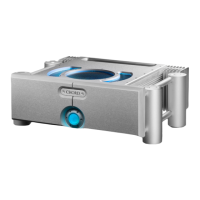

 To Next Page
 General