EasyManua.ls Logo

Christie IMB - User Manual

Christie IMB
122 pages
Print Icon
To Next Page IconTo Next Page
Loading...
Christie Integrated Media
Block
User Manual
020-100845-05

Table of Contents

Question and Answer IconNeed help?

Do you have a question about the Christie IMB and is the answer not in the manual?

Overview

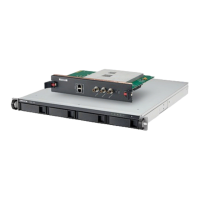
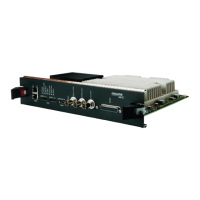
The Christie Integrated Media Block (IMB) is a printed circuit board designed to be installed in the card cage on the operator side of a Christie Solaria Series 2 projector. Its primary function is to decrypt encrypted content stored on an external storage device, enabling the playback of digital cinema content. The IMB is compatible with Christie Solaria 2K and 4K projectors and meets Digital Cinema Initiatives, LLC (DCI) specifications.

Important Technical Specifications:

  • Storage: Requires a network-attached storage (NAS) or direct attached storage (DAS) device with 1TB or greater storage, RAID 5 capability, Gigabit Ethernet connectivity (for NAS), and Network File System (NFS) support (for NAS). Content cannot be stored directly on the IMB.
  • Connectivity:
    • NAS: Connects to one of two gigabit Ethernet ports (NAS-A or NAS-B) on the IMB.
    • DAS: Connects to one of two external serial ATA (eSATA) ports (DAS-A or DAS-B) on the IMB.
    • Ingest Port: A USB/eSATA port for ingesting content. An eSATA-to-SATA cable is optional but can reduce ingest time.
    • Audio Output: AES3 port (25-pin D-sub female) for digital audio output, supporting 8 channel pairs.
    • Multi-projector Playback: Dedicated input and output ports for multi-projector setups (Christie IMB to Christie IMB only).
    • LTC Output: For timecode synchronization.
    • Ethernet Port: 10-Base-T/100-Base-T/1000-Base-T, Female RJ-45 connector, 1000 Mbps bit rate.
    • eSATA Interface: SATA revision 2.0, 3.0 Gbps bit rate.
    • USB 1 Port: Universal Serial Bus 2.0, 480 Mbps maximum bit rate.
  • Power Requirements: +12.0 VDC, +/- 5% voltage tolerance, 6.25 A maximum current. Connects via a Series 2-compatible backplane, PCI Express (x16) card edge connection.
  • Physical Specifications: 280 mm (11 inches) L x 219 mm (8.62 inches) W x 57 mm (2.24 inches) H. Weight: 2.0 kg (4.4 lb).
  • Environmental:
    • Operating Temperature: 0°C to 35°C (50°F to 95°F).
    • Non-Operating Temperature: 20°C to 65°C (-4°F to 149°F).
    • Operating Humidity (non-condensing): 20% to 80%.
    • Non-Operating Humidity (non-condensing): 0% to 95%.
    • Altitude: 0 - 3000 meters.
  • Supported Formats:
    • 2D Video (JPEG2000): SMPTE 428-1-2006 and 428-11-2009, resolutions up to 4096 x 2160 (with 4K upgrade), frame rates from 24.0 to 50.0, 12-bits bit depth, X'Y'Z' (4:4:4) color format. Maximum bandwidth 500 Mbps.
    • 3D Video: SMPTE 428-1-2006 and 428-11-2009, resolutions 2048 x 1080, frame rates from 24.0 x 2 to 60.0 x 2, 12-bits bit depth, X'Y'Z' (4:4:4) color format. Projector must be in line interleave mode for 3D playback. High frame rate (HFR) 3D content (above 24.0 fps) requires a specific IMB upgrade.
    • MPEG-2 MXF Interop: Supports .mpg, mpeg, .ts formats, or as part of an Interop formatted Digital Cinema package (DCP). Resolutions 1280 x 720 and 1920 x 1080, frame rates from 25.0 to 60.0, 8-bits bit depth, 4:2:0 chroma format. Automatic conversion to XYZ 4:4:4 12-bit for display.
    • Audio Formats: SMPTE 428-2-2006, 48.000 kHz and 96.000 kHz sample rates, 24-bits bit depth.

Usage Features:

  • Installation and Configuration: Requires a Christie Solaria Series 2 projector with firmware 3.0.0(1) or later. Installation involves physically inserting the IMB into the projector's card cage and then configuring network settings, audio settings, and activating "marriage" for secure content display.
  • Content Management:
    • Ingest: Content (movies, trailers, KDM keys) is ingested from external hard drives (USB or eSATA) or remotely from a network IMB, TMS, or satellite receiver.
    • Playback: Supports playback of 2D, 3D, HFR, and MPEG-2 content. Users can load individual content files or create and manage play lists.
    • Play Lists: Allows creation, import, export, copying, renaming, and editing of play lists, including adding content, changing content order, and adding automation events.
    • Key Management: View all, expired, and expiring KDM keys. Delete individual or all displayed keys.
  • Automation:
    • Macros: Define lists of actions (e.g., opening curtains, turning on house lights) that can be triggered by global triggers or added to play lists. Built-in support for Christie ACT, Dolby CP650/CP750, and Integ JNIOR automation devices.
    • Input Cues: Configure events (e.g., GPI state change, Ethernet message) that delay playback in a play list or trigger a macro in a global trigger.
    • Global Triggers: Combine an input cue with a macro, always active and independent of specific play lists.
    • Intermissions: Add intermissions to play lists, pausing the main feature and playing a separate intermission play list.
  • Audio Settings: Map speakers and audio channels to AES outputs.
  • System Settings: Restart the server, download certificates, remove orphaned assets, restore factory default settings, view status information, and manage licenses.
  • Software Upgrades: Upload and install Christie IMB software upgrade packages.

Maintenance Features:

  • Preventative Maintenance: Essential for proper operation and warranty validity. Specific maintenance items and schedules are detailed in the Maintenance section of the manual.
  • Troubleshooting: Comprehensive section addressing diagnostic, ingest, KDM key, license, network-attached storage, playback, and setup/connection issues.
  • Logs: Access Screen Management System (SMS) and Security Manager (SM) logs to identify performance issues. Download logs and SM reports to a USB flash drive. Clear the log list.
  • Backup and Restore: Backup and restore content drive settings, automation definitions, scheduled events, audio settings, and speaker mappings. Backup files can be copied to a USB flash drive.
  • IMB Interrogation: Run an IMB interrogation to save a compressed file containing SMS log, SM log, and configuration information.

Christie IMB Specifications

General IconGeneral
BrandChristie
ModelIMB
CategoryProjector
LanguageEnglish

Related product manuals