EasyManua.ls Logo

Chromalox 2110 - User Manual

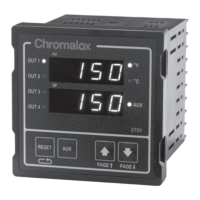
Chromalox 2110
31 pages
Print Icon
To Next Page IconTo Next Page
Loading...
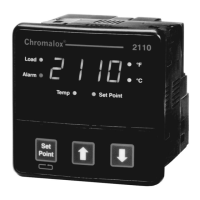
2110 Temperature
Controller
Load
Alarm
Set
Point
Temp
2110
°F
°C
Set Point
Chromalox
Chromalox
®
User Manual
0037-75409
Issue Date 5/02

Other manuals for Chromalox 2110

Questions and Answers

  • D
    daniel26Aug 16, 2025
    What to do if the process does not heat up on my Chromalox Temperature Controller?
    • M
      Mr. Edward JonesAug 16, 2025
      If your Chromalox Temperature Controller's process isn't heating up, first verify that the Load LED is ON, indicating power is being applied to the load. Also, check if the load fuse is open and ensure the heater or fuse is not open. Make sure the output limit is set to 100%, the set point is greater than the process temperature, and the output wiring is correctly connected.
  • A
    Allison Gomez DDSAug 18, 2025
    Why does my Chromalox 2110 display alternate between HI and SENS?
    • W
      William AllenAug 19, 2025
      If your Chromalox Temperature Controller display alternates between HI and SENS, and the 2110 disables the control output, it could be due to an open sensor or calibration issues. Check the sensor wiring and selection switches. To verify if the controller is at fault, remove the thermocouple and place a jumper across the sensor terminals. If the display reads approximately ambient, the sensor is open, and you should replace the thermocouple.
  • J
    Jacqueline DouglasAug 21, 2025
    How to troubleshoot a Chromalox Temperature Controller that is not in control?
    • K
      Kathleen WhiteAug 21, 2025
      If your Chromalox Temperature Controller is not in control, check the Proportional Band setting and Automatic Reset setting for incorrect settings. Also, verify the thermocouple polarity to ensure correct thermocouple wiring.
  • E
    Eric CrossAug 25, 2025
    What to do if my Chromalox 2110 shows erratic operation?
    • J
      justinjordanAug 26, 2025
      If your Chromalox Temperature Controller is operating erratically, it may be due to intermittent sensor connections or internal controller failure. Check the sensor wiring or substitute a sensor simulator. You can also power down and repower up the controller.
  • A
    Amber MorrisonAug 28, 2025
    How to fix a Chromalox 2110 when the display doesn't light up?
    • M
      Mark JosephAug 28, 2025
      If your Chromalox Temperature Controller display does not light up and the controller does not function, it could be due to no power being applied or an open external fuse. Check the power wiring and fusing. Also, power down and repower up the controller.
  • M
    Matthew WilliamsAug 31, 2025
    Why does my Chromalox Temperature Controller continually go through power-up reset?
    • J
      John NormanAug 31, 2025
      If your Chromalox Temperature Controller continually goes through a power-up reset, it might be due to severe electrical noise. Try separating the sensor wiring from other wiring and applying a power line filter.
  • M
    Marissa FloresSep 3, 2025
    Why is my Chromalox 2110 not heating up?
    • W
      William SchmidtSep 3, 2025
      If the Chromalox Temperature Controller process isn't heating up, first, verify the Load LED is ON, indicating power to the load. Then, check if the heater or load fuse is open. Also, make sure the output limit is set to 100%, the set point is higher than the process temperature, and the output wiring is correctly connected.
  • A
    Alison DonovanSep 5, 2025
    What to do if Chromalox 2110 Temperature Controller display does not light?
    • S
      Sarah CarterSep 6, 2025
      If the Chromalox Temperature Controller display doesn't light up and the controller isn't working after applying power, check the power wiring and fusing to ensure they are correctly connected. Also, inspect the external fuse; if it's open, power down the controller, and then power it back up.
  • P
    Paul BruceSep 9, 2025
    How to fix erratic operation of Chromalox 2110 Temperature Controller?
    • R
      ruizlindaSep 9, 2025
      If your Chromalox Temperature Controller is operating erratically, start by checking the sensor wiring for intermittent connections; you might also substitute a sensor simulator. Power down the controller and then power it back up. For external electrical noise issues, contact Chromalox.
  • J
    John CampbellSep 12, 2025
    What to do if Chromalox 2110 Temperature Controller alternates between HI and SENS?
    • M
      Melanie MitchellSep 12, 2025
      If the Chromalox Temperature Controller display alternates between HI and SENS, and the 2110 disables the control output, check the sensor wiring for any issues. Also, verify the selection switches to ensure they are properly calibrated. To verify that controller is at fault, remove the thermocouple and place a jumper across the sensor terminals of the 2110. If the display reads approximately ambient, then the sensor is open. Replace the thermocouple. See Section 7–Calibration.

Summary

Quick Setup Guide

Sensor and Control Mode Configuration

Configure input sensor type and control mode using dip switches.

Adjusting the Set Point

Learn how to set and adjust the desired temperature set point using front panel buttons.

Installation and Wiring Guide

Sensor and Control Type Selection

Configure input sensor type and control mode using dip switches.

Mounting and Preparation

Securing the Controller

Sensor Input Wiring Details

Sensor Input Wiring

Detailed instructions for connecting various sensor types to the controller.

Control Output Wiring

Control Output Wiring Options

Instructions for wiring the controller's output signals to loads.

Set Point and Configuration Adjustments

Adjusting the Temperature Set Point

Steps to modify the target temperature value using front panel controls.

Accessing Controller Configuration

Overview of accessing and modifying controller parameters via menus.

Configuration Menu Navigation

Navigating Configuration Menus

Detailed steps for navigating and adjusting configuration menus.

Security and Configuration Menu Details

Security Codes and Access Levels

Explains security levels and codes for accessing configuration settings.

Configuration Menu Functions

Lists and describes the available configuration menus and their functions.

Control and Alarm Operations

Replacing Output Modules

Output Module Installation Procedure

Calibration Procedures

Calibration Notes and Sensor Calibration

Chromalox 2110 Specifications

General IconGeneral
Control ModeON/OFF
Output TypeRelay
DisplayLED
Supply Voltage120/240 VAC
Input TypeThermocouple, RTD
Sensor TypeJ, K

Related product manuals