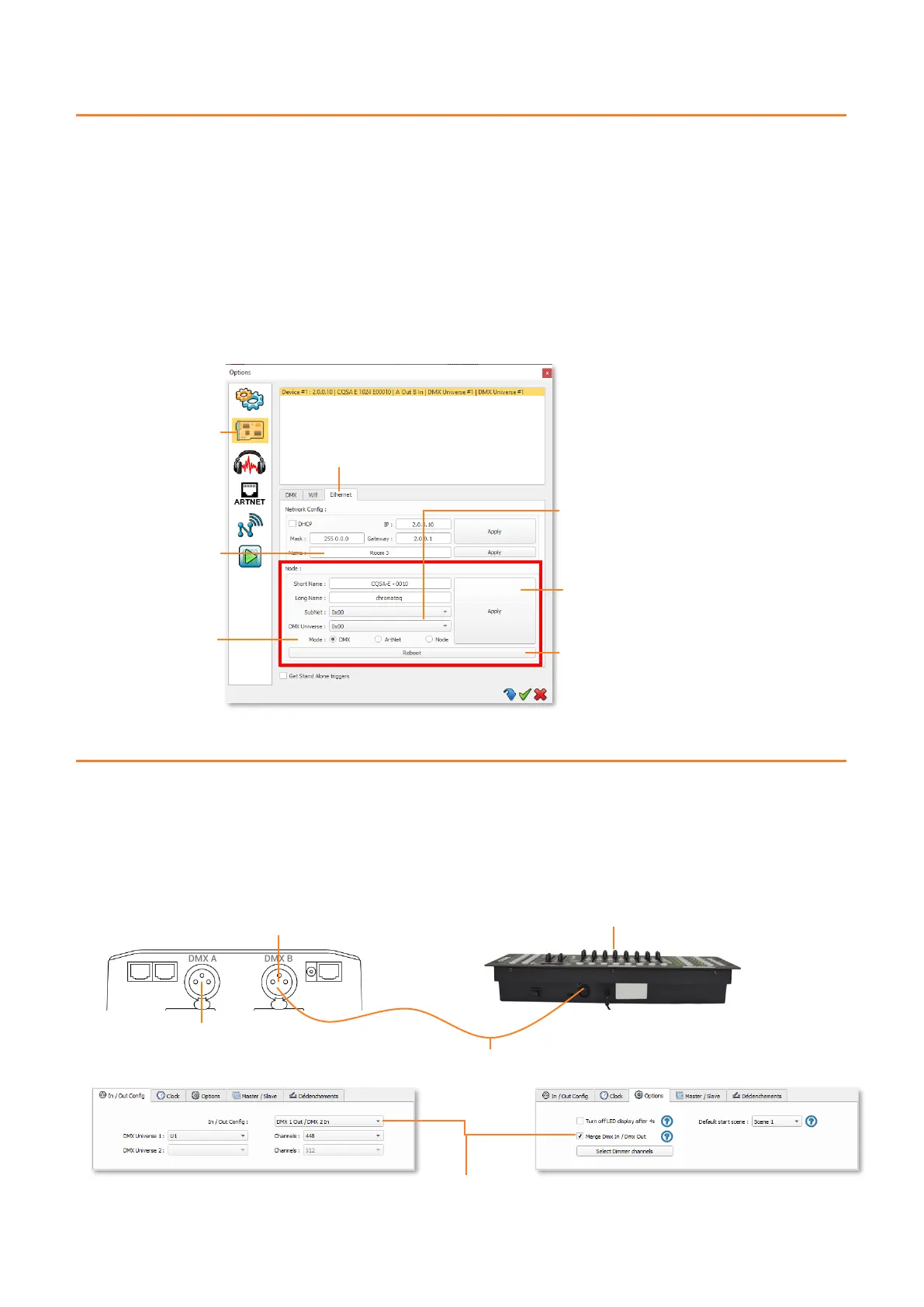
Choice of the universe of the
first port, the second port will
be the following universe
DMX Output A is an HTP merger of
interface DMX data and the DMX
data coming in on input line B
NODE SETTING AND CONFIGURATION
The interface can be used as a NODE. It will be detected on the Art-Net network and DMX universes can be assigned to its
DMX outputs.
When the interface is in Stand Alone mode, the F3 function allows access to the NODE mode.
Once in NODE mode, the interface displays (No) and it is now visible on the Art-Net network.
NODE configuration from software
It is possible to configure the NODE from the software.
Go to the "Tools" and "Options" menu and select the "Device" tab.
In the "Ethernet" tab, in addition to the Network Configuration, the Node section allows you to configure your node.
DMX MERGE CONFIGURATION
One DMX port must be turned into an input to capture the DMX signal provided by another DMX source.
The interface will merge the incoming signal with its own output signal by comparing the DMX levels with an HTP filter
(priority on the highest levels of the signals). Merging is a solution to keep manual control of channels when using a DMX
board, for example. It’s also a method to create a multi-zone system by merging several interfaces on one final DMX line. In
this last case, each interface can play a scene dedicated to the fixtures at the same time and on the same DMX line.



 To Next Page