GETTING TO KNOW YOUR INSTRUMENT PANEL 35
The Main Menu items consists of the following:
Speedometer
Vehicle Info
Driver Assist
Hybrid Info
Trip (Trip A/Trip B)
Audio
Messages
Screen Setup
The system allows the driver to select
information by pushing the following buttons
mounted on the steering wheel:
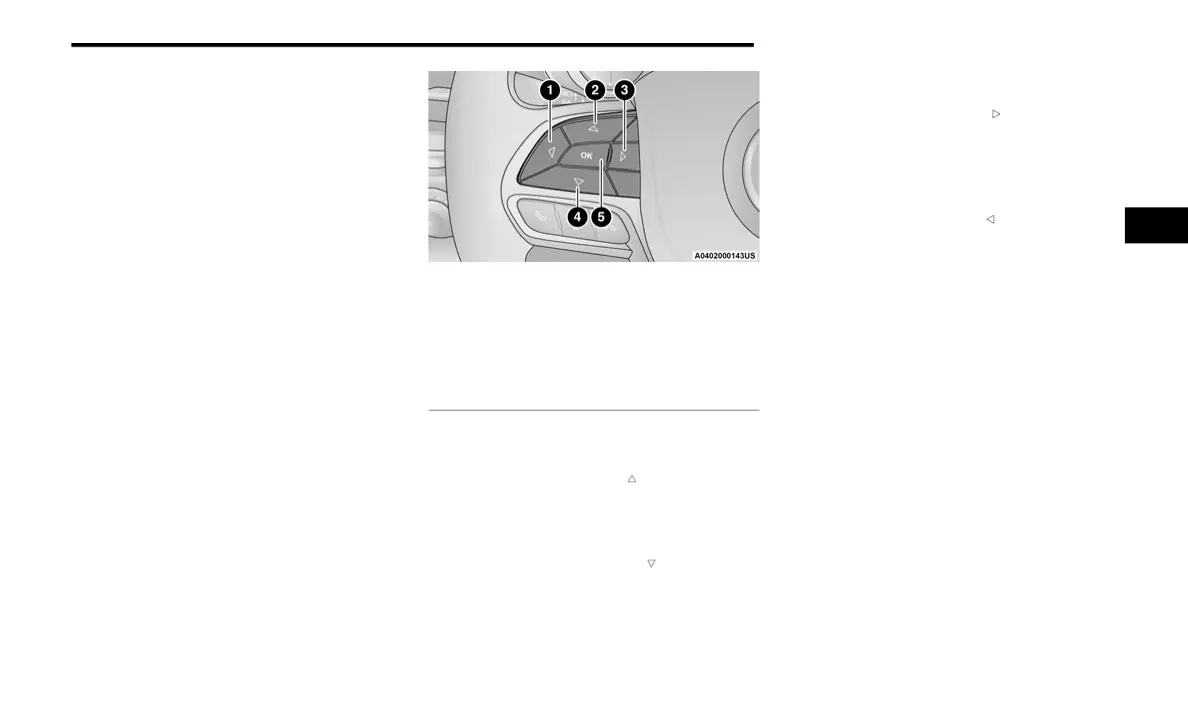
Instrument Cluster Display Control Buttons
Up Arrow Button
Push and release the up arrow button to
scroll upward through the Main Menu items.
Down Arrow Button
Push and release the down arrow button
to scroll downward through the Main Menu
items.
Right Arrow Button
Push and release the right arrow button to
access the information screens or submenu
screens of a main menu item.
Back/Left Arrow Button
Push and release the left arrow button to
access the information screens or submenu
screens of a main menu item.
OK Button
Push the OK button to access/select the
information screens or submenu screens of a
Main Menu item. Push and hold the OK arrow
button for one second to reset displayed/
selected features that can be reset.
OIL LIFE RESET
Your vehicle is equipped with an engine oil
change indicator system. The “Oil Change
Due” message will display for approximately
five seconds after a single chime has
sounded, to indicate the next scheduled oil
change interval has been reached. The
engine oil change indicator system is duty
cycle based, which means the engine oil
1 — Left Arrow Button
2 — Up Arrow Button
3 — Right Arrow Button
4 — OK Button
5 — Down Arrow Button
3
21_RU2_H_SU_EN_USC_t.book Page 35















 To Next Page