Method of operation
- 89 -
Chapter X Method of operation
I. Description of wire controller
1. Ordinary wire controller
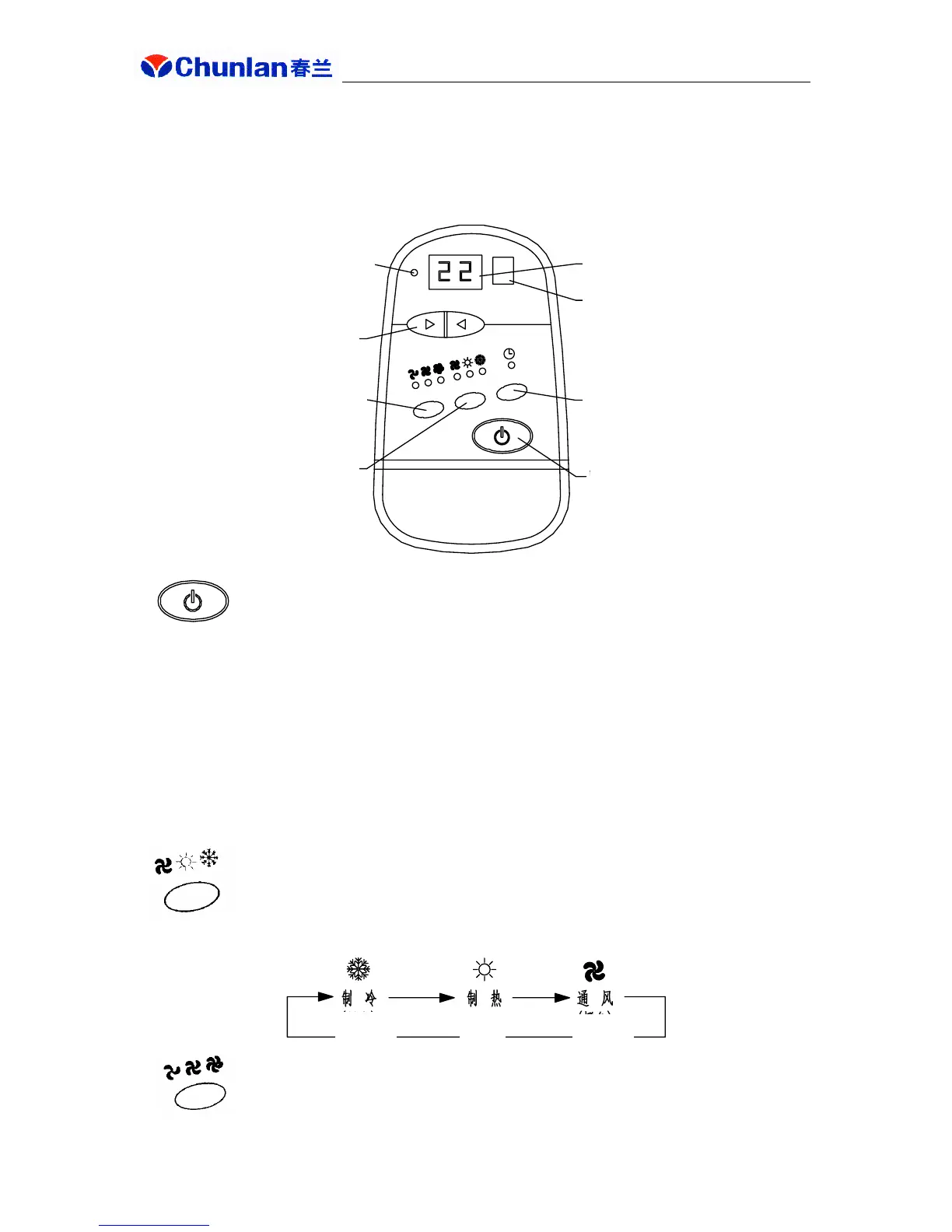
Power ON/OFF key
● When power is turned on, power indicator (red) lights up and the unit is in stop status.
● Press power ON/OFF key, the unit will be in ventilating status (high air flow) and
temperature is set at 22℃. At this time, use functional key to select operating status. With unit in
operating status, press power ON/OFF key will stop the unit and place it in standby status.
● After pressing power ON/OFF key, if power supply is interrupted and resumed, the unit
will be restored to the status before power interruption.
Functional key
● Press this key and the unit will cycle through following modes and displays:
Air speed setting key
Power indicator
Temperature setting key
Air speed setting key
Functional key
Display window
Remote control
reception window
Timing key
Power ON/OFF key
Cooling
(green)
Heating
(red)
Ventilating
(orange)


 To Next Page