EN - 6
No. Function OFF ON
5
Neutral zone 6K 4K
6
Neutral zone ventilation in comfort mode Off On
7
Mode allocated to window contact input Economy Frost protection
8
Active direction of the window contact input Normally open Normally closed
To confirm a switch modification, the appliance must be switched off.
«Reconfiguring the switches on a V30 built into a vertical cased Major Line:
- Before carrying out any operation on the V30 switch off the appliance by turning off the power supply.
- Remove the Major Line’s casing
- As the V30 controller is not fixed to the device’s frame, it remains integrated with the casing.
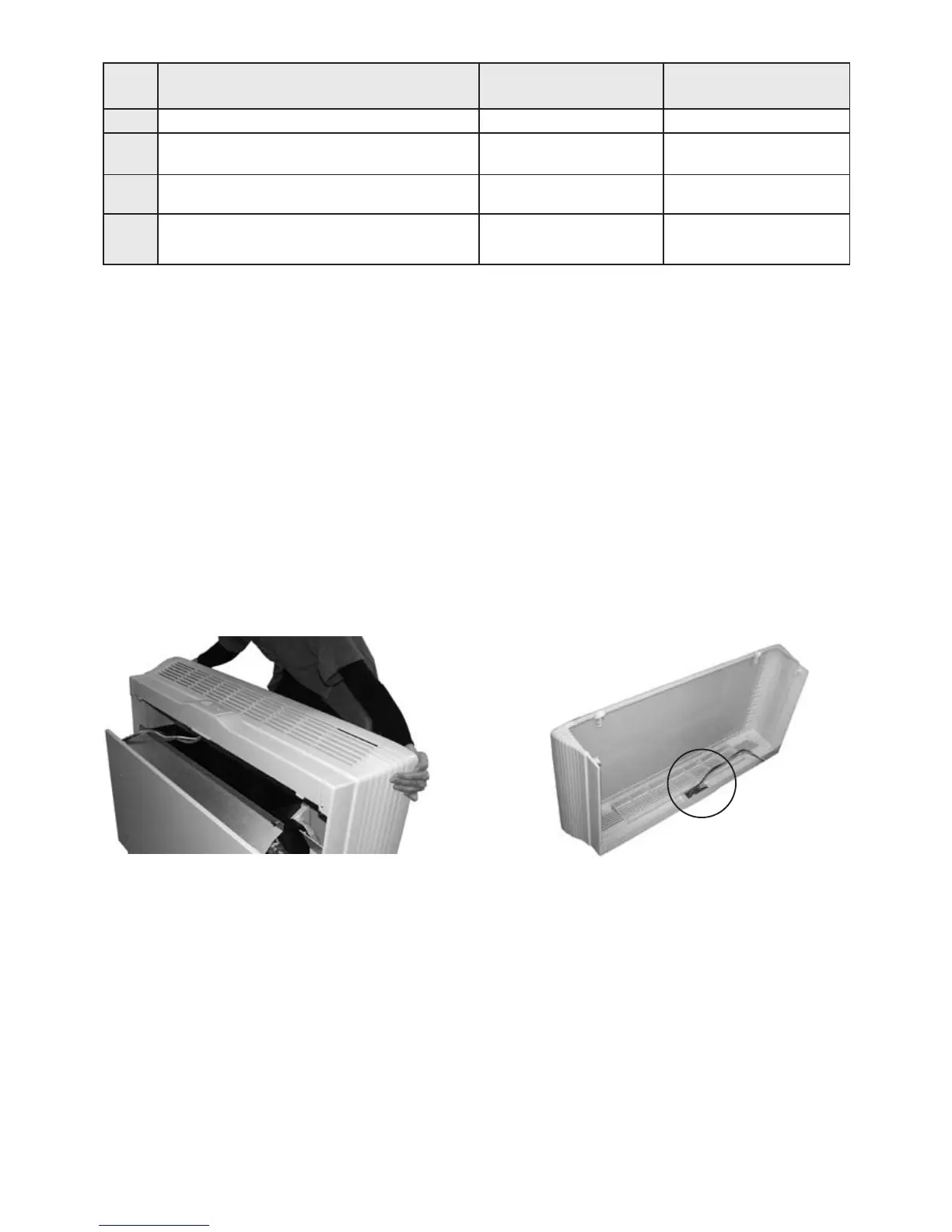
- Remove the casing/thermostat assembly (fig.1).
- Turn the casing over to access the thermostat (fig.2).
- Adjust the switches located behind the thermostat
- Connect any water temperature and air temperature sensors to the fast-on connector:
Terminals 1-2 for the air temperature sensor corresponding to the COM - NTC inlet on the V30.
Terminals 3-4 for the water temperature sensor corresponding to the COM - CO inlet on the V30.
(see diagram of the built-in V30 thermostat on page 26 and the wiring diagram which corresponds to your
application).»
Fig.1
Fig.2



 To Next Page